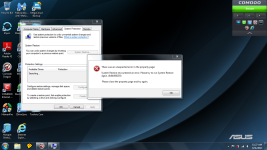
Hi guys. I tried to create a system restore before doing some system maintenance, but my laptop cannot create the restore point. Does anyone know what might cause this? Thanks for any advice. I attached a screenshot of the error message.


The MalwareTips app
Your community, one tap away.
Open MalwareTips from your Home Screen or desktop. Follow discussions, find answers and pick up where you left off.
- Home Screen access
- Optional push alerts
- Your community
You're ready to explore.Explore what's new
Installation instructions
iPhone & iPad
- Open MalwareTips in Safari and tap Share. You may need to open the Page Menu first.
- Choose Add to Home Screen. If it is not listed, use Edit Actions to add it.
- Keep Open as Web App enabled if shown, then tap Add.
Android
- Open MalwareTips in Chrome or another browser that supports app installation.
- Open the browser menu and look for Install app, Install and create shortcut, or Add to Home screen.
- Choose Install and confirm. Wording varies by browser.
Desktop
- Chrome: use the install icon in the address bar, or the menu under Cast, save and share.
- Edge: open the menu, then More tools, Apps and Install this site as an app.
- Safari on Mac: choose Share or File, then Add to Dock. Firefox on Windows: look for the web apps button in the address bar.
If you cannot find an install option, update your browser or use its bookmark option to keep MalwareTips close.
Keep up with your conversations
After installation, open the app and sign in. Enable push notifications in Preferences if you want alerts. On iPhone and iPad, push requires a Home Screen web app and iOS or iPadOS 16.4 or later.
Sign in to manage notificationsInstallation is optional. Your notification settings stay under your control.
You are using an out of date browser. It may not display this or other websites correctly.
You should upgrade or use an alternative browser.
You should upgrade or use an alternative browser.
Solved Failed to Create System Restore
- Status
- Not open for further replies.


Littlebits
Retired Staff
Also would like to add sometimes security products will interfere with System Restore, disable all security products and try again.
Make sure you have all of your Windows Services on default settings.
Thanks.
Make sure you have all of your Windows Services on default settings.
Thanks.
Upvote
0
I tried your ideas but I still get the same error message. Does Microsoft have a tool for fixing this. Thanks.Littlebits said:Also would like to add sometimes security products will interfere with System Restore, disable all security products and try again.
Make sure you have all of your Windows Services on default settings.
Thanks.
Upvote
0
Littlebits
Retired Staff
Here are some helpful links:
http://www.makeuseof.com/tag/3-check-system-restore-working/
http://www.tweaking.com/content/page/set_windows_services_to_default_startup.html (Sets all Windows Services to default)
https://sites.google.com/a/obxcompguy.com/foolish-it/d7/online-manual/usage/repair-tab (D7 Repair Windows guide)
Download D7
Make sure you read everything before using D7 is is a very powerful tool and can cause other problems. Only select the Repair System Restore option.
Before you attempt any manual fixes, try booting your System into Windows Safe Mode and verify that System Restore is not working.
If it is working in Windows Safe Mode then you have something interning with it causing the errors. So don't do any repairs try to find out what is causing the problems.
Enjoy!!
http://www.makeuseof.com/tag/3-check-system-restore-working/
http://www.tweaking.com/content/page/set_windows_services_to_default_startup.html (Sets all Windows Services to default)
https://sites.google.com/a/obxcompguy.com/foolish-it/d7/online-manual/usage/repair-tab (D7 Repair Windows guide)
Download D7
Make sure you read everything before using D7 is is a very powerful tool and can cause other problems. Only select the Repair System Restore option.
Before you attempt any manual fixes, try booting your System into Windows Safe Mode and verify that System Restore is not working.
If it is working in Windows Safe Mode then you have something interning with it causing the errors. So don't do any repairs try to find out what is causing the problems.
Enjoy!!
Upvote
0
Littlebits
Retired Staff
ad18 said:Comodo was not the problem. Windows set itself to allow zero disk space for system restore.
I'm glad you figured out the problem, the question still remains how did System Restore get set to use zero disk space?
Did you happen to use a system maintenance or tweaking tool that could have changed the setting?
I have never heard of settings changing on their own.
Thanks.
Upvote
0
- Status
- Not open for further replies.
Recently browsing
Members who viewed this thread in the last 5 minutes
You may also like...
-
 Troubleshooting A Recurring Problem
 -

-

-

-
