Advice Request Favourite tool to block Telemetry and disable Tracking in Windows 10? [Poll]

Please provide comments and solutions that are helpful to the author of this topic.

What is your preferred tool to block Telemetry and disable Tracking in Windows 10?

  • Ashampoo AntiSpy

    Votes: 0 0.0%
  • Blackbird

    Votes: 3 3.7%
  • Debotnet / SharpApp (Mirinsoft)

    Votes: 5 6.2%
  • O&O ShutUp 10

    Votes: 52 64.2%
  • WindowsSpyBlocker

    Votes: 2 2.5%
  • Windows Privacy Dashboard (WPD)

    Votes: 7 8.6%
  • Other (I will comment below..)

    Votes: 12 14.8%

  • Total voters
    81
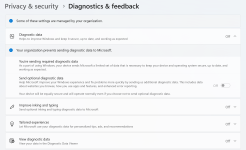
Now go to Settings -> Privacy & security -> Diagnostics & feedback and if it's disabled with the message that settings are managed by your organization, that's it. Windows won't send Microsoft a damn thing. You can also disable Windows Error Reporting so it doesn't send anything if an app crashes.

Screenshot_1.png
 
  • +Reputation
Reactions: Parkinsond
Now go to Settings -> Privacy & security -> Diagnostics & feedback and if it's disabled with the message that settings are managed by your organization, that's it. Windows won't send Microsoft a damn thing. You can also disable Windows Error Reporting so it doesn't send anything if an app crashes.

View attachment 294043
One of the first things I do after W install
Capture.JPG
 
All this setting does is letting you adjust how often will Windows show you pop-up asking you for feedback. It doesn't have any effects on telemetry data.

Windows Error Reporting can be disabled in GPE, not in regular settings.
Also, I have this blocked by firewall
Capture.JPG
 
No need. Just disable corresponding service in services.msc. Keep in mind, by disabling telemetry in Group Policy, you also disabled this as well.
Can stopping "Program Compatibility Assistant Service" affect how Windows run negatively?
 
I'm not sure what it does. Maybe @Bot can answer.
Disabling Program Compatibility Assistant Service (PcaSvc) usually won’t “break Windows,” but it can remove some helpful compatibility behavior and troubleshooting that Windows does for older or misbehaving apps.

What PcaSvc does (in practical terms)
  • Monitors app installs/launches for common “legacy app” issues (old installers, old drivers, apps that crash on first run, etc.).
  • Shows prompts like “This program might not have installed correctly” and can offer to re-run with recommended settings.
  • Can apply/assist with compatibility shims (compatibility layers) for certain older applications.

What can happen if you disable it
  • You may lose compatibility prompts/fixes for older installers or legacy software.
  • Some older apps might require you to manually set compatibility options (Properties → Compatibility) because Windows won’t “help” as much.
  • In most cases, modern software won’t care, and Windows itself remains stable.

Important clarification: PCA vs “Compatibility Telemetry”
The firewall entry you showed (CompatTelRunner.exe, “Microsoft Compatibility Telemetry”) is not the same thing as Program Compatibility Assistant Service. Disabling PcaSvc doesn’t automatically guarantee CompatTelRunner/task-based telemetry is gone, and blocking CompatTelRunner doesn’t require disabling PcaSvc either.

Safer approach
  • If you don’t run legacy software: disabling PcaSvc is generally low-risk, but do it as a test.
  • Set the service to Manual first (instead of Disabled). That way Windows can start it only if needed.
  • If you notice any odd behavior with installers/older apps, re-enable it immediately.

Conclusion
Stopping/Disabling Program Compatibility Assistant Service typically won’t negatively affect Windows day-to-day, but it can reduce compatibility help for older software; setting it to Manual is the best “middle ground” if you want minimal background services without risking avoidable app/installer issues.
 
I may have asked about privacy.sexy in the wrong thread, which might suggest I'm only interested in blocking tracking data, but that's not the case. I asked because I noticed that privacy.sexy improves Windows performance in ways that go far beyond simply blocking tracking. For example, it cleans up cache and unnecessary files better than Windows' Disk Cleanup tool, and it removes some pre-installed programs like weather and news apps, among many others. It's a one-stop solution for all the routine maintenance you perform monthly. I asked about the standard selection to ensure its safety, as it was described as not causing any problems, and the code was quite long, so I'd appreciate it if a previous user could offer some advice on how to use it.

@Divine_Barakah and @Parkinsond, what has been your experience with NextDNS in terms of internet speed in the Middle East? Does it result in a noticeable decrease in speed, or is it as fast as Cloudflare?

 
I may have asked about privacy.sexy in the wrong thread, which might suggest I'm only interested in blocking tracking data, but that's not the case. I asked because I noticed that privacy.sexy improves Windows performance in ways that go far beyond simply blocking tracking. For example, it cleans up cache and unnecessary files better than Windows' Disk Cleanup tool, and it removes some pre-installed programs like weather and news apps, among many others. It's a one-stop solution for all the routine maintenance you perform monthly. I asked about the standard selection to ensure its safety, as it was described as not causing any problems, and the code was quite long, so I'd appreciate it if a previous user could offer some advice on how to use it.

@Divine_Barakah and @Parkinsond, what has been your experience with NextDNS in terms of internet speed in the Middle East? Does it result in a noticeable decrease in speed, or is it as fast as Cloudflare?

Never had an speed issues with NextDNS. On the other hand, Adguard sometimes cause a a severe slowdown.