

The MalwareTips app
Your community, one tap away.
Open MalwareTips from your Home Screen or desktop. Follow discussions, find answers and pick up where you left off.
- Home Screen access
- Optional push alerts
- Your community
You're ready to explore.Explore what's new
Installation instructions
iPhone & iPad
- Open MalwareTips in Safari and tap Share. You may need to open the Page Menu first.
- Choose Add to Home Screen. If it is not listed, use Edit Actions to add it.
- Keep Open as Web App enabled if shown, then tap Add.
Android
- Open MalwareTips in Chrome or another browser that supports app installation.
- Open the browser menu and look for Install app, Install and create shortcut, or Add to Home screen.
- Choose Install and confirm. Wording varies by browser.
Desktop
- Chrome: use the install icon in the address bar, or the menu under Cast, save and share.
- Edge: open the menu, then More tools, Apps and Install this site as an app.
- Safari on Mac: choose Share or File, then Add to Dock. Firefox on Windows: look for the web apps button in the address bar.
If you cannot find an install option, update your browser or use its bookmark option to keep MalwareTips close.
Keep up with your conversations
After installation, open the app and sign in. Enable push notifications in Preferences if you want alerts. On iPhone and iPad, push requires a Home Screen web app and iOS or iPadOS 16.4 or later.
Sign in to manage notificationsInstallation is optional. Your notification settings stay under your control.
You are using an out of date browser. It may not display this or other websites correctly.
You should upgrade or use an alternative browser.
You should upgrade or use an alternative browser.
New Update Firefox 149 adds built-in free VPN with 50GB monthly data
-
 Thread starter
lokamoka820
Thread starter
lokamoka820
- Start date
- 57 Replies
- 6,818 Views


Shadowra
Level 42
Verified
Top Poster
Content Creator
Malware Tester
Well-known
High Reputation
Forum Veteran
I played around with it a bit: It’s more of a proxy than a real VPN...
It connected me to a server in France (I’m in France), so if I want to visit a Belgian, German, or Swiss website—I can’t.
But it’s very fast! Tested on my 2 Gbps download, 800 Mbps upload FTTH fiber connection
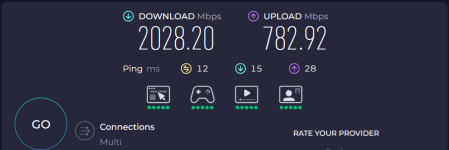
It connected me to a server in France (I’m in France), so if I want to visit a Belgian, German, or Swiss website—I can’t.
But it’s very fast! Tested on my 2 Gbps download, 800 Mbps upload FTTH fiber connection

I ran that test on mac mini with M4 chip with safari, and it was crazy big number iirc 40+_something (maybe more)I can't be the only one out of all Firefox users to have better performance than on Chromium. I say the test is flawed.

I can't be the only one out of all Firefox users to have better performance than on Chromium. I say the test is flawed.
I, on the other hand, implemented the FastFox changes without seeing any improvement.
The bottom line is that your PC happens to meet these specific conditions... so it’s just luck, nothing more.
Every speed test shows that Firefox is slower than Chromium.
You, I repeat, are the exception that proves the rule.
P.S.
Tests are like any other tests; they must be evaluated for what they are and within their specific context.
If you hold this “belief,” then even the AV tests published on this forum could be flawed.
Last edited:

In my case I don't need this addition as I already have a VPN however highly likely to be of use to many so thanks Firefox but as I use Wolf its not available on that fork, as regards speedometer, when I tested this PC a few weeks ago Brave trounced Wolf /Firefox hugely even ginormously, however that in my case that reading does not translate into anything meaningful whatsoever in general or none general use here, so I'm still happy with Wolf, as I no longer have Brave I'll give Edge a try for fun as need another coffee this morning to survive 
In my case I don't need this addition as I already have a VPN however highly likely to be of use to many so thanks Firefox but as I use Wolf its not available on that fork, as regards speedometer, when I tested this PC a few weeks ago Brave trounced Wolf /Firefox hugely even ginormously, however that in my case that reading does not translate into anything meaningful whatsoever in general or none general use here, so I'm still happy with Wolf, as I no longer have Brave I'll give Edge a try for fun as need another coffee this morning to survive
I survive thanks to Ginseng.....


Speedometer apart, Brave felt a bit slower for me compared to Chrome, Edge, and even Yandex.In my case I don't need this addition as I already have a VPN however highly likely to be of use to many so thanks Firefox but as I use Wolf its not available on that fork, as regards speedometer, when I tested this PC a few weeks ago Brave trounced Wolf /Firefox hugely even ginormously, however that in my case that reading does not translate into anything meaningful whatsoever in general or none general use here, so I'm still happy with Wolf, as I no longer have Brave I'll give Edge a try for fun as need another coffee this morning to survive
Did not try Firefox recently to compare.

How to Enable or Disable Free Built-in VPN in Mozilla Firefox

 www.askvg.com
STEP 1: Open Mozilla Firefox and type about:config in the address bar and press Enter. It’ll show you a warning message, click on “Accept the Risk and Continue” button. It’ll open Firefox’s hidden secret advanced configuration page i.e. about:config page.
STEP 2: Now type ipp inside the preference search box and look for following preference:
browser.ipProtection.enabled
STEP 3: The browser.ipProtection.enabled preference decides the availability of the new built-in VPN feature in Firefox.
To forcefully activate and enable the built-in VPN in Firefox, set the browser.ipProtection.enabled preference to True.
If you want to disable and remove the built-in VPN in your Firefox browser, you can set the browser.ipProtection.enabled preference to False.
How to Enable or Disable Free Built-in VPN in Mozilla Firefox
Mozilla Firefox 149.0 and later versions come with a free built-in VPN feature to improve privacy and safety. This article will help you in enabling or disablin
Firefox’s free VPN is getting the one feature it was missing

 www.omgubuntu.co.uk
Now a report by Soren Hentzschel (German) says the upcoming Firefox 151 release on 19 May will support server selection in Firefox VPN, letting you pick a location from any of the feature’s supported server locations, currently USA, UK, France, Canada and Germany.
Firefox's free VPN is getting the one feature it was missing
Mozilla has attracted kudos since it added a free built-in VPN to its Firefox web browser, not least because of the generous 50 GB a month usage limit.
www.omgubuntu.co.uk
The one problem with VPNs no one talks about is they are easy to block @ the protocol/network level. Anyone who has traveled to a authoritarian run country with highly restricted comms and internet will tell you they just don't work. And if they do work there is a reason why they work because the government uses it itself or they are collecting intelligence/offensive cyber operations.
I Firefox and use it daily but it's VPN is useless for the people who need to it most, better off smuggling in a Star-link.
I
Firefox and use it daily but it's VPN is useless for the people who need to it most, better off smuggling in a Star-link.
DNS over HTTPS (DoH) in Max Protection mode often conflicts with VPNs because it bypasses the VPN tunnel, causing DNS queries to route through the public internet instead of the encrypted connection. This mismatch can result in network errors, DNS leaks, or sites failing to load because the browser’s DNS resolver does not align with the VPN’s assigned IP address or internal network rules.The VPN with Enable DNS over HTTPS using: Default Protection works, in my case with max protection not work.
Frequently Asked Questions about Virtual Private Networks and VPN Clients for Mac
VPN Tracker is the ultimate VPN client for Mac. Here many of your questions about Virtual Private Networks, also called VPNs, will be answered.
 www.vpntracker.com
The Default Protection automatically enables secure DNS in available regions and falls back to the default resolvers if there are issues. Default protection allows you to use local providers when possible. It disables DoH when VPN, parental control or enterprise policies are active or when a network tells Firefox not to use secure DNS.

2037364 - When using the new VPN and DoH with Maximum Protection i cant get any dns resolved and so i cant go to any website.
VERIFIED (amarchesini) in Firefox - IP Protection. Last updated 2026-06-08.
 bugzilla.mozilla.org

Whenever I encountered YouTube blocking VPN, I just deleted cookies and then videos played normally.As I've not used it how does it play when using YouTube do it block YT??
Firefox Built-In VPN Goes Unlimited and Adds 28 Countries Through August 31

 www.ghacks.net
What’s Changing in Firefox’s Built-In VPN During the Promotion
For the duration of the promotion (now through August 31):
Browsing remains subject to the local laws and content restrictions of whichever region the user selects.
- Bandwidth is unlimited, up from the standard 50GB per month
- 28 country locations are available, an expansion from the standard set
- The full available country list is: Australia, Austria, Belgium, Bulgaria, Canada, Chile, Colombia, Denmark, Finland, France, Germany, Ireland, Italy, Malaysia, Mexico, Netherlands, New Zealand, Norway, Portugal, Singapore, South Africa, Spain, Sweden, Thailand, United Kingdom, and United States
Firefox Built-In VPN Goes Unlimited and Adds 28 Countries Through August 31 - gHacks Tech News
Mozilla is removing the 50GB bandwidth cap on Firefox's free built-in VPN and expanding access to 28 country locations through August 31.
www.ghacks.net
Recently browsing
Members who viewed this thread in the last 5 minutes
You may also like...
-

-

-

-
 New Update Opera adds free VPN to Opera for iOS
 -