New Update Firefox Stable Release

Firefox 143.0.3 official release later today. Note: including security fixes
https://www.firefox.com/en-US/firefox/143.0.3/releasenotes/
Thanks for posting, silversurfer.

The Firefox 143.0.3 release notes mention:
"Adjusted the timing of the new drag-to-pin interaction cue for better reliability. (Bug 1989344)"

Firefox 143.0 introduced "Tabs can now be pinned by dragging them to the start of the tab strip," and that feature has been annyoing me ever since.

Firefox 143.0.3 introduces the about:config preference browser.tabs.dragDrop.pinInteractionCue.delayMS
Changing the value of this preference to 1200-1500 is equivalent to turning off the drag-to-pin feature.
Source, Mozilla Connect post by asafko.
 
Firefox 143.0.3 introduces the about:config preference browser.tabs.dragDrop.pinInteractionCue.delayMS
Changing the value of this preference to 1200-1500 is equivalent to turning off the drag-to-pin feature.
Changing the value of the preference to 1500 adjusts the timing of the drag-to-pin interaction to 1500 ms. To me that is not 'turning it off'.
Adjusting the value to 5000 or 9000 ms suits me better, as I really don't need and don't want that drag-to-pin feature.
 
  • Like
Reactions: Jack and Sorrento
In case some of you missed this information regarding Firefox 143 for Android

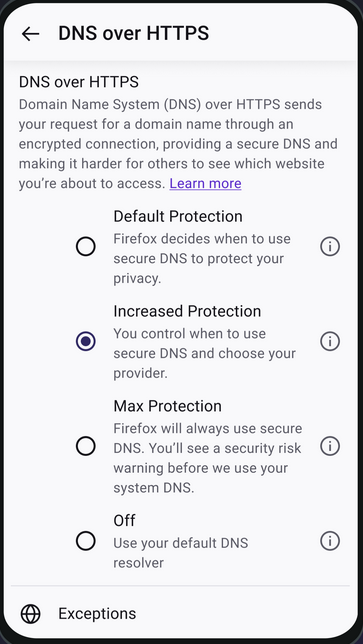
Introducing DoH for Android


After bringing encrypted DNS protection to millions of desktop users, we’re now extending the same to mobile. Firefox users who have been waiting for DoH on Android can now turn it on and browse with the same privacy protections as on their desktops.

Starting with this week’s release of Firefox 143 for Android, users can choose to enable DoH in Firefox on their mobile devices by selecting “Increased Protection” DoH configuration. Performance testing with Firefox DoH partners is currently underway. If DoH is as fast as we expect, we plan to enable it by default for Android users in certain regions, similar to desktop users. Until then, these configuration options provide you the choice to opt in early.


image-25-1.png
 
I updated Firefox to the latest version (144) but I didn't get the "Profile Management" feature, is it available for all regions or is it still rolling out or what?
 
I updated Firefox to the latest version (144) but I didn't get the "Profile Management" feature, is it available for all regions or is it still rolling out or what?
According to Release Notes, seems to be still:
This feature is part of a progressive roll out.

What is a progressive roll out?
  • Certain new Firefox features are released gradually. This means some users will see the feature before everyone does. This approach helps to get early feedback to catch bugs and improve behavior quickly, meaning more Firefox users overall have a better experience.
 
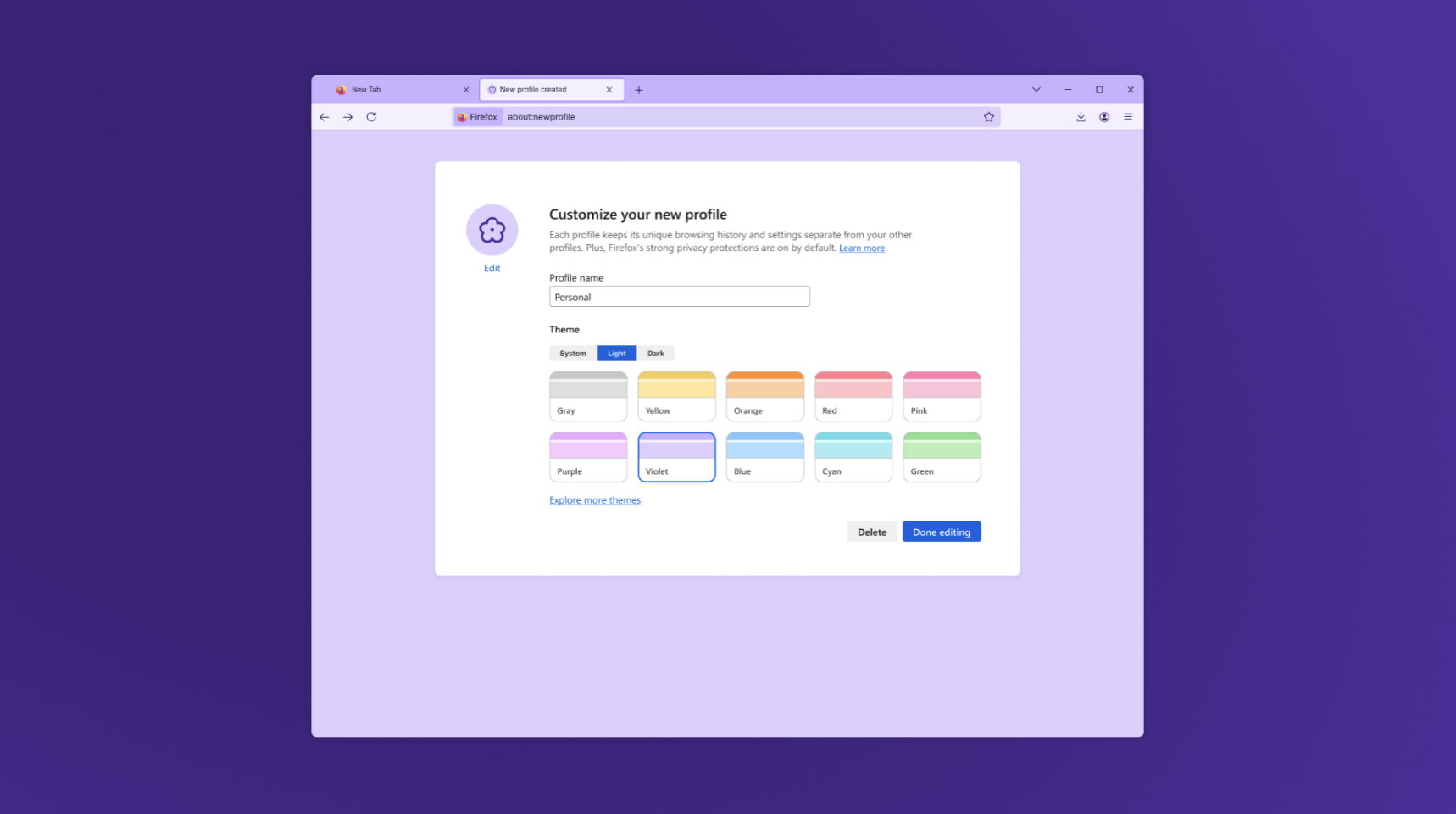
If already available... the new user Profile Management should look like that:
 
Firefox 144.0.2 official release later today...
  • Fixed an issue where the list of available locales in about:settings contained more locales than downloaded or currently supported.
  • Fixed an issue where using the keyboard to open the Unified Search drop-down menu was inconsistent. The drop-down menu is now properly expanded so that users can select a search engine from the keyboard.
  • Fixed an issue where curated photo collections on the For You page of Microsoft OneDrive could not load and a gray screen would appear instead. The collections will now be displayed as expected.
  • Fixed a startup crash that affected Windows users with Avast or other security software installed.
  • Fixed an issue on macOS where the emoji selection shortcut and menu item stopped working after switching between apps.
  • Fixed an issue on macOS where dragging images from Firefox could fail or behave unexpectedly in third-party apps like Preview.
  • Fixed performance and video playback issues on macOS 14.6 (Tahoe) that occurred when the system was heavily utilized.
  • Fixed a browser hanger on macOS 14.6 (Tahoe) that could occur if bookmark folders contained loops or repeated references to themselves.
  • security fix
 
Thanks for posting, silversurfer.
It is interesting that you can share what is in the release notes, even when the new release notes aren't available yet.
I have been searching, but I wasn't able to find where to find release notes before publishing.
Can you share where it is that you find release notes information that early?
Thanks again.
 
Thanks for posting, silversurfer.
It is interesting that you can share what is in the release notes, even when the new release notes aren't available yet.
I have been searching, but I wasn't able to find where to find release notes before publishing.
Can you share where it is that you find release notes information that early?
Thanks again.
We can find earlier information about release notes there:
 
Firefox 145.0.1 released:
  • Fixed an issue causing breakage on sites using Three.js. (Bug 1995939)
  • Fixed a failure to open Firefox from the desktop launcher on older versions of Windows 10. (Bug 2000411)
  • Fixed Web compatibility issues with Rogers. Rogers customers would see a broken iframe with "Firefox Can’t Open This Page" when viewing bills, rather than the billing info. (Bug 1996823)
  • Fixed an issue in the Web Developer Tools preventing copy all or save all requests as HAR. (Bug 1995694)