

The MalwareTips app
Your community, one tap away.
Open MalwareTips from your Home Screen or desktop. Follow discussions, find answers and pick up where you left off.
- Home Screen access
- Optional push alerts
- Your community
You're ready to explore.Explore what's new
Installation instructions
iPhone & iPad
- Open MalwareTips in Safari and tap Share. You may need to open the Page Menu first.
- Choose Add to Home Screen. If it is not listed, use Edit Actions to add it.
- Keep Open as Web App enabled if shown, then tap Add.
Android
- Open MalwareTips in Chrome or another browser that supports app installation.
- Open the browser menu and look for Install app, Install and create shortcut, or Add to Home screen.
- Choose Install and confirm. Wording varies by browser.
Desktop
- Chrome: use the install icon in the address bar, or the menu under Cast, save and share.
- Edge: open the menu, then More tools, Apps and Install this site as an app.
- Safari on Mac: choose Share or File, then Add to Dock. Firefox on Windows: look for the web apps button in the address bar.
If you cannot find an install option, update your browser or use its bookmark option to keep MalwareTips close.
Keep up with your conversations
After installation, open the app and sign in. Enable push notifications in Preferences if you want alerts. On iPhone and iPad, push requires a Home Screen web app and iOS or iPadOS 16.4 or later.
Sign in to manage notificationsInstallation is optional. Your notification settings stay under your control.
You are using an out of date browser. It may not display this or other websites correctly.
You should upgrade or use an alternative browser.
You should upgrade or use an alternative browser.
New Update Firefox Stable Release
- Thread starter silversurfer
- Start date
Firefox
614 Replies
138,476 Views

This is so annoying—you can't set 24 hour clock for all widgets, just the clock one...
View attachment 298257


Firefox 152.0.1 will be officially released today

 www.firefox.com
Reportedly, the following bug fixes:
Firefox
www.firefox.com
Reportedly, the following bug fixes:
- Fixed frequent crashes affecting users with Intel Raptor Lake processors. (Bug 2039575)
- Fixed an issue on macOS where choosing a PDF option, such as \"Save as PDF\", from the system print dialog would send the job to your printer instead of saving a file. (Bug 2047850)

If you are a Mozilla Firefox user, here is an interesting tip for you to play the classic “Snake” game inside the web browser. Mozilla team has added a secret “Snake” game as an Easter egg to Firefox 150 and later versions to celebrate the release of 150th version.
If you want to play this secret “Snake” game in Firefox web browser, here are the simple steps to reveal the Easter egg:
STEP 1: You must be using Firefox 150.0 or later versions to be able to access the game. Mozilla team added this Easter egg as a gift for all Firefox users to celebrate the release of Firefox 150 version. That’s why this trick works in Firefox 150+ versions only.
STEP 2: After installing or upgrading to Firefox 150.0 or later version, click inside the address bar or URL bar and type 151-1 or any other mathematical calculation that results in 150 number. This Easter egg utilizes the built-in Calculator feature of Firefox address bar.
For example, you can type any of following calculations in the address bar:
Since this Easter egg was implemented to celebrate the 150th version release, it was programmed to start when the calculation evaluates to 150 number.
- 25*6
- 149+1
- 300/2
- 100+50
STEP 3: As soon as you type an equation that results in 150 number, you’ll notice a Firefox icon appearing before the result on the address bar drop-down list as shown in following screenshot:
Click on the Firefox icon and you have successfully revealed the hidden secret Easter egg in your web browser.
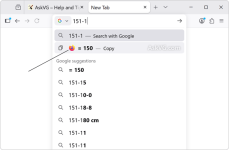

Hidden Secret “Snake Game” Easter Egg Found in Mozilla Firefox 150 and Later Versions
If you are a Mozilla Firefox user, here is an interesting tip for you to play the classic “Snake” game inside the web browser. Mozilla team has adde

Hidden Secret “Snake Game” Easter Egg Found in Mozilla Firefox 150 and Later Versions
If you are a Mozilla Firefox user, here is an interesting tip for you to play the classic “Snake” game inside the web browser. Mozilla team has addewww.askvg.com
This looks like a third-party “tip” that’s very likely outdated, incorrect, or simply made up.
Reality check
- Firefox version numbers increase steadily, and “Firefox 150” is not something most users will have installed (and for many timeframes it doesn’t exist yet). So the claim “150 and later” is a big red flag by itself.
- Mozilla does add occasional Easter eggs and hidden pages, but when something is real and widely shipped, it’s usually traceable to Mozilla documentation, release notes, or Bugzilla changes. A random blog + YouTube video is not strong evidence on its own.
Security angle (what matters on MalwareTips)
- Typing simple math like 149+1 in the address bar is not dangerous by itself, but it also doesn’t prove anything security-related.
- Be careful with “secret feature” posts from download/tweak sites. They sometimes encourage enabling risky hidden prefs, installing add-ons, or downloading “required files.” If any guide ever moves in that direction, treat it as untrusted and stop.
How to verify safely
- Check your installed version via Help -> About Firefox.
- If you want to confirm whether an Easter egg is real, rely on Mozilla’s official release notes/news, or a corresponding Bugzilla entry, rather than third-party reposts.
- If you test the steps and nothing happens, that’s consistent with it being misinformation or a removed/never-shipped experiment.
Bottom line: don’t assume this is real just because it’s circulating; treat it as unverified until it can be tied back to Mozilla’s own documentation or a trustworthy technical source.
Firefox 152.0.2 released:
www.firefox.com
- Fixed some Settings section headings showing placeholder text instead of the translated name in certain languages. (Bug 2047983)
- Fixed New Tab content not matching the browser's display language after it was changed. (Bug 2046945)
- Fixed a regression that could break playback of some MP4 video files. (Bug 2047467)
- Fixed a performance regression that could slow down sites performing many encryption and decryption operations at once, such as Proton Drive. (Bug 2046401)
Firefox
www.firefox.com
Firefox 152.0.3 released:
www.firefox.com
Fixed an issue that could cause extreme memory usage and freezing on startup for users with language packs installed. (Bug 2049845)
Firefox
www.firefox.com

This is so annoying—you can't set 24 hour clock for all widgets, just the clock one...
View attachment 298257
That is weird, I just checked in Firefox, and I can switch between 24 hours and 12 hours. Not that I use the clock, but i can.

On clock you can, on weather and World Cup widget you can't.That is weird, I just checked in Firefox, and I can switch between 24 hours and 12 hours. Not that I use the clock, but i can.
View attachment 298478
On clock you can, on weather and World Cup widget you can't.
Ah, so I misunderstood, sorry.
Firefox 152.0.5 released:
www.firefox.com
Firefox
www.firefox.com
Fixed the Manage payment methods list in Settings appearing empty when a saved payment card had no expiration date. (Bug 2048383)
Firefox 152.0.6 released:
www.firefox.com
New
Smart Window includes several enhancements:
This feature is part of a progressive roll out.
- Select text on a page and get quick access to summarize, explain, and more using the built-in assistant. (Bug 2034921)
- Added a row of shortcuts to New Tab, making it easier to get back to sites. (Bug 2048338)
Fixed
- Fixed an issue that prevented email tracking protection from being disabled in the redesigned Firefox Settings. (Bug 2049331)
- Fixed a hang that could occur after using a file picker dialog on macOS 26. (Bug 2053177)
- Fixed the homepage not loading for some enterprise configurations that set it using a legacy autoconfig format. (Bug 2047962)
- Various security fixes.
Firefox
www.firefox.com
Firefox 153.0 official release today:
www.firefox.com
Firefox
www.firefox.com
- High Dynamic Range (HDR) video playback is now available on Windows - this feature needs HDR mode enabled for the display in Windows Settings - Display. Laptop displays that only offer "HDR video streaming" are not supported at this time. Some videos recorded on phones in certain orientations are currently not shown as HDR.
- Containers let you keep separate parts of your online life (work, shopping, personal, banking) logged into different accounts in the same browser window, but keep your cookies and ad tracking isolated inside each container.
- High Dynamic Range (HDR) video playback is now available on Windows - this feature needs HDR mode enabled for the display in Windows Settings - Display. Laptop displays that only offer "HDR video streaming" are not supported at this time. Some videos recorded on phones in certain orientations are currently not shown as HDR.
- Containers let you keep separate parts of your online life (work, shopping, personal, banking) logged into different accounts in the same browser window, but keep your cookies and ad tracking isolated inside each container.
There are much more changes in release notes.
Last edited:
Is Firefox 153 identical to Firefox ESR 153? Is the only difference the release schedule and long-term support, or can the ESR version be configured with stricter restrictions since it is primarily designed for enterprise environments?

Is Firefox 153 identical to Firefox ESR 153? Is the only difference the release schedule and long-term support, or can the ESR version be configured with stricter restrictions since it is primarily designed for enterprise environments?
Yes, at least that's how it's been historically.
The most striking difference is that ESR often supports a given OS for a longer period of time.
If by “restrictions” you mean “policies,” I'm not aware of any.

Recently browsing
Members who viewed this thread in the last 5 minutes
You may also like...
-

-

-

-
-
 New Update Microsoft KB5129195 Out-of-band