New Update Firefox Stable Release

Firefox
612 Replies 137,944 Views
Yep, that's what I was using the 50 GB free version. I just posted the "upgrade" numbers $$ for comparison :)
Connect to the UK server and vist bbc.co.uk/iplayer. Does it let you access it?

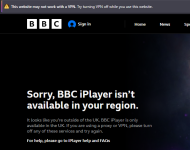
It doesn't let me; Firefox even says website won't work. When I go to browserleaks.com/ip it appears the IP address is from Sweden instead of UK.

Screenshot_1.png
Screenshot_2.png
 
Connect to the UK server and vist bbc.co.uk/iplayer. Does it let you access it?

It doesn't let me; Firefox even says website won't work. When I go to browserleaks.com/ip it appears the IP address is from Sweden instead of UK.

View attachment 300031 View attachment 300032

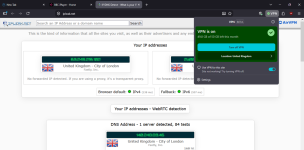
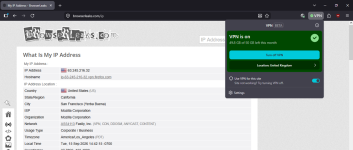
Here's what I get on my end, correct servers, but BBC is blocked. edit: now, let me blow your mind, when I cleared my cookies, history and went to browserleaks, it showed I was connected to California, while the VPN said UK (3rd image). On the ipleak test page, it shows it correctly as in my 1st image :rolleyes:

2026-09-15_16-33-56.png 2026-09-15_16-34-56.png 2026-09-15_16-42-34.png
 
Last edited:
Here's what I get on my end, correct servers, but BBC is blocked. edit: now, let me blow your mind, when I cleared my cookies, history and went to browserleaks, it showed I was connected to California, while the VPN said UK (3rd image). On the ipleak test page, it shows it correctly as in my 1st image :rolleyes:

View attachment 300036 View attachment 300037 View attachment 300038
Yeah, UK location doesn't work correctly at all. I also got California once and the next time I tried again I got Sweden. 😅
 
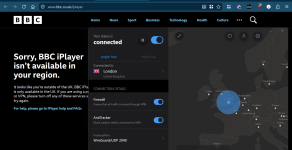
As for myself, with IVPN...not so much :(

View attachment 300051
IVPN I question there server locations. I've had numerous myip checks say the server is located in HK when it's not on the client. Something isn't right with either them or myip.

Mullvad, Windscribe, AirVPN, Perfect Privacy no problems with geo-location. Servers are where they said they were.
 
Interesting to see how different the results can be between users. It looks like regional detection can depend on more than just the VPN location shown in the app.

Things like how IP ranges are classified by geolocation databases, browser/session data, or other detection methods used by websites can probably affect the final result. That might explain why one user gets the expected location while another sees a completely different country, even with a similar VPN setup. 🌐🔒
 
From Waterfox to LibreWolf and Pale Moon, there's a browser for almost every Mozilla dissenter
Mozilla and MZLA have delivered the latest releases in their new fortnightly cycle, but users who dislike the faster pace have alternatives.

Firefox 156 is trickling out to users. The release notes only mention two new features: for Mac users, there's now an option in Settings to automatically launch the app at login. This vulture has received criticism for saying this in some of the product's forums before, but since pretty much every OS has a built-in facility for this, we don't really see the point – though it's harmless and could be handy.

Users who have chosen French, German or Italian will now find suggestions from Wikipedia in their own languages – along with potentially less welcome ads from Mozilla partners. If you don't want such suggestions, you can turn them off in Firefox Suggest settings.

As with the previous release of both apps, the changes in Thunderbird sound slightly more useful – but again, they are small. Thunderbird 156 offers more troubleshooting info in the event of problems with OpenPGP, and more options for OAuth authorization for POP3 and IMAP accounts. There are also additional enterprise policies for controlling filters and user customizations.

As we said last time, though, users who want to get off the rapid-upgrade train have several options. The most obvious comes directly from Mozilla: the Firefox ESR and Thunderbird ESR versions only get security fixes, with full new versions only coming annually. Currently, both are on version 153, which appeared in late July.

A fistful of forks
Read the full Story:
 
Firefox 156.0.1
  • Fixed the NVDA screen reader not announcing address bar buttons when the mouse pointer moves over them. (Bug 2069276)
  • Fixed elements inside a link not showing their CSS :active styles while being clicked. (Bug 2067272)
  • Fixed Firefox becoming unresponsive on some pages that use CSS anchor positioning. (Bug 2070171)
  • Fixed Firefox windows on macOS 27 immediately returning to maximized after being restored by double-clicking the title bar. (Bug 2066632)
  • Fixed Firefox leaking system handles on Windows as content processes were started and stopped. (Bug 2069644)
 
Firefox 157.0

New​

  • Firefox's biggest visual refresh in years is now available, with a modernized look across the browser toolbars, sidebar, menus and individual features, built with our updated design system. It also includes:
    • New built-in themes with light and dark versions, to personalize the look of Firefox in one click.
    • A new compact mode that reduces toolbar and tab spacing to leave more room for web content, useful on smaller screens and in split-screen layouts.
  • WebRTC video calls can now use hardware AV1 decoding on devices that support it, instead of always decoding AV1 video in software.
  • Firefox now shows a warning in the site information panel (the shield icon in the address bar) and in Settings when it has been set up to record its encryption keys, which could let other software on the computer read encrypted web traffic.
  • Firefox Suggest now offers suggestions in the address bar in Austria, Belgium, Czech Republic, Denmark, Finland, Hungary, Ireland, Luxembourg, Netherlands, Norway, Poland, Portugal, Slovakia, Spain, Sweden, and Switzerland. They can be controlled in the Firefox Suggest settings. Learn more.

Fixed​

  • Fixed video from phones and tablets appearing sideways or upside down in WebRTC calls.
  • Fixed the address bar searching for the typed text instead of opening the selected suggestion when a page was still loading, such as shortly after Firefox started.
  • Fixed some HDR videos encoded in 8-bit color formats looking dull and gray on Windows instead of displaying in HDR.
  • Improved audio and video synchronization when repeatedly changing the playback speed of videos, for example on YouTube.
  • Fixed the Vertical Tabs sidebar not reappearing when the cursor moves to the edge of the screen in full screen mode.
  • Fixed an issue on Windows where making a video full screen would leave the Windows taskbar showing over the video.
  • Various security fixes.

Changed​

  • Pressing Tab now moves focus straight to the text field of the address bar and search bar instead of stopping on the search engine button first. The button can still be reached with Shift+Tab.
  • Amazon is no longer included as a built-in search engine. It can still be added as a custom search engine in the search settings. Learn more.
  • The updated sidebar is now enabled for everyone. Anyone still using the previous sidebar will keep a similar layout, with the panel switcher at the top of the sidebar. Additionally, the “Show sidebar” option has been removed from Settings.

    While we continue to refine the new design, the previous sidebar version can still be restored by setting sidebar.revamp to false in about:config. This also turns off vertical tabs. The preference will remain available until the end of 2027.
  • Web page alert(), confirm() and prompt() dialogs, the color and date pickers, and form autocomplete drop-downs now match the page's light or dark color scheme.
 

Recently browsing

Members who viewed this thread in the last 5 minutes

Back
Top