
This means that Firefox performs better in the test than Vivaldi.
That is good to know, but I am still sticking with Vivaldi for daily use.



Open MalwareTips from your Home Screen or desktop. Follow discussions, find answers and pick up where you left off.
If you cannot find an install option, update your browser or use its bookmark option to keep MalwareTips close.
After installation, open the app and sign in. Enable push notifications in Preferences if you want alerts. On iPhone and iPad, push requires a Home Screen web app and iOS or iPadOS 16.4 or later.
Sign in to manage notificationsInstallation is optional. Your notification settings stay under your control.
 Thread starter
lokamoka820
Thread starter
lokamoka820
This means that Firefox performs better in the test than Vivaldi.

That is good to know, but I am still sticking with Vivaldi for daily use.

And that's where Speedometer is great information to have, as well as other informative apps, websites etc. where we can evaluate what gains can be made to improve performanceAll of you have faster computers than I do.
For me, even a small difference matters.

Nobody knows what it means except browser developers. We are just assuming that the higher number means better performance.I knew I had forgotten something.
This is the same test with Firefox and uBlock Origin.
View attachment 298176
I wouldn't call it informative because it doesn't have to represent the real picture. On my laptop, Brave currently scores 23.3, while Firefox scores 18.8. I noticed these numbers fluctuate day by day and despite Firefox having lower score for me, I can notice it being faster.And that's where Speedometer is great information to have, as well as other informative apps, websites etc. where we can evaluate what gains can be made to improve performance

I ran this experiment and got these results. In Brave, third‑party cookies are set to be blocked, yet the WhatIsMyBrowser test shows “Yes”. After checking with the developer tools, no external cookies are stored, and Brave blocks scripts from domains like googlesyndication.com. Then I tried creating a local cookie and simulating a third‑party one using an iframe, where Brave displayed the blocking message.Even though I’ve read the explanation provided by support, I still don’t understand why Brave fails this test when third-party cookies are disabled in the settings:
Are Third-Party cookies enabled in my web browser?
With Firefox, too, it’s always possible to block third-party cookies whenever the user chooses.

 Any feedback is appreciated.
I ran this experiment and got these results. In Brave, third‑party cookies are set to be blocked, yet the WhatIsMyBrowser test shows “Yes”. After checking with the developer tools, no external cookies are stored, and Brave blocks scripts from domains like googlesyndication.com. Then I tried creating a local cookie and simulating a third‑party one using an iframe, where Brave displayed the blocking message.
I'm not sure if my test is entirely correct, but I thought it might be interesting to share it in case someone (like @Sampei.Nihira) wants to review or comment on the results.
View attachment 298179 View attachment 298180 View attachment 298181

With Brave I get this, over and over (tried on five different moments)Even though I’ve read the explanation provided by support, I still don’t understand why Brave fails this test when third-party cookies are disabled in the settings:
Are Third-Party cookies enabled in my web browser?
With Firefox, too, it’s always possible to block third-party cookies whenever the user chooses.


Which websites have detected your Brave browser?Brave is a good compromise but it get detected by ad-heavy websites and they refuse to load properly.
Tried Zen; in addition to its cons, I had arrows in news website dispalyed ad "forward" and "backwords" words.
arabseed; so resilientWhich websites have detected your Brave browser?
It's why I don't prefer browsers with a built-in ad blocker; extensions are more efficient. Try Helium: minimal, speedy, and built-in uBlock Origin.Brave is a good compromise but it get detected by ad-heavy websites and they refuse to load properly.
This is the first time I have seen this type of detection. I have tried it with both Brave browser and Vivaldi + uBOL, and the result was as follows.arabseed; so resilient
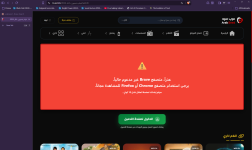
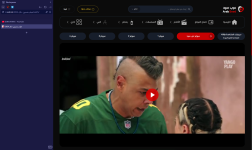
uBOL works just fine with this specific website.This is the first time I have seen this type of detection. I have tried it with both Brave browser and Vivaldi + uBOL, and the result was as follows.
View attachment 298185View attachment 298186

which 2 are you using?Now I only have 2 extensions that are always enabled.
which 2 are you using?



Ungoogled Chromium on Windows is a crime. It not digitally signed and I believe it is not wise to use such a browser. Helium is digitally signed and I'd use it over UGClibrewolf / firefox / waterfox || Edge / ungoogled chromium
Members who viewed this thread in the last 5 minutes


