
I don't trust Brave. The past incidents left scars. In the same way, DDG was caught allowing Microsoft trackers. Firefox, too, was sending (pinging) what you default browser is to Mozilla.Replacing Google ads with its own ads, replacing G for B.


Open MalwareTips from your Home Screen or desktop. Follow discussions, find answers and pick up where you left off.
If you cannot find an install option, update your browser or use its bookmark option to keep MalwareTips close.
After installation, open the app and sign in. Enable push notifications in Preferences if you want alerts. On iPhone and iPad, push requires a Home Screen web app and iOS or iPadOS 16.4 or later.
Sign in to manage notificationsInstallation is optional. Your notification settings stay under your control.
 Thread starter
lokamoka820
Thread starter
lokamoka820
I don't trust Brave. The past incidents left scars. In the same way, DDG was caught allowing Microsoft trackers. Firefox, too, was sending (pinging) what you default browser is to Mozilla.Replacing Google ads with its own ads, replacing G for B.

I trust none; Brave is just fast, resources-friendly, stable, and has a nice adblocker.I don't trust Brave. The past incidents left scars. In the same way, DDG was caught allowing Microsoft trackers. Firefox, too, was sending (pinging) what you default browser is to Mozilla.
Privacy is a dream. In this era one can never obtain it. Some of my friends brag about using open source software and Linux instead of Windows and they forgot that they are running open source software on a closed source hardware.I trust none; Brave is just fast, resources-friendly, stable, and has a nice adblocker.
But all will sell you for an extra penny.

Does Brave Shields work well on the Waterfox browser? Are there any compatibility issues?Privacy is a dream. In this era one can never obtain it. Some of my friends brag about using open source software and Linux instead of Windows and they forgot that they are running open source software on a closed source hardware.
My main browser is Vivaldi and it is less evil. My secondary browser is Waterfox now and it is good to some extent. Edge is no longer a browser and it is too bloated. Chrome is my enemy.
I hope Helium keeps improving. And I hope it never loses its way.
Waterfox comes with Ublock Origin preinstalled. I have no idea if Brave Shields is available as an extension and if it allows you to install it on other browsers.Does Brave Shields work well on the Waterfox browser? Are there any compatibility issues?
WF announced they incorporated Brave adbocker.Waterfox comes with Ublock Origin preinstalled. I have no idea if Brave Shields is available as an extension and if it allows you to install it on other browsers.
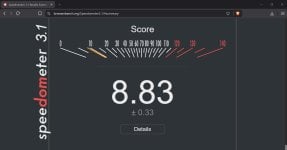
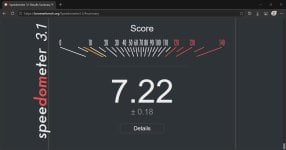 vs Edge with no extensions
But there is a catch! By default Waterfox adblocker does allow non-tracking, text-based ads to display on Waterfox default search engine (1.org)I confirm that Waterfox does ship with Brave Shields, but not as an extension. Adblock-rust is compiled directly into Waterfox's main process loop.
As for licensing, Brave is distributed under MPL-2.0. Since Waterfox is a Firefox fork, this aligns perfectly with Brave licensing.
I have used it for 3 days. Insane memory and could consumption. I hated that it starts with Windows by default. I do not see any reason to use it. It is still not mature and I'd persoanlly use Vivaldi over it.@Parkinsond
How has your experience with Zen Browser been so far?

I don't know if it's possible in Brave, but in Firefox you typeI just discovered that the search field in the Vivaldi browser has the same Firefox feature that lets you temporarily change the search engine by clicking on the search engine icon instead of remembering shortcuts. This is one of my favorite Firefox features. Well done, Vivaldi.
View attachment 298654
@g -> press Enter and it searches Google. You type @b -> press Enter and it starts searching Bing. I love that!
I believe it is also available in Chromiim-based browsers too. You go to search engines settings and assign shortcuts there. I have not personally tried it as I just use DDG.I don't know if it's possible in Brave, but in Firefox you type@g-> press Enter and it searches Google. You type@b-> press Enter and it starts searching Bing. I love that!
I don't know if it's possible in Brave, but in Firefox you type@g-> press Enter and it searches Google. You type@b-> press Enter and it starts searching Bing. I love that!
Yes, all browsers have shortcuts assigned to change the search engine for a one-time search. However, I am referring to the fact that in Firefox and Vivaldi, you can click the search engine icon to reveal a dropdown menu listing all predefined search engines in your browser settings. This makes switching between them much more convenient. Perhaps my screenshot was unclear because it was small, but here is what I mean:I believe it is also available in Chromiim-based browsers too. You go to search engines settings and assign shortcuts there. I have not personally tried it as I just use DDG.
Vivaldi uses nicknames to search engines
And brave assigns shortcuts and so on.
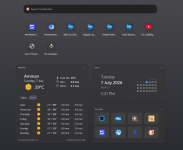
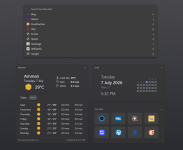

Reduced to 8.9 %.
P.S.
Having too many extensions enabled slows down your browser.
Now I only have 2 extensions that are always enabled.
 I was having a little chat with Google of the slower web page loading with FF compared to Brave. Mind you, it's not that drastic, but is noticeable.
Opera and Yandex have side-bar toggle or context menu entry to turn off dark mode flag on specific sites, but on the expense of lots of cons.I do realize with Brave I can go into Brave Flags and enable dark mode, but on this site it wipes out the upper right corner icons (they're there when I hover my mouse over that area) and some members Avatars look like a film negative, so I disabled it.
After a break from Firefox for about 1–2 months, I came back recently with release 153. I didn’t notice any real speed difference compared to other Chromium-based browsers, and the issues I’d been having with Reddit and GitHub seem to have disappeared. YouTube also starts immediately now, though I don’t know what changed. It probably isn’t noticeable to most users, unlike what Speedometer 3.1 shows. I’m using uBlock Origin and Dark Reader, and I also added “Adaptive Tab Bar Color” which works with Dark Reader. Maybe that extension caused the improvement!Yep, you're right

Its results are variable.unlike what Speedometer 3.1 shows
After a break from Firefox for about 1–2 months, I came back recently with release 153. I didn’t notice any real speed difference compared to other Chromium-based browsers, and the issues I’d been having with Reddit and GitHub seem to have disappeared. YouTube also starts immediately now, though I don’t know what changed. It probably isn’t noticeable to most users, unlike what Speedometer 3.1 shows. I’m using uBlock Origin and Dark Reader, and I also added “Adaptive Tab Bar Color” which works with Dark Reader. Maybe that extension caused the improvement!
I had to disable Brave shields premanently for Google search to avoid the prompts.This morning in Brave it was fine, then about an hour ago, here we go again with the Google prompts
I had a similar problem with its fork, Zen.The only issue now is with this forum software, if I use a emoticon in a reply I can't get the cursor to the right of it to continue typing
Members who viewed this thread in the last 5 minutes


