

First Firefox 7 Beta Promises Dramatically Lower Memory Use
- Thread starter jamescv7
- Start date
You are using an out of date browser. It may not display this or other websites correctly.
You should upgrade or use an alternative browser.
You should upgrade or use an alternative browser.
- Status
- Not open for further replies.


D
Deleted member 178
if i want the same boolean for ff6, should i spell it like this ? : extensions.checkCompatibility.firefox
D
Deleted member 178
Nightly dont show me some RAM improvement compared to FF6 , so i switched back to the latest. the boolean works.

Also Firefox will also become less usage in memory once it was idle too. Good analysis MrXidus so its shows that FF patch memory consumption was working well.

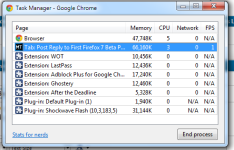
Got 4GB RAM.....so I have to agree with you. The Ram Usage wasn't a problem for me......The RAM Usage will increase once the users will start adding plugins .... Right now I'm using 5 add ons on Chrome which take around 60MB to run and to be fair I had never even monitor how much they are using because...well.... I have 4 GB RAMShadow Death said:To be honest, I don't think Firefox has ever had a memory issue. "Firefox uses 100-200MB of ram"... woo... 100-200MB out of how many gigs of ram?
 . As long as everything is working fine I see no major if the browser is using 100 or 200 MB of ram to run.
The Ram Usage wasn't really a issue for Firefox,the main problem for Mozilla is that Google is building an entire world around Chrome....eg : Chrome Web Store...Did you check it out lately? They've got a ton of stuff.. And what is Mozilla doing? ... Well.....they are trying to lower the memory usage from 100 to 150.... pathetic...
Attachments

umbrapolaris said:if i want the same boolean for ff6, should i spell it like this ? : extensions.checkCompatibility.firefox
According to this info on the setting extensions.checkCompatibility.6.0 might work and there is also an addon that can change that setting for you (Add-on Compatibility Reporter). However you should also consider the following:
This is useful if you are using alpha, beta or nightly (development) builds which Add-on authors do not yet support. However, enabling incompatible extensions may cause crashes or other malfunctions.
Another thing you could do is download and "hack" the extensions that do not work -> see point 2 in this article
bogdan said:However you should also consider the following:
This is useful if you are using alpha, beta or nightly (development) builds which Add-on authors do not yet support. However, enabling incompatible extensions may cause crashes or other malfunctions.
Yep. It's always a good idea to disable all add-ons but one when you're testing compatibility for this reason.
I tried this at the moment just to make trafficlight worked, and this is good as temporary band aid solution since its not yet updated.
Jack said:what is Mozilla doing? ... Well.....they are trying to lower the memory usage from 100 to 150.... pathetic...
Which they have successfully done.
Since Firefox as only one process (exclude plugin-container) and can consume high RAM yet that's the right path on lowering the memory usage.Unlike chrome it have a multiprocesses that can equalized the consume of RAM.
- Status
- Not open for further replies.
You may also like...
-
 Hot Take Mozilla will extend support for Firefox for Windows 7 and Windows 8
- Started by nicolaasjan
- Replies: 3
-

-
 New Update Firefox's Accessibility Performance is getting a huge boost
- Started by silversurfer
- Replies: 0
-
-
Unmaintained Mozilla Firefox support for Windows 7, 8 and 8.1 ends September 2024
- Started by silversurfer
- Replies: 4