Serious Discussion Fort Firewall

tnodir

Level 7
Verified
Well-known
Fort is a simple firewall for Windows 7+.

Features:
  • Filter by network addresses, application groups
  • Filter by SvcHost.exe service names
  • Support wildcards in program path names
  • Application group speed limits
  • Blocklists via "Zones"
  • Stores traffic statistics
  • Graphical display of bandwidth
  • Has own kernel driver, based on Windows Filtering Platform (WFP)
  • Open Source (GPLv3)
Download Firewall v3.5.6
 
Last edited by a moderator:

Attachments

  • Screenshot 2022-07-22 105922.png
    Screenshot 2022-07-22 105922.png
    51.5 KB · Views: 490
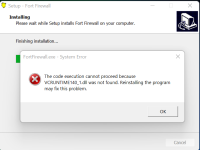
This time, When I clicked on programs, I got the blue screen. Luckly I was in shadow mode
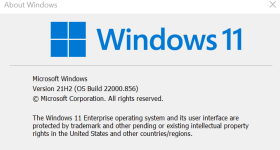
What Windows version, build number, 32/64 bit? (Maybe ISO file's name? So I'll install it in VM.)

Which Fort's installation package was used? (windows-x86.exe or windows10-x86_64.exe?)

How to reproduce the crash?

Any error logs in the Fort firewall/logs/ folder?

Please send the memory dump file to nodir.temir@gmail.com
 
There won't be any log files or dump files. When in Shadow mode. Nothing is saved after reboot.
I installed the 86 visual C files because installing the 64 version would not work.
I used the windows10-x86_64.exe install file.
I opened the GUI and clicked programs and got the blue screen.
 

Attachments

  • Screenshot 2022-08-13 125412.png
    Screenshot 2022-08-13 125412.png
    22.8 KB · Views: 494
@ticklemefeet I can't to reproduce the crash:
- Start existing Windows 11 in VM
- Uninstall existing Fort Firewall
- Install Shadow Defender 1.5.0.726, turn on Shadow Mode and Reboot
- Install `FortFirewall-3.6.0-windows10-x86_64.exe` and open its Programs window

Maybe you also installed other security programs or antivirus?

> I opened the GUI and clicked programs and got the blue screen.

Can you please get a screenshot of the BSOD?
I just tried installing again and clicking on programs and it seems to be working fine now. Fingers crossed
 
Fort Firewall v3.6.1
  • UI: The enabled "Dark Mode" is active, when System's theme is Dark too.
  • UI: Programs: Refactor "Options" button.
  • UI: Options: Add "Right Click" tray event and "Ignore" action.
  • UI: Tray: "Double Click"-s default action is "Ignore" now. (To immediately do "Single Click"-s action.)
  • UI: Options: App Groups: Remove "Fragment first TCP packet".
  • UI: Update SQLite to v3.39.4
  • Driver: Check the device on asynchronous flow deletion. (Fix BSOD on shutdown/reboot.)
  • Installer: Check compatibility with HVCI (Core Isolation).
Attention: Edit the Options: Tray: "Double Click" event's action to restore an old action to "Show Options".
 
Fort Firewall v3.6.4
  • UI: Programs: Improve sorting by "State" column (Alerted programs are always on top).
  • UI: Tray: Change icon color on some states.
  • UI: Options: Save user.ini changes on OK/Apply only.
  • UI: Tray Menu: Move Options & Zones to Options sub-menu.
  • UI: Options: Add ability to Stop Internet when Quota exceeds.
  • UI: Programs: Add "Restrict access to LAN only" flag.
 

MalwareTips community

Join the discussion

Create a free account to reply to this thread, ask your own questions and get help from the community.

  • Reply and ask questions
  • Get alerts when someone answers
  • Free malware removal help

Join 75,697 members who help each other for free, since 2010.

Create free account
or continue with

Recently browsing

Members and guests who viewed this thread in the last 5 minutes

Back
Top