

The MalwareTips app
Your community, one tap away.
Open MalwareTips from your Home Screen or desktop. Follow discussions, find answers and pick up where you left off.
- Home Screen access
- Optional push alerts
- Your community
You're ready to explore.Explore what's new
Installation instructions
iPhone & iPad
- Open MalwareTips in Safari and tap Share. You may need to open the Page Menu first.
- Choose Add to Home Screen. If it is not listed, use Edit Actions to add it.
- Keep Open as Web App enabled if shown, then tap Add.
Android
- Open MalwareTips in Chrome or another browser that supports app installation.
- Open the browser menu and look for Install app, Install and create shortcut, or Add to Home screen.
- Choose Install and confirm. Wording varies by browser.
Desktop
- Chrome: use the install icon in the address bar, or the menu under Cast, save and share.
- Edge: open the menu, then More tools, Apps and Install this site as an app.
- Safari on Mac: choose Share or File, then Add to Dock. Firefox on Windows: look for the web apps button in the address bar.
If you cannot find an install option, update your browser or use its bookmark option to keep MalwareTips close.
Keep up with your conversations
After installation, open the app and sign in. Enable push notifications in Preferences if you want alerts. On iPhone and iPad, push requires a Home Screen web app and iOS or iPadOS 16.4 or later.
Sign in to manage notificationsInstallation is optional. Your notification settings stay under your control.
You are using an out of date browser. It may not display this or other websites correctly.
You should upgrade or use an alternative browser.
You should upgrade or use an alternative browser.
Serious Discussion Fort Firewall
-
 Thread starter
tnodir
Thread starter
tnodir
- Start date
- 510 Replies
- 111,050 Views

It will block all "filter-able" inbound traffic.Is this rule blocking all inbound traffic?
There are "Filter local ..." flags in the Options: IP Addresses: LAN, which are ticked off by default.
So the LAN addresses are always auto-allowed by default.
Also this rule will block all incoming ICMP requests too, so you can't ping your machine from Internet (if you are not behind router).
(local_port() is redundant here.)

Should I replace "local_port" with "port" to work?(local_port() is redundant here.)
I want when allowing program to connect, to have only outbound traffic, while blocking all inbound one.
Only "dir(in)" is sufficient to block all incoming connections and requests for all protocols (UDP, TCP, ICMP etc) to any local port (1-65535).I want when allowing program to connect, to have only outbound traffic, while blocking all inbound one.
Thank you; I will modify the rule.Only "dir(in)" is sufficient to block all incoming connections and requests for all protocols (UDP, TCP, ICMP etc).

@Andytay70,
I'm on an extended sabbatical leave.
I'm on an extended sabbatical leave.


I agree with you. I have yet to try it but I prefer to wait for the implementation of "Ask to connect" filter mode. Serious Discussion - Fort Firewall and subsequent response from the developer.this is a good firewall !
Last edited:
Currently using with "block if not allowed" and termination of the first connection does not matter for me as the wildcard feature helps to not being prompted again for those with version number in path.I agree with you. I have yet to try it but I prefer to wait for the implementation of "Ask to connect" filter mode. Serious Discussion - Fort Firewall and subsequent response from the developer.
Fort Firewall 3.20.0
- UI: Rework App. Groups to Groups and per-program Speed Limits (#38, #93, #143, #210, #423, #479, #518).
- UI: Add Time Periods, used by Groups and Speed Limits (#173, #718).
- UI: Program: Add "Block Inbound" flag.
- UI: Improve Programs window (#704, #705, #707).
- UI: Improve Services window; Repair services reset by Windows Update (#641, #762).
- UI: Improve Connections window (#139, #708).
- UI: Add Turkish and Vietnamese languages.
- UI: Update SQLite to 3.53.4
- Driver: Speed Limits: Improve shaping accuracy (#435).
- Driver: Various fixes (#756).
- Other fixes (#709, #720, #749).
Fort Firewall 3.20.0
- UI: Rework App. Groups to Groups and per-program Speed Limits (#38, #93, #143, #210, #423, #479, #518).
- UI: Add Time Periods, used by Groups and Speed Limits (#173, #718).
- UI: Program: Add "Block Inbound" flag.
- UI: Improve Programs window (#704, #705, #707).
- UI: Improve Services window; Repair services reset by Windows Update (#641, #762).
- UI: Improve Connections window (#139, #708).
- UI: Add Turkish and Vietnamese languages.
- UI: Update SQLite to 3.53.4
- Driver: Speed Limits: Improve shaping accuracy (#435).
- Driver: Various fixes (#756).
- Other fixes (#709, #720, #749).
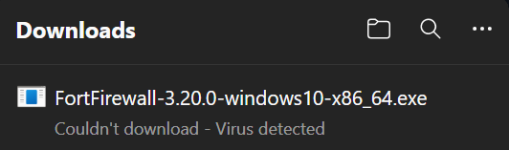
@Parkinsond Yes, false positive. Check with other AV, not MS Defender.
Agree; on VT, only MD and Rising are flagging.@Parkinsond Yes, false positive. Check with other AV, not MS Defender.

Is the driver signed yet. If not, pass. It's been 10x10^134 years since we were promised a signed driver. What's the point without that? Any security appllication that tells you that you have to lessen your security in order to use it is not something I want to use. Disable HVCI? Nope.
Last edited:
I've tried at that time with no success. I don't want to deal with MS abomination again.since we were promised a signed driver.
I’d rather spend the money on a Mac and get all the necessary certificates for $100 a year.
Since I’m building this firewall for myself, I’ll continue developing it for the time being.
Thanks for feedback!
Last edited:
It is working flawlessly.I've tried at that time with no success. I don't want to deal with MS abomination again.
I’d rather spend the money on a Mac and get all the necessary certificates for $100 a year.
Since I’m building this firewall for myself, I’ll continue developing it for the time being.
The lightest among all free firewalls, with granular control.
I have no virtualizaion in my old machine, so I do not have the option of core isolation in Windows security, which I consider a lower priority than a good firewall.
Fort Firewall 3.20.1
- UI: Add Filter Simulator: Show the driver's decision on a connection (also from the Connections window).
- UI: Split the Statistics window into the Traffic and Connections windows.
- UI: Install/Remove the Service as Administrator from a non-admin UI (#472).
- UI: Password: Add "Unlock till" N minutes (#686).
- UI: Schedule: Set the Tasks' interval in minutes (#422).
- UI: TrayIcon: Check the Rules' actions by their enabled state (#678).
- UI: Backup: Restore the windows by the imported settings (#742).
- UI: Control: Add "rule on|off|report" and "rule set-text|get-text" commands (#727).
- UI: Control: Add "graph show|hide|switch" command (#743).
- UI: Control: "prog add": Open the Edit Program dialog without the Programs window (#680).
- Driver: Keep a wildcard program's paths on removal of a listed program (#696).
Recently browsing
Members who viewed this thread in the last 5 minutes
You may also like...
-
 New Update Sandboxie-Plus v1.18.2 / 5.73.2 Latest
 -

-

-
 Serious Discussion Orion Malware Cleaner (OMC) - By Trident
 -