

The MalwareTips app
Your community, one tap away.
Open MalwareTips from your Home Screen or desktop. Follow discussions, find answers and pick up where you left off.
- Home Screen access
- Optional push alerts
- Your community
You're ready to explore.Explore what's new
Installation instructions
iPhone & iPad
- Open MalwareTips in Safari and tap Share. You may need to open the Page Menu first.
- Choose Add to Home Screen. If it is not listed, use Edit Actions to add it.
- Keep Open as Web App enabled if shown, then tap Add.
Android
- Open MalwareTips in Chrome or another browser that supports app installation.
- Open the browser menu and look for Install app, Install and create shortcut, or Add to Home screen.
- Choose Install and confirm. Wording varies by browser.
Desktop
- Chrome: use the install icon in the address bar, or the menu under Cast, save and share.
- Edge: open the menu, then More tools, Apps and Install this site as an app.
- Safari on Mac: choose Share or File, then Add to Dock. Firefox on Windows: look for the web apps button in the address bar.
If you cannot find an install option, update your browser or use its bookmark option to keep MalwareTips close.
Keep up with your conversations
After installation, open the app and sign in. Enable push notifications in Preferences if you want alerts. On iPhone and iPad, push requires a Home Screen web app and iOS or iPadOS 16.4 or later.
Sign in to manage notificationsInstallation is optional. Your notification settings stay under your control.
You are using an out of date browser. It may not display this or other websites correctly.
You should upgrade or use an alternative browser.
You should upgrade or use an alternative browser.
Question Free great antivirus for android?
- Thread starter Studynxx
- Start date
Other security for Android & iOS
13 Replies
2,121 Views
Help answer the author's question with clear explanations and useful steps.

Bitdefender
Is it real-time protection on the FREE plan, or on-demand only?Bitdefender

The free Bitdefender seems to be on-demand and on-install scanning. The non-free version claims to do more, but with non-root access, it still probably can do less than Google Play Store itself. I treat the free ones as second-opinion scanners anyway, but with Google being so effective (according to VT), they seem to be rather redundant.

Sophos, avg, avast has free antiviruses that has realtime protection aswell
Choose sophos if you want bit more privacy and no advertising in app, its completely free. Just enable pua/pup protection & scan for less reputable apps option too, i guess its the one youre looking for
Choose sophos if you want bit more privacy and no advertising in app, its completely free. Just enable pua/pup protection & scan for less reputable apps option too, i guess its the one youre looking for

Majority of risks for Android come when users download questionable apps from the store or sideload.
Google removes malicious apps, but often it is done post-factum. The control is not as tight as iOS.
In addition to installing antivirus as Sophos, do the following, to ensure your device is not at risk:
Avoid sideloading apps, always download from the store. Be specially suspicious about cracked/modded apps that bypass software paywalls.
When downloading from the store, ensure you are downloading popular apps and games from trusted developers. Avoid apps like wallpaper downloaders, optimisers, flash lights and so on.
Bitdefender detected the following apps as malicious in a blog post, notice the names (none of them sound like something essential or worth installing)
* AFL Wallpapers 4K (com.contec.aflwallpapers4k)
* All (com.deadsimpleapps.all)
* App Facil (com.devindie.appfacil)
* Ram App (book.com.ram.app)
* Alamin Care CTG App (com.alamincarectg.app)
* Russia 2018 Stickers (stickers.russia2018)
* Connect Animals OK (net.playtouch.connectanimalsok)
* iHub Mobile (com.advfn.Android.ihubmobile)
* CPCC Go (edu.cpcc.go)
* Class 3 PDF (com.ik.class3pdf)
* Amin Rostami (ir.amin.rostami)
* Apyar Car Download (com.fhuchudev.apyarcardownload)
* Mega Sena (com.kacyano.megasena)
* Tie Dye Neon Weed Keyboard Theme (com.ikeyboard.theme.tiedye.neon.weed)
* Auto Refresh Any Website (studio.harpreet.autorefreshanywebsite)
* Auto Web Page Reloader 2022 (com.mdpabhel.autowebpagereloader2022)
* USSD S11 (uz.pdp.ussds11)
Ensure that your device is always up-to-date.
Use secure DNS to block access to malicious websites.
Google removes malicious apps, but often it is done post-factum. The control is not as tight as iOS.
In addition to installing antivirus as Sophos, do the following, to ensure your device is not at risk:
Avoid sideloading apps, always download from the store. Be specially suspicious about cracked/modded apps that bypass software paywalls.
When downloading from the store, ensure you are downloading popular apps and games from trusted developers. Avoid apps like wallpaper downloaders, optimisers, flash lights and so on.
Bitdefender detected the following apps as malicious in a blog post, notice the names (none of them sound like something essential or worth installing)
* AFL Wallpapers 4K (com.contec.aflwallpapers4k)
* All (com.deadsimpleapps.all)
* App Facil (com.devindie.appfacil)
* Ram App (book.com.ram.app)
* Alamin Care CTG App (com.alamincarectg.app)
* Russia 2018 Stickers (stickers.russia2018)
* Connect Animals OK (net.playtouch.connectanimalsok)
* iHub Mobile (com.advfn.Android.ihubmobile)
* CPCC Go (edu.cpcc.go)
* Class 3 PDF (com.ik.class3pdf)
* Amin Rostami (ir.amin.rostami)
* Apyar Car Download (com.fhuchudev.apyarcardownload)
* Mega Sena (com.kacyano.megasena)
* Tie Dye Neon Weed Keyboard Theme (com.ikeyboard.theme.tiedye.neon.weed)
* Auto Refresh Any Website (studio.harpreet.autorefreshanywebsite)
* Auto Web Page Reloader 2022 (com.mdpabhel.autowebpagereloader2022)
* USSD S11 (uz.pdp.ussds11)
Ensure that your device is always up-to-date.
Use secure DNS to block access to malicious websites.
F
ForgottenSeer 123960
I've been following your posts on this topic. Given the choices you're making, I think you'd find my post on habits highly relevant.

 malwaretips.com
Serious Discussion - A Habit based Guide for Mobile Security
Your smartphone is a portable hub for your personal and professional life, making it a prime target for cybercriminals. This guide focuses on the simple, yet crucial, habits that will protect your mobile device and the sensitive data it holds. 1. Secure Your Device Physically The first line of...
malwaretips.com


F
ForgottenSeer 123960
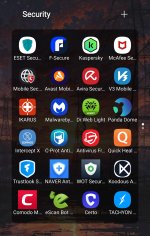
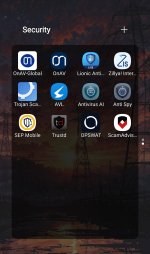
This is a community-driven VT app for Android that's more effective and less of a strain on your system. It scans both personal and system apps.With this basic set-up, I don't really worry about where I'm getting the software from.

VirusTotal Mobile - Apps on Google Play
VirusTotal is a service that analyses suspicious files and URLs
Youre missing trend micro otherwise youre good to goWith this basic set-up, I don't really worry about where I'm getting the software from.

As far as I know, Trend Micro no longer has any free version, even for scanning. Correct me if I'm wrong. There used to be Trend Micro Dr. Safety a pretty good app, but its support was discontinued. Anyway, with Trend Micro, any modification is considered a virus, which doesn’t work for me.Youre missing trend micro otherwise youre good to go


AV for android, that just feels ... weird.

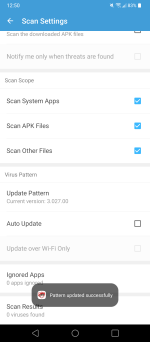
Dr safety and Dr safety lite are not in the Play Store but if you have access to the APK, it still works. Still receiving updates and I'm still using it as secondary scanner.As far as I know, Trend Micro no longer has any free version, even for scanning. Correct me if I'm wrong. There used to be Trend Micro Dr. Safety a pretty good app, but its support was discontinued. Anyway, with Trend Micro, any modification is considered a virus, which doesn’t work for me.
Attachments
Recently browsing
Members who viewed this thread in the last 5 minutes
You may also like...
-
 Software Review Panda Dome Advanced Antivirus 2026
 -
Software Review AVG Free Antivirus
-

-

-
 Advice Request What AV for an Android Phone?