Free Turbo VPN

VPN and DNS
5 Replies 2,054 Views

Brownie2019

Level 23
Verified
Well-known
Forum Veteran
Turbo VPN should always be installed on your Windows operating system. While browsing on the Internet, you can perform your tasks without worrying about any threat because the Turbo VPN will take care of that part. No matter if it is your privacy or safety, you can increase your productivity the way it should be.

 
Absolutely, Turbo VPN provides great security and privacy features. Thanks for sharing the download link for Windows users.
 
1745124146549.png


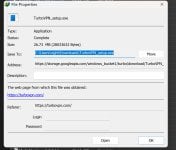
This is what happens when I try to download Turbo VPN
 
Downloaded the file with no issues, Avast here. Maybe a FP from Bitdefender? Have you tried to submit the file to them?

2025-04-20_075316.jpg
 
Last edited by a moderator:
This is what happens when I try to download Turbo VPN
No great loss. The download is malware free as confirmed by VirusTotal. Malwarebytes detects it as harmless PUP and nothing else detects it. But like most free VPNs, it has some privacy concerns, which is a good reason not to use it.

Final Verdict — Too Unreliable to Recommend​

Overall, Turbo VPN doesn’t offer anything that makes it worth using. It’s poor for streaming, numerous servers won’t even connect, and it doesn’t have an audited logging policy. Its security features are lacking, and it failed my leak tests. Even if you’re unhappy with the service, claiming a refund isn’t as straightforward as with most VPNs. In short, look elsewhere.
There are plenty of other sites giving this VPN bad reviews.
As always, be aware that VPNs that VPNMentor aggressively promotes are the ones they they own.
 
Again.... No Thanks! I'd rather browse the web unprotected than use one of these data mining Chinese (or who knows from where) free VPNs.

If your desperate for a VPN but have no money or resources I recommend ProtonVPN and Windscribe. They have free tiers or data allowances per month.
 

Recently browsing

Members who viewed this thread in the last 5 minutes

Back
Top