Battle GDATA VS Kaspersky

Compare list
GDATA VS Kaspersky

low L!fe

Level 7
Thread author
Verified
Well-known
Oct 11, 2014
315
994
568
39
Hello Guys
I got a subscription from Kaspersky Total Security 2021 and G Data Internet Security 2021 for a one year subscription And I'm in a lake,
what do I choose on my personal device?
Who is the best of them?
Detection rate
Ransomware
Firewall
l protection
Thank you
note i have 32GB ram
 
I agree with you on some points.

Yes I also feel that Kaspersky here on this forum is overrated compared to other products like Bitdefender, ESET. Obviously there are differences between products and some do well on certain issues and others do not. I see few or (almost none) people here citing that Kaspersky's offline detection rate is terrible.

Unfortunately here we can't say much about that or say anything regarding Kaspersky that your thread or post is deleted.
I'm not saying kaspersky offline detection is terrible but it's not the best. What bothers me about Kaspersky is that it is the only av that disinfects in real time, why don't they make the advanced disinfection run before running the operating system, that is, when rebooting, as most avs like Avast do? , Norton, Bitdefender and others. Greetings to all.
 
Does it really matter how Kaspersky disinfects files? The ultimate goal is keeping the PC clean and Kaspersky excels at that. Their BB is one of the few ones(another is BD) that can roll back the malicious actions. Most other BB can stop the attack but can't roll back the actions. Now talking about online detection, most of the AV's now focus on online detection (Norton, TM, WD). Even Avast, BD, ESET and F-Secure needs internet connectivity to boost up their protection. F-Secure DeepGuard works better when internet is enabled. Avast streaming updates require an active internet connection and detects unknown malware using the generic mal32 name. BD also uses the internet to query their cloud and classify unknown malware as generic malware. ESET also needs an internet connection to query their LiveGrid and if you don't have an active internet it displays a warning. Norton outrightly warns you if you run a scan without an internet connection. WD BAFS requires an active internet connection. Most importantly the most common source of malware is the internet(2nd being flash drives). If you don't have an internet connection then your chances of being infected are pretty slim.
 
Yes I understand I did not say that Kaspersky is a bad AV or worse than others, including my subscription is 2 years 🙂 on the contrary is really one of the few (not to say the only) that gives me the feeling of security when using.

As I said it is necessary to understand that each AV behaves and acts in a different way and even uses different mechanisms in relation to other AV on the market.

Regarding the topic, I use it and recommend you Kaspersky as in a previous post as I have done.
 
Does it really matter how Kaspersky disinfects files? The ultimate goal is keeping the PC clean and Kaspersky excels at that. Their BB is one of the few ones(another is BD) that can roll back the malicious actions. Most other BB can stop the attack but can't roll back the actions. Now talking about online detection, most of the AV's now focus on online detection (Norton, TM, WD). Even Avast, BD, ESET and F-Secure needs internet connectivity to boost up their protection. F-Secure DeepGuard works better when internet is enabled. Avast streaming updates require an active internet connection and detects unknown malware using the generic mal32 name. BD also uses the internet to query their cloud and classify unknown malware as generic malware. ESET also needs an internet connection to query their LiveGrid and if you don't have an active internet it displays a warning. Norton outrightly warns you if you run a scan without an internet connection. WD BAFS requires an active internet connection. Most importantly the most common source of malware is the internet(2nd being flash drives). If you don't have an internet connection then your chances of being infected are pretty slim.
I completely agree with you. Advanced Disinfection technology is Kaspersky's selling point. Many reputable AVs, including ESET, F-Secure, Norton, etc, are bad at disinfecting/repairing threats, which is a pity. In my experience with F-Secure, it frequently fails to deal with infected archives/documents. ESET and Norton are better, but not as good as Kaspersky.

Regarding roll-back, G Data can also delete files dropped/modified by malware and restore registry changes. However, it cannot restore encrypted files (As far as I know, only Appcheck/Kaspersky/Sophos/BD/WV can restore encrypted files).
 
Thank you for your cooperation I'm going with Kaspersky
Try GData, see @Shadowra video test he made.

 
Does it really matter how Kaspersky disinfects files? The ultimate goal is keeping the PC clean and Kaspersky excels at that. Their BB is one of the few ones(another is BD) that can roll back the malicious actions. Most other BB can stop the attack but can't roll back the actions. Now talking about online detection, most of the AV's now focus on online detection (Norton, TM, WD). Even Avast, BD, ESET and F-Secure needs internet connectivity to boost up their protection. F-Secure DeepGuard works better when internet is enabled. Avast streaming updates require an active internet connection and detects unknown malware using the generic mal32 name. BD also uses the internet to query their cloud and classify unknown malware as generic malware. ESET also needs an internet connection to query their LiveGrid and if you don't have an active internet it displays a warning. Norton outrightly warns you if you run a scan without an internet connection. WD BAFS requires an active internet connection. Most importantly the most common source of malware is the internet(2nd being flash drives). If you don't have an internet connection then your chances of being infected are pretty slim.
Obviously it matters how you disinfect, it is much better to disinfect while the system is not running than in real time. I have seen considerable blue screens in kaspersky caused by malware penetrating the system and then the antivirus taking action. Greetings.
 
Obviously it matters how you disinfect, it is much better to disinfect while the system is not running than in real time. I have seen considerable blue screens in kaspersky caused by malware penetrating the system and then the antivirus taking action. Greetings.
I don't know about the latest version but the last time I used KIS in 2019 it did have an advanced disinfection option in the settings. Personally I've never had BSOD with any AV while removing malware but then again different systems have different outcomes.
 
I don't know about the latest version but the last time I used KIS in 2019 it did have an advanced disinfection option in the settings. Personally I've never had BSOD with any AV while removing malware but then again different systems have different outcomes.

I never have either. It still has the advanced disinfection options.
 
Last edited:
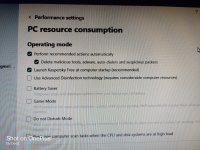
Kaspersky still has the Advanced disinfection option in the latest version. So it's on par with BD. Just enable the option if it's disabled for some reason. Please pardon me for the picture quality. Took it during my work.

IMG_20220430_111448.jpg
 
I do believe Kaspersky is a good program, but last night I installed it again to tray and see if anything has changed. Everything was good until I took a speed-test. I run PIA, have 500mb line, and I only got 365mb with PIA on. I suspected that my daughter was killing the line with games but sadly, it was Kaspersky. I turned of Kaspersky, got 489mb and I installed f-secure again and I have with PIA on, 480-489mb.

I want the best speed I am paying for, so Kaspersky is retired now.
 
  • Like
Reactions: Nevi and low L!fe
You will forgive me for what I am about to say, with everyone's permission.
Kaspersky, I feel that it is an overrated av for various reasons, I stopped using it since Russia started the war. I have seen several tests where Kaspersky fails to detect, I am annoyed by the way Kaspersky disinfects the system, as it does so once the malware has penetrated the system.
Its offline detection is mediocre and it is not good against script.
Gdata: I used it a few years ago, it has a very powerful engine, I would say one of the best on the Bitdefender market, but it is only the engine, it does not have the artificial intelligence that they use. Its behavior blocker is decent, but there is something very serious about Gdata and its virus removal is horrible, not to say painful, once the malware has penetrated the system, Greetings to all. pd: the second engine in Gdata is mediocre.
Though I don't like security products from authoritarian State like Russian and China , but i can't deny that Kaspersky is one of top class security product , which equals Bitdefender ( i use it) , Norton etc...
 
I do believe Kaspersky is a good program, but last night I installed it again to tray and see if anything has changed. Everything was good until I took a speed-test. I run PIA, have 500mb line, and I only got 365mb with PIA on. I suspected that my daughter was killing the line with games but sadly, it was Kaspersky. I turned of Kaspersky, got 489mb and I installed f-secure again and I have with PIA on, 480-489mb.

I want the best speed I am paying for, so Kaspersky is retired now.
Share your findings if you test this with other products also.
 
I do believe Kaspersky is a good program, but last night I installed it again to tray and see if anything has changed. Everything was good until I took a speed-test. I run PIA, have 500mb line, and I only got 365mb with PIA on. I suspected that my daughter was killing the line with games but sadly, it was Kaspersky. I turned of Kaspersky, got 489mb and I installed f-secure again and I have with PIA on, 480-489mb.

I want the best speed I am paying for, so Kaspersky is retired now.

Never had an issue with download speed and Kaspersky. 400/80 line that runs regardless of whether Kaspersky is on or off