I have it as a separate extensionI think you may have misunderstood my question my friend. Do you have Nano Defender as a separate extension or as a filterlist inside Nano?
~LDogg


Open MalwareTips from your Home Screen or desktop. Follow discussions, find answers and pick up where you left off.
If you cannot find an install option, update your browser or use its bookmark option to keep MalwareTips close.
After installation, open the app and sign in. Enable push notifications in Preferences if you want alerts. On iPhone and iPad, push requires a Home Screen web app and iOS or iPadOS 16.4 or later.
Sign in to manage notificationsInstallation is optional. Your notification settings stay under your control.
 Thread starter
bayasdev
Thread starter
bayasdev
I have it as a separate extensionI think you may have misunderstood my question my friend. Do you have Nano Defender as a separate extension or as a filterlist inside Nano?
~LDogg

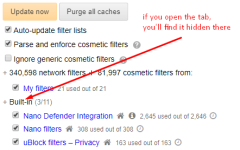
I'd recommend getting rid of the extension and have a look at he built-in filterlist. Have a look at the screenshot I have shown for you. Does the same thing as the extension. Plus more extensions, can mean a bigger attack surface target as well.I have it as a separate extension
I haven't noticed any slowdown yetGood change, a question, Kaspersky Anti-banner does not slow down your browsing.
Because when I used it if it slowed me down


Leave it off...Kaspersky Anti-banner


Added Emsisoft Browser Security addon to improve phishing protection

I'd recommend getting rid of the extension and have a look at he built-in filterlist. Have a look at the screenshot I have shown for you. Does the same thing as the extension. Plus more extensions, can mean a bigger attack surface target as well.
~LDogg

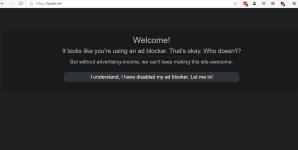
With only uBlock Origin and the attached filters enabled I have no problem accessing tpaste.netI found that the extension was needed to get past the adblocker warning on some sites, tpaste.net being a good example.
Are there UBO settings that I can use that'll let me ditch ND?
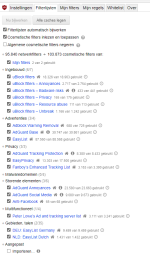
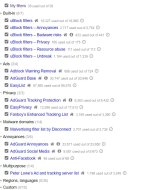
With only uBlock Origin and the attached filters enabled I have no problem accessing tpaste.net
View attachment 230643
No special settings needed.
What if you disable the malvertising filters of disconnect?Here's what I get with the same filters
(Weirdly they seemed to work initially)
What if you disable the malvertising filters of disconnect?
I can still access the site without any problems.
Without Nano Defender enabled, I still get the anti-adblock message.
I'm using Chromium Edge, if that makes any difference.
Me to, what are your tracking protection settings in Edge? Mine are on balanced.Without Nano Defender enabled, I still get the anti-adblock message.
I'm using Chromium Edge, if that makes any difference.
Me to, what are your tracking protection settings in Edge? Mine are on balanced.
Try removing ND completely, next select > "Purge all caches" and then re-check Adblock Warning Removal list.
Me to, what are your tracking protection settings in Edge? Mine are on balanced.
When put that way i suppose that is needed then.I found that the extension was needed to get past the adblocker warning on some sites, tpaste.net being a good example.
Are there UBO settings that I can use that'll let me ditch ND?
Members who viewed this thread in the last 5 minutes