


The MalwareTips app
Your community, one tap away.
Open MalwareTips from your Home Screen or desktop. Follow discussions, find answers and pick up where you left off.
- Home Screen access
- Optional push alerts
- Your community
You're ready to explore.Explore what's new
Installation instructions
iPhone & iPad
- Open MalwareTips in Safari and tap Share. You may need to open the Page Menu first.
- Choose Add to Home Screen. If it is not listed, use Edit Actions to add it.
- Keep Open as Web App enabled if shown, then tap Add.
Android
- Open MalwareTips in Chrome or another browser that supports app installation.
- Open the browser menu and look for Install app, Install and create shortcut, or Add to Home screen.
- Choose Install and confirm. Wording varies by browser.
Desktop
- Chrome: use the install icon in the address bar, or the menu under Cast, save and share.
- Edge: open the menu, then More tools, Apps and Install this site as an app.
- Safari on Mac: choose Share or File, then Add to Dock. Firefox on Windows: look for the web apps button in the address bar.
If you cannot find an install option, update your browser or use its bookmark option to keep MalwareTips close.
Keep up with your conversations
After installation, open the app and sign in. Enable push notifications in Preferences if you want alerts. On iPhone and iPad, push requires a Home Screen web app and iOS or iPadOS 16.4 or later.
Sign in to manage notificationsInstallation is optional. Your notification settings stay under your control.
You are using an out of date browser. It may not display this or other websites correctly.
You should upgrade or use an alternative browser.
You should upgrade or use an alternative browser.
Serious Discussion Handy (I think) video about recall from Britec.
- Thread starter Morro
- Start date
Windows 11
7 Replies
865 Views


F
ForgottenSeer 114717
Human memory processes and recalls images much more capably and efficiently than written text. Microsoft was merely attempting to use this truth from educational psychology and memory studies.
News Flash #1: An attacker with the wherewithal don't need Recall. They have hundreds of options to surveille your use of a PC - Windows or Linux - from screenshots, to keylogging, to continuous monitoring, to usage history, to just about anything you can imagine.
News Flash #2: Nations and their governments do not need Recall either. They already got your number. It is trivial for them to find you (unless you live off-grid deep in the forest). It is trivial for them to piece together your daily life - including your digital life.
Now, if you are boffing your wife's or husband's best friend (or secretly living another life doing stuff that you feel compelled to hide from others because of negative consequences) and they're sending you sweet love messages and sexting, and you're logging into social media or email accounts to view that stuff, well then - you've got a much larger problem than trying to hide your porn addiction. Recall is gonna provide divorce evidence. You're gonna pay alimony for infidelity.
News Flash #1: An attacker with the wherewithal don't need Recall. They have hundreds of options to surveille your use of a PC - Windows or Linux - from screenshots, to keylogging, to continuous monitoring, to usage history, to just about anything you can imagine.
News Flash #2: Nations and their governments do not need Recall either. They already got your number. It is trivial for them to find you (unless you live off-grid deep in the forest). It is trivial for them to piece together your daily life - including your digital life.
Now, if you are boffing your wife's or husband's best friend (or secretly living another life doing stuff that you feel compelled to hide from others because of negative consequences) and they're sending you sweet love messages and sexting, and you're logging into social media or email accounts to view that stuff, well then - you've got a much larger problem than trying to hide your porn addiction. Recall is gonna provide divorce evidence. You're gonna pay alimony for infidelity.
Last edited by a moderator:

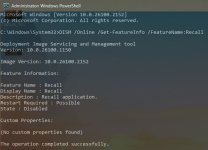
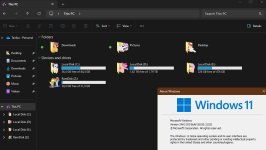
Indeed, though Recall runs by default, it can be still be disabled (26100.2152), and it does not break explorer, whatever is that supposed to do?!He clears up some FUD
F
ForgottenSeer 114717
A little bit related, but after watching the video, for those who are inclined to ask "Exactly what features are present and enabled on my Windows system?" that question can be quickly answered using Admin cmd or PowerShell:
For some this will surely open a can of paranoid worms. For others it will create more questions than they can shake two sticks at.
Reference @oldschool : "a can of paranoid worms."
DISM /online /Get-Features /Format:TableFor some this will surely open a can of paranoid worms. For others it will create more questions than they can shake two sticks at.
Reference @oldschool : "a can of paranoid worms."
You do not want to go there:For some this will surely open a can of paranoid worms.
Code:
DISM /Online /Get-Capabilities
C:\Windows\System32\WindowsPowerShell\v1.0\powershell.exe "Get-AppxPackage -AllUsers -PackageTypeFilter Bundle  | Where-Object {$_.NonRemovable -eq $False} | Select-Object Name, PackageFullName"
fsutil storagereserve query C:
vssadmin list shadowstorage
perfmon - tracing
F
ForgottenSeer 114717
You are probably correct.You do not want to go there:
It depends upon the extent of the paranoia, but more importantly, the degree of ignorance about what they are looking at. It is ignorance that drives much of the digital security paranoia among the humans. It is the reason that fear-mongering is such an effective sales tactic.
Recently browsing
Members who viewed this thread in the last 5 minutes
You may also like...
-

-
 Serious Discussion Windows 11 Recall — Productivity Perk or Privacy Disaster?
 -

-
-
