Advice Request Hard Configurator: error in "FullEventLogView" on Login

Please provide comments and solutions that are helpful to the author of this topic.

Wrecker4923

Level 9
Thread author
Verified
Well-known
Apr 11, 2024
402
2,078
769
Hello (especially @Andy Ful ),

I was looking at whitelisting some .exe(s) from the SRP, and I ran into this error in the FullEventLogView while logging in:

Record ID: 10890
Event ID: 4
Level: Warning
Channel: Microsoft-Windows-Security-Mitigations/KernelMode
Provider: Microsoft-Windows-Security-Mitigations
Description: Process '\Device\HarddiskVolume3\Windows\System32\svchost.exe' (PID 1416) was blocked from creating a child process 'C:\WINDOWS\system32\DllHost.exe' with command line 'C:\WINDOWS\system32\DllHost.exe /Processid:{3EB3C877-1F16-487C-9050-104DBCD66683}'.
Record ID: 10890
Task: 2
Keywords: 0x8000000000000000
Process ID: 1416
Thread ID: 27168
User: NT AUTHORITYSYSTEM

I found this warning and error log entries at about the same second in the event log:

- <Event xmlns=" ">
- <System>
<Provider Name="Microsoft-Windows-DistributedCOM" Guid="{1B562E86-B7AA-4131-BADC-B6F3A001407E}" EventSourceName="DCOM" />
<EventID Qualifiers="0">10000</EventID>
<Version>0</Version>
<Level>2</Level>
<Task>0</Task>
<Opcode>0</Opcode>
<Keywords>0x8080000000000000</Keywords>
<TimeCreated SystemTime="xxx" />
<EventRecordID>1001811</EventRecordID>
<Correlation ActivityID="{bb762119-f465-0002-c6d4-1abe65f4dc01}" />
<Execution ProcessID="1416" ThreadID="27168" />
<Channel>System</Channel>
<Computer>xxx</Computer>
<Security UserID="xxx" />
</System>
- <EventData>
<Data Name="param1">C:\WINDOWS\system32\DllHost.exe /Processid:{3EB3C877-1F16-487C-9050-104DBCD66683}</Data>
<Data Name="param2">2147942767</Data>
<Data Name="param3">{0358B920-0AC7-461F-98F4-58E32CD89148}</Data>
</EventData>


- <Event xmlns=" ">
- <System>
<Provider Name="Microsoft-Windows-Search" Guid="{CA4E628D-8567-4896-AB6B-835B221F373F}" EventSourceName="Windows Search Service" />
<EventID Qualifiers="32768">3036</EventID>
<Version>0</Version>
<Level>3</Level>
<Task>3</Task>
<Opcode>0</Opcode>
<Keywords>0x80000000000000</Keywords>
<TimeCreated SystemTime="xxx" />
<EventRecordID>157750</EventRecordID>
<Correlation />
<Execution ProcessID="19124" ThreadID="0" />
<Channel>Application</Channel>
<Computer>xxx</Computer>
<Security />
</System>
- <EventData>
<Data Name="ExtraInfo">Context: Application, SystemIndex Catalog Details: 0x%08x (0x80072ee4 - An internal error occurred in the Microsoft Windows HTTP Services (HRESULT : 0x80072ee4))</Data>
<Data Name="URL">iehistory://{xxx}/</Data>
</EventData>
</Event>
</Event>

The DCOM server mentioned in the log shows in the registry as a "Wininet Cache task object", with the InProcServer32 pointing to "%systemroot%\system32\wininet.dll".

[HKEY_CLASSES_ROOT\CLSID\{0358b920-0ac7-461f-98f4-58e32cd89148}]
@="Wininet Cache task object"
"AppID"="{3eb3c877-1f16-487c-9050-104dbcd66683}"

[HKEY_CLASSES_ROOT\CLSID\{0358b920-0ac7-461f-98f4-58e32cd89148}\InProcServer32]
@="%systemroot%\system32\wininet.dll"
"ThreadingModel"="Both"

If I switch OFF the SRP in Hard Configurator, the error doesn't occur.

I don't see any symptoms because of this error (mostly because I rarely use search, although I sort of like having it). It seems to be an error from the search indexing system.

Question:​

Should I ignore this and hope that search would still work normally? Should I just turn the SRP off? Can I do something to allow a normal child process launch for this?

edit: fixed the event ID, level information in the original FullEventLogView.
 
Last edited:
Hello (especially @Andy Ful ),

I was looking at whitelisting some .exe(s) from the SRP, and I ran into this error in the FullEventLogView while logging in:

Record ID: 10890
Event ID Level: 4 Warning
Channel: Microsoft-Windows-Security-Mitigations/KernelMode
Provider: Microsoft-Windows-Security-Mitigations
Description: Process '\Device\HarddiskVolume3\Windows\System32\svchost.exe' (PID 1416) was blocked from creating a child process 'C:\WINDOWS\system32\DllHost.exe' with command line 'C:\WINDOWS\system32\DllHost.exe /Processid:{3EB3C877-1F16-487C-9050-104DBCD66683}'.
Record ID: 10890
Event ID Level: 4 Warning
Channel: Microsoft-Windows-Security-Mitigations/KernelMode
Provider: Microsoft-Windows-Security-Mitigations
Task: 2
Keywords: 0x8000000000000000
Process ID: 1416
Thread ID: 27168
User: NT AUTHORITYSYSTEM

I found this warning and error log entries at about the same second in the event log:

- <Event xmlns=" ">
- <System>
<Provider Name="Microsoft-Windows-DistributedCOM" Guid="{1B562E86-B7AA-4131-BADC-B6F3A001407E}" EventSourceName="DCOM" />
<EventID Qualifiers="0">10000</EventID>
<Version>0</Version>
<Level>2</Level>
<Task>0</Task>
<Opcode>0</Opcode>
<Keywords>0x8080000000000000</Keywords>
<TimeCreated SystemTime="xxx" />
<EventRecordID>1001811</EventRecordID>
<Correlation ActivityID="{bb762119-f465-0002-c6d4-1abe65f4dc01}" />
<Execution ProcessID="1416" ThreadID="27168" />
<Channel>System</Channel>
<Computer>xxx</Computer>
<Security UserID="xxx" />
</System>
- <EventData>
<Data Name="param1">C:\WINDOWS\system32\DllHost.exe /Processid:{3EB3C877-1F16-487C-9050-104DBCD66683}</Data>
<Data Name="param2">2147942767</Data>
<Data Name="param3">{0358B920-0AC7-461F-98F4-58E32CD89148}</Data>
</EventData>


- <Event xmlns=" ">
- <System>
<Provider Name="Microsoft-Windows-Search" Guid="{CA4E628D-8567-4896-AB6B-835B221F373F}" EventSourceName="Windows Search Service" />
<EventID Qualifiers="32768">3036</EventID>
<Version>0</Version>
<Level>3</Level>
<Task>3</Task>
<Opcode>0</Opcode>
<Keywords>0x80000000000000</Keywords>
<TimeCreated SystemTime="xxx" />
<EventRecordID>157750</EventRecordID>
<Correlation />
<Execution ProcessID="19124" ThreadID="0" />
<Channel>Application</Channel>
<Computer>xxx</Computer>
<Security />
</System>
- <EventData>
<Data Name="ExtraInfo">Context: Application, SystemIndex Catalog Details: 0x%08x (0x80072ee4 - An internal error occurred in the Microsoft Windows HTTP Services (HRESULT : 0x80072ee4))</Data>
<Data Name="URL">iehistory://{xxx}/</Data>
</EventData>
</Event>
</Event>

The DCOM server mentioned in the log shows in the registry as a "Wininet Cache task object", with the InProcServer32 pointing to "%systemroot%\system32\wininet.dll".

[HKEY_CLASSES_ROOT\CLSID\{0358b920-0ac7-461f-98f4-58e32cd89148}]
@="Wininet Cache task object"
"AppID"="{3eb3c877-1f16-487c-9050-104dbcd66683}"

[HKEY_CLASSES_ROOT\CLSID\{0358b920-0ac7-461f-98f4-58e32cd89148}\InProcServer32]
@="%systemroot%\system32\wininet.dll"
"ThreadingModel"="Both"

If I switch OFF the SRP in Hard Configurator, the error doesn't occur.

I don't see any symptoms because of this error (mostly because I rarely use search, although I sort of like having it). It seems to be an error from the search indexing system.

Question:​

Should I ignore this and hope that search would still work normally? Should I just turn the SRP off? Can I do something to allow a normal child process launch for this?
What you’re seeing does not look like malware activity by itself. It’s a legitimate Windows COM activation path being blocked, and the side effects are showing up as DCOM errors (and possibly Search-related noise).

What the log actually means
  • svchost.exe is trying to launch DllHost.exe (COM Surrogate) to host a COM object (your CLSID “Wininet Cache task object”, backed by wininet.dll).
  • Windows blocks the child process creation, and you then get a DistributedCOM 10000 event because the COM server could not be started.

The important clue is the channel/provider:
“Microsoft-Windows-Security-Mitigations/KernelMode” is typically related to Windows exploit mitigations (Exploit Protection / process mitigation options), not classic SRP logging. So even if it correlates with toggling SRP in Hard_Configurator, the block itself is very consistent with a “child process creation” mitigation being applied to svchost.exe (or system-wide), which prevents svchost from spawning DllHost.

Should you ignore it?
If you have no functional symptoms, it’s not an emergency. However, it’s generally not a good idea to leave core Windows COM activation repeatedly blocked, because it can cause “random” breakage later (Search components, Control Panel applets, shell tasks, thumbnail handlers, scheduled tasks, etc.) without an obvious connection to the original hardening change.

Turning SRP off “fixes” it, but it also removes a meaningful layer of protection. A better approach is to keep SRP and adjust the specific hardening setting that is blocking COM Surrogate creation.

What to do (safe/low-risk steps first)
1) Check Exploit Protection settings for svchost.exe (most likely cause)
  • Open Windows Security
  • App & browser control
  • Exploit protection settings
  • Go to “Program settings”
  • Look for an entry for svchost.exe (or any entry you/Hard_Configurator added)
  • Check if “Child process creation” (or similarly named setting) is set to Block/On
  • Set it back to “Use default” (or Off) for svchost.exe, then reboot and re-test the event

If that mitigation is enabled for svchost.exe, it will explain the exact wording: “svchost.exe was blocked from creating a child process DllHost.exe”.

2) Check whether Hard_Configurator is applying extra hardening beyond SRP
Hard_Configurator can change more than just SRP depending on what options were applied. If there is a hardening option specifically related to blocking “child processes” or blocking COM-related LOLBins, revert only that option rather than disabling SRP entirely.

3) If you intentionally blocked DllHost.exe as a LOLBin via SRP, undo that
Blocking DllHost.exe globally is high-impact on Windows. If you have an explicit SRP “Disallowed” rule for DllHost.exe, remove it, or ensure System32/SysWOW64 copies are not blocked.

Common allow targets (if you must explicitly allow) are:
  • %WINDIR%\System32\DllHost.exe
  • %WINDIR%\SysWOW64\DllHost.exe
Path rules are usually more practical here than hash rules (hash rules can break after updates).

Recommendation
Keep SRP enabled, and fix the underlying block by reverting the “child process creation” mitigation (or any explicit rule) that prevents svchost.exe from launching DllHost.exe. That’s the least disruptive way to restore normal Windows COM behavior while keeping your hardening intact.
 
  • Like
Reactions: Wrecker4923
Upvote 0
Which Event ID in the FullEventLogView list is responsible for those events?

1781214778168.png
 
Upvote 0
It's event ID 4.

This is an Exploit Protection block event: "Do not allow child processes".
None of H_C's applications can apply this mitigation to svchost.exe (like in your post).
This event is also unrelated to Microsoft Defender ASR rules (they trigger other event IDs).
Technically, it is not possible for H_C to directly trigger event ID 4 for svchost.exe.
Please recheck (if you can) that disabling SRP in H_C can solve this issue for sure. If so, there is a possibility that H_C restricts something else, which then causes the system to block a child process of svchost. It would be interesting to understand what is happening.

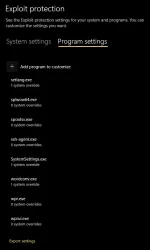
Did you inspect the Exploit Protection mitigations of svchost.exe (especially "Do not allow child processes")?
App & browser control >> Exploit protection >> Exploit protection settings >> Program settings >> svchost.exe >> Do not allow child processes
 
Last edited:
Upvote 0
Did you inspect the Exploit Protection mitigations of svchost.exe (especially "Do not allow child processes")?
App & browser control >> Exploit protection >> Exploit protection settings >> Program settings >> svchost.exe >> Do not allow child processes
I did; there wasn't an entry for the svchost.exe at all.

Please recheck (if you can) that disabling SRP in H_C can solve this issue for sure. ...It would be interesting to understand what is happening.
I will today.
 
Upvote 0
Did you inspect the Exploit Protection mitigations of svchost.exe (especially "Do not allow child processes")?
App & browser control >> Exploit protection >> Exploit protection settings >> Program settings >> svchost.exe >> Do not allow child processes
07 Exploit Protection.webp
Please recheck (if you can) that disabling SRP in H_C can solve this issue for sure.
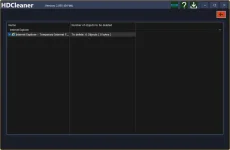
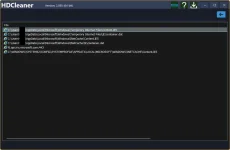
You're right. The issue doesn't depend on the "Switch OFF/ON" buttons in the hard configurator at all. It depends on whether I use HDCleaner to clear Internet Explorer's temporary internet files. So I guess the exploit protection must be coming from Windows itself. Since this doesn't appear to be mainline (haha, too much of a "cleaning" habit), I can probably safely ignore it or turn off that cleaning in HDCleaner. I'm attaching the settings and files as curiosities.

01 HDCleaner - Internet Explorer.webp
06 HDCleaner - Internet Explorer.webp

edited: image
 
Last edited:
  • Like
Reactions: Andy Ful
Upvote 0
Thanks for confirming that this issue is unrelated to H_C.
It is still strange that the application HDCleaner can mess with blocking child processes of Svchost.:unsure:
This block is only temporary, so maybe HDCleaner wants to prevent Svchost actions at the moment of cleaning.
 
  • Like
Reactions: Wrecker4923
Upvote 0
It is still strange that the application HDCleaner can mess with blocking child processes of Svchost.:unsure:
This block is only temporary, so maybe HDCleaner wants to prevent Svchost actions at the moment of cleaning.
The blocking doesn't happen at deletion; it happens when I log in, possibly with Windows recreating some of the deleted files. I haven't investigated further yet; I might report it to the developer in the future.
 
Upvote 0
Thanks for confirming that this issue is unrelated to H_C.
It is still strange that the application HDCleaner can mess with blocking child processes of Svchost.:unsure:
This block is only temporary, so maybe HDCleaner wants to prevent Svchost actions at the moment of cleaning.
totally unrelated perhaps, but I saw "similar error" in win10 where the system is blocking DeepInstinct\DeepASC.dll ref svchost & dll is signed valid. I sent the errors upstream and DeepInstinct is now analyzing. but not many MT folks are using DeepInstinct...
 
Upvote 0