Hard Configurator - may 2019 report

AlanOstaszewski

Level 16
Thread author
Verified
Top Poster
Malware Hunter
Jul 27, 2017
775
4,949
1,479
23
Germany
www.linkedin.com
Hard Configurator report for may 2019
  1. Containment: KVM/QEMU
  2. Windows: 10 LTSB
  3. VPN: CyberGhost
  4. Product: Windows SmartScreen (activated by Hard_Configurator with recommended SRP and restrictions)
  5. Office: LibreOffice (standard settings)
Disclaimer: Experimental setup for testing effectiveness of Windows SmartScreen and script restrictions against 0-day malware samples. This test is suitable for users with above-average knowledge of Windows' built-in security features.

may 2019Amount of samplesSamples that have harmed the system/ changed system configurationFiles aren't touched/encrypted
Malware Samples #13130yes
Malware Samples #23230yes
Mixed Threats #20 (10/05/2019)200yes

Hard_Configurator by @Andy Ful
 
Last edited:
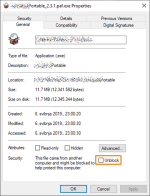
Do all those (malware) files have "Unblock" unchecked (picture)?

View attachment 213324
You can test any EXE file after ticking "Unblock". If you run it normally, then SmartScreen will not be triggered. If you use "Run As SmartScreen or "Run By SmartScreen" the SmartScreen will be triggered, anyway. That is why I call this "Forced SmartScreen".(y)
 
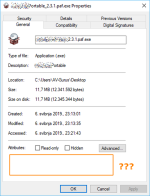
I try to run (normal) i got block by admin but after that when i check Properties that options is not there any more.

View attachment 213325
Using Unblock bypasses SmartScreen but not SRP. The "Run As SmartScreen" feature bypasses SRP, but obligatory forces SmartScreen.:giggle:
Whatever you will do, you are protected.(y)
 
Do all those (malware) files have "Unblock" unchecked (picture)?

View attachment 213324

Even if the question has already been answered: I recorded a short video where I show uncut downloading samples and their properties (a few things I had to censor).


tl;dr:
the samples don't have a mark of the web because I use 7-zip