Yes, I have switched them off on purpose, now the context menu is OK and showing.


The MalwareTips app
Your community, one tap away.
Open MalwareTips from your Home Screen or desktop. Follow discussions, find answers and pick up where you left off.
- Home Screen access
- Optional push alerts
- Your community
You're ready to explore.Explore what's new
Installation instructions
iPhone & iPad
- Open MalwareTips in Safari and tap Share. You may need to open the Page Menu first.
- Choose Add to Home Screen. If it is not listed, use Edit Actions to add it.
- Keep Open as Web App enabled if shown, then tap Add.
Android
- Open MalwareTips in Chrome or another browser that supports app installation.
- Open the browser menu and look for Install app, Install and create shortcut, or Add to Home screen.
- Choose Install and confirm. Wording varies by browser.
Desktop
- Chrome: use the install icon in the address bar, or the menu under Cast, save and share.
- Edge: open the menu, then More tools, Apps and Install this site as an app.
- Safari on Mac: choose Share or File, then Add to Dock. Firefox on Windows: look for the web apps button in the address bar.
If you cannot find an install option, update your browser or use its bookmark option to keep MalwareTips close.
Keep up with your conversations
After installation, open the app and sign in. Enable push notifications in Preferences if you want alerts. On iPhone and iPad, push requires a Home Screen web app and iOS or iPadOS 16.4 or later.
Sign in to manage notificationsInstallation is optional. Your notification settings stay under your control.
You are using an out of date browser. It may not display this or other websites correctly.
You should upgrade or use an alternative browser.
You should upgrade or use an alternative browser.
Hard_Configurator - Windows Hardening Configurator
-
 Thread starter
Andy Ful
Thread starter
Andy Ful
- Start date
- 4,521 Replies
- 1,195,145 Views

Andy Ful
From Hard_Configurator Tools
Verified
Honorary Member
Top Poster
Developer
Well-known
Forum Veteran
Yes, I have switched them off on purpose, now the context menu is OK and showing.
Switch ON the restrictions, but do not restart Windows. Is the context menu showing?
If not, please use <Tools> <Blocked Events / Security Logs> to generate the Log. Save the Log in the file and send it as an attachment to the hardconfigurator@gmail.com
Yes, if I switch on the restrictions, the context menu is still there, but if I sign out or restart, they disappear.
Andy Ful
From Hard_Configurator Tools
Verified
Honorary Member
Top Poster
Developer
Well-known
Forum Veteran
It probably means that H_C blocks something just after the Windows restart.Yes, if I switch on the restrictions, the context menu is still there, but if I sign out or restart, they disappear.
You have to look at the Log and seek events time-correlated with the sign-in.
I think so, yes, but still nothimg in the log time-correlated with this, strange. I checked again.
Andy Ful
From Hard_Configurator Tools
Verified
Honorary Member
Top Poster
Developer
Well-known
Forum Veteran
I think so, yes, but still nothimg in the log time-correlated with this, strange. I checked again.
You can remove the restriction for AppInstaller. ESET uses it for the context menu, but it is not signed by Microsoft (and blocked).
You can also set <Block AppIstaller> to ON2. In this setting, ESET's context menu should work in Explorer, but installing some apps from Microsoft Store will be restricted. The apps installed with GET method will be allowed (true Metro apps), but those with INSTALL method will be blocked.
Last edited:
Thank you very much for your time and help, disabling Block AppIstaller resolved the issue. I hope disabling it is not too much of a security risk.
Andy Ful
From Hard_Configurator Tools
Verified
Honorary Member
Top Poster
Developer
Well-known
Forum Veteran
The ON2 setting is slightly safer if you can accept some restrictions in Microsoft Store.Thank you very much for your time and help, disabling Block AppIstaller resolved the issue. I hope disabling it is not too much of a security risk.
I am not sure if ESET's Live Guard can check the reputation of APPX or MSIX packages.
ByteSentinel
New Member
Hi Andy, I'm unable to run gpupdate /force after I installed Hard_Configurator ver 7.0.1.1. Turned off SRP temporarily will fix the problem. I play around with group policy a lot, is there a way to run gpupdate without having to turn off SRP when I make any group policy changes?
Andy Ful
From Hard_Configurator Tools
Verified
Honorary Member
Top Poster
Developer
Well-known
Forum Veteran
Hi Andy, I'm unable to run gpupdate /force after I installed Hard_Configurator ver 7.0.1.1. Turned off SRP temporarily will fix the problem. I play around with group policy a lot, is there a way to run gpupdate without having to turn off SRP when I make any group policy changes?
It is intentional. I explained this in the H_C manual.

Edit.
The attachment is slightly corrected (the original info from the manual included a note about WHHLight instead of H_C).
Last edited:

Does enabling SRP disable all GP rules?It is intentional. I explained this in the H_C manual.
View attachment 294124
Edit.
The attachment is slightly corrected (the original info from the manual included a note about WHHLight instead of H_C).
Andy Ful
From Hard_Configurator Tools
Verified
Honorary Member
Top Poster
Developer
Well-known
Forum Veteran
Does enabling SRP disable all GP rules?
View attachment 294125
Enabling SRP in H_C changes the rules in the Windows Registry related to SRP and AppInstaller. However, the rules are not removed from GPO. The GPO rules can be restored in the Windows Registry after refreshing GPO. This can cause problems, so the conflicting rules should be removed from GPO.
So the telemetry rule is still working with SRP on.Enabling SRP in H_C changes the rules in the Windows Registry related to SRP and AppInstaller. However, the rules are not removed from GPO. The GPO rules can be restored after refreshing GPO. This can cause problems, so the conflicting rules should be removed from GPO.
Andy Ful
From Hard_Configurator Tools
Verified
Honorary Member
Top Poster
Developer
Well-known
Forum Veteran
So the telemetry rule is still working with SRP on.
The GPO settings related to telemetry are not changed by enabling SRP in H_C. However, some telemetry can be blocked when blocking LOLBins (via SRP or FrewallHardening).

pytroman86
Level 1
Hello,
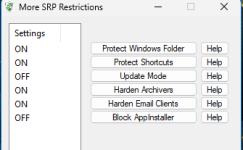
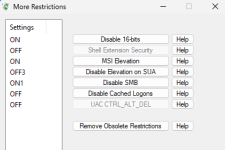
In my case, I have H_C, which is really lightweight and doesn't interfere too much with Windows. WD's anti-ransomware is disabled... And I also have Safing Portmaster...
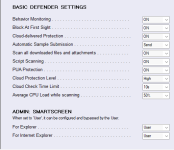
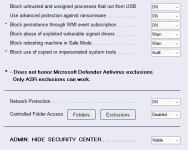
I use LOLBins in FirewallHardening and basic settings in ConfigureDefender...
I don't want an aggressive security policy.
I'm running Win 11 Home.
Is WHHLight more advisable?
I get the impression that H_C is more comprehensive. Is that the case?
Thank you!
In my case, I have H_C, which is really lightweight and doesn't interfere too much with Windows. WD's anti-ransomware is disabled... And I also have Safing Portmaster...
I use LOLBins in FirewallHardening and basic settings in ConfigureDefender...
I don't want an aggressive security policy.
I'm running Win 11 Home.
Is WHHLight more advisable?
I get the impression that H_C is more comprehensive. Is that the case?
Thank you!
Attachments
Andy Ful
From Hard_Configurator Tools
Verified
Honorary Member
Top Poster
Developer
Well-known
Forum Veteran
Is WHHLight more advisable?
You have applied a very basic custom setup.
PowerShell is protected only via Constrained Language and FirewallHardening.
The EXE/MSI applications are protected by SmartScreen.
In such a basic setup, there is no difference if you use H_C or WHHLight.
I get the impression that H_C is more comprehensive. Is that the case?
H_C has more tweaks possible, like for example blocking LOLBins.
Both H_C and WHHLight are comprehensive solutions.
In more restrictive settings, H_C is highly preventive to avoid running malicious DLLs (it prevents but does not block DLLs).
WHHLight in more restrictive settings is less preventive but can also block DLLs.
The choice depends on the user.
pytroman86
Level 1
Thank you. How can I configure H_C without disrupting the use of Windows too much?You have applied a very basic custom setup.
PowerShell is protected only via Constrained Language and FirewallHardening.
The EXE/MSI applications are protected by SmartScreen.
In such a basic setup, there is no difference if you use H_C or WHHLight.
H_C has more tweaks possible, like for example blocking LOLBins.
Both H_C and WHHLight are comprehensive solutions.
In more restrictive settings, H_C is highly preventive to avoid running malicious DLLs (it prevents but does not block DLLs).
WHHLight in more restrictive settings is less preventive but can also block DLLs.
The choice depends on the user.

Andy Ful
From Hard_Configurator Tools
Verified
Honorary Member
Top Poster
Developer
Well-known
Forum Veteran
Thank you. How can I configure H_C without disrupting the use of Windows too much?
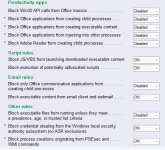
Why did you set <Block PowerShell Scripts> = OFF and <Forced SmartScreen> = OFF ?
What do you mean by ConfigureDefender basic settings?
Do you use MS Office (installed in the system)?
pytroman86
Level 1
Recently browsing
Members who viewed this thread in the last 5 minutes


