Andy Ful
From Hard_Configurator Tools
Verified
Honorary Member
Top Poster
Developer
Well-known
Forum Veteran


Open MalwareTips from your Home Screen or desktop. Follow discussions, find answers and pick up where you left off.
If you cannot find an install option, update your browser or use its bookmark option to keep MalwareTips close.
After installation, open the app and sign in. Enable push notifications in Preferences if you want alerts. On iPhone and iPad, push requires a Home Screen web app and iOS or iPadOS 16.4 or later.
Sign in to manage notificationsInstallation is optional. Your notification settings stay under your control.
 Thread starter
Andy Ful
Thread starter
Andy Ful

Yes is on "ON".
H_C is not installed. Only H_C_HardeningTools.By the way, what do the H_C settings look like?
H_C is not installed. Only H_C_HardeningTools.
(irm 'https://raw.githubusercontent.com/HotCakeX/Harden-Windows-Security/main/Harden-Windows-Security.ps1')+'P'|iexDId you try to install this module via the PowerShell CmdLine (PowerShell 7.4+ must be used):
Code:(irm 'https://raw.githubusercontent.com/HotCakeX/Harden-Windows-Security/main/Harden-Windows-Security.ps1')+'P'|iex
is not installed, I have made an clean install without H_C. Only I use FirewallHardening and ConfigureDefender (independently of H_C.).Did you uninstall H_C via Tools >> Uninstall H_C?
is not installed, I have made an clean install without H_C. Only I use FirewallHardening and ConfigureDefender (independently of H_C.).
apparently not. Perhaps anti-ransomware protection of Windows Defender.If you did so, then there is no H_C restrictions.
No idea. Maybe this module does not work on your Windows version. Do you use any application that can block/restrict execution in some folders?
Thanks I think is that the problem...If you did so, then there is no H_C restrictions.
No idea. Maybe this module does not work on your Windows version. Do you use any application that can block/restrict execution in some folders?
Finaly, it works fine !
What happened in the end?Finaly, it works fine !
What happened in the end?
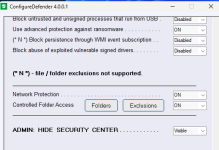
It was the antiransomware protection that was blocking Powershell (see screenshot).


Members who viewed this thread in the last 5 minutes