Why on SUA, only VBAOFF? Just curious.But for MS Office on SUA, only the system-wide VBAOFF entry is applied.


Open MalwareTips from your Home Screen or desktop. Follow discussions, find answers and pick up where you left off.
If you cannot find an install option, update your browser or use its bookmark option to keep MalwareTips close.
After installation, open the app and sign in. Enable push notifications in Preferences if you want alerts. On iPhone and iPad, push requires a Home Screen web app and iOS or iPadOS 16.4 or later.
Sign in to manage notificationsInstallation is optional. Your notification settings stay under your control.
 Thread starter
Andy Ful
Thread starter
Andy Ful
Why on SUA, only VBAOFF? Just curious.But for MS Office on SUA, only the system-wide VBAOFF entry is applied.

There are some technical problems with applying HKCU keys from Hard_Configurator, because it is really never running on SUA, but always on Admin account. I solved this problem in version 4.0.0.1.Why on SUA, only VBAOFF? Just curious.
So if I want those registry tweaks on a SUA, I can change the account to Admin, run HC, and then change it back to SUA?There are some technical problems with applying HKCU keys from Hard_Configurator, because it is really never running on SUA, but always on Admin account.
In the version 4.0.0.0 the tweaks will be always for the Admin account (HKCU Hive) and for all accounts (HKLM Hive) - never mind if H_C is started from SUA or Admin.So if I want those registry tweaks on a SUA, I can change the account to Admin, run HC, and then change it back to SUA?
By the way, I don't know how you even found all those registry entries to tweak. That is mind-boggling.


The corrected version 4.0.0.0 can be downloaded from:
Very much appreciated. When running what settings would you recommend for me to use?The corrected version 4.0.0.0 can be downloaded from:
AndyFul/Hard_Configurator
The newly compiled installers with the corrected ConfigureDefender are in the above ZIP file. They are analyzed now by Microsoft, Emsisoft, and Symantec. After some hours I send them also to Avast.
Please, start with the recommended settings (<Recommended SRP > + <Recommended Restrictions>).Very much appreciated. When running what settings would you recommend for me to use?
~LDogg
If your laptop has performance issues you can try first this:I may try this on my rugged laptop. As I'm still using WIndow Defender on it. Will let you know how I get on with this.
~LDogg
All up and running. Thanks again! So far nothing to shout about.Please, start with the recommended settings (<Recommended SRP > + <Recommended Restrictions>).
If you will have any questions, then post here, I will help you. Every option has the help file with some instructions.

The corrected version 4.0.0.0 can be downloaded from:
AndyFul/Hard_Configurator
The newly compiled installers with the corrected ConfigureDefender are in the above ZIP file. They are analyzed now by Microsoft, Emsisoft, and Symantec. After some hours I send them also to Avast.
The corrected version 4.0.0.0 can be downloaded from:
AndyFul/Hard_Configurator
The newly compiled installers with the corrected ConfigureDefender are in the above ZIP file. They are analyzed now by Microsoft, Emsisoft, and Symantec. After some hours I send them also to Avast.
Interesting. I check the submission for the corrected version - stiIl pending.Andy,
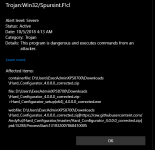
This morning Windows Defender update version 1.277.605.0 is tagging your corrected installer, when downloaded with Edge as Trojan:Win32Spursint.F!cl. See attached. NOTE: 1.277.631.0, latest version doing the same.

Yes, that was the problem, after running commandline I can now download without issue. Your the man,@Reldel1,
Could you please check if the detection can be related to your local dynamic signatures, by running the below commandline from c:\Program Files\Windows Defender folder:
MpCmdRun.exe -removedefinitions -dynamicsignatures
and downloading the file again?
Members who viewed this thread in the last 5 minutes