Hard_Configurator - Windows Hardening Configurator

... When I created SUA approx. a year ago I neglected to move those to SUA and it made H_C more complicated than need be. I solved this not long ago simply by moving everything to SUA. Voila! Problem solved.

I am now using Windows10_Recommended_Enhanced Profile as well.
The other solution is creating the new Admin account (at least one Admin account is required) and change the type of the old Admin account to SUA. That can be often a more precise and quick way.
 
The other solution is creating the new Admin account (at least one Admin account is required) and change the type of the old Admin account to SUA. That can be often a more precise and quick way.
Let me get this straight. Apart from the administrator account I have.
I have to create another administrator account and then change it to SUA?:giggle:
 
Let me get this straight. Apart from the administrator account I have.
I have to create another administrator account and then change it to SUA?:giggle:
No. It is better to convert the old one. Furthermore, you cannot convert both.:giggle:
 
Best practice "a la Umbra" :

1- local admin account (for the "admin" of the house) for maintenance tasks.
2- SUA (with MS account or not) for all the house members including the admin; made for daily usage.
3- Guest account for friends passing by.
 
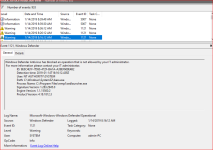
@Andy Ful - Can you explain this for me please? Is this going to interfere with Windows updates?

I get the feeling sometimes that while EV shows various WD blocks, the operations actually proceed. :unsure:
 

Attachments

  • Event view.PNG
    Event view.PNG
    36.5 KB · Views: 509
@Andy Ful - Can you explain this for me please? Is this going to interfere with Windows updates?

I get the feeling sometimes that while EV shows various WD blocks, the operations actually proceed. :unsure:
You activated the ASR rule "Block credential stealing from the Windows local security authority subsystem (lsass.exe)" (it is not enabled in Defender High settings). This rule does not block the process, but only forbid the access to lsass.exe. From your post I can see that such access is forbidden for Windows Setup Remediations Service in Windows 10:
https://support.microsoft.com/en-us...ions-1507-1511-1607-1703-1709-and-1803-for-up
What are Sedsvc.exe, Sedlauncher.exe Files and REMPL Folder in Windows 10? - AskVG
This is the legal M$ soft, which includes reliability improvements to Windows Update Service components in Windows 10, for versions up to 1803 (it is absent on ver. 1809).
If you have any problem with Windows Updates, then disable that ASR rule.
 
Generally, disabling that rule is not recommended. It can be especially important in organizations and businesses, where the malware can attack the user from the local network with administrative rights. Next it can attack lsass.exe to steal credentials, admin passwords, etc.
With H_C settings, the malware originated by the user actions can hardly elevate, because it will be first blocked by H_C settings (default-deny). So, in this special configuration in the home environment, disabling that ASR rule can be more beneficial than the danger of broken updates.
 
You activated the ASR rule "Block credential stealing from the Windows local security authority subsystem (lsass.exe)" (it is not enabled in Defender High settings). This rule does not block the process, but only forbid the access to lsass.exe. From your post I can see that such access is forbidden for Windows Setup Remediations Service in Windows 10:
https://support.microsoft.com/en-us...ions-1507-1511-1607-1703-1709-and-1803-for-up
What are Sedsvc.exe, Sedlauncher.exe Files and REMPL Folder in Windows 10? - AskVG
This is the legal M$ soft, which includes reliability improvements to Windows Update Service components in Windows 10, for versions up to 1803 (it is absent on ver. 1809).
If you have any problem with Windows Updates, then disable that ASR rule.

This helps to expand my understanding. I am still on 1803 and have not been offered the latest feature update. If it is offered and I encounter problems then I will disable. Thanks!

@Umbra - I keep it enabled until I can verify it is blocking a feature update.
 
You activated the ASR rule "Block credential stealing from the Windows local security authority subsystem (lsass.exe)" (it is not enabled in Defender High settings). This rule does not block the process, but only forbid the access to lsass.exe. From your post I can see that such access is forbidden for Windows Setup Remediations Service in Windows 10:
https://support.microsoft.com/en-us...ions-1507-1511-1607-1703-1709-and-1803-for-up
What are Sedsvc.exe, Sedlauncher.exe Files and REMPL Folder in Windows 10? - AskVG
This is the legal M$ soft, which includes reliability improvements to Windows Update Service components in Windows 10, for versions up to 1803 (it is absent on ver. 1809).
If you have any problem with Windows Updates, then disable that ASR rule.
I found the lsass rule to be the most problematic of all the ASR rules. It conflicted with some of my software.
 
That depends on the CF settings. You can set CF in such a way, that you do not need H_C. But, such CF setup can also break your system or updates.

Those two in combo seems like it would be asking for problems.
 
Those two in combo seems like it would be asking for problems.
H_C is probably compatible with CF in any settings, but CF can be configured in a similar way as H_C. The H_C default-deny settings are simply more compatible with Windows and Windows Updates.