Troubleshooting Haven't been able to run IObit Uninstaller since installing Avast Internet Security

conceptualclarity

Level 21
Verified
Honorary Member
Top Poster
Content Creator
Well-known
Forum Veteran
Describe the problem
IObit Uninstaller processes when opened die before launching
What have you tried?
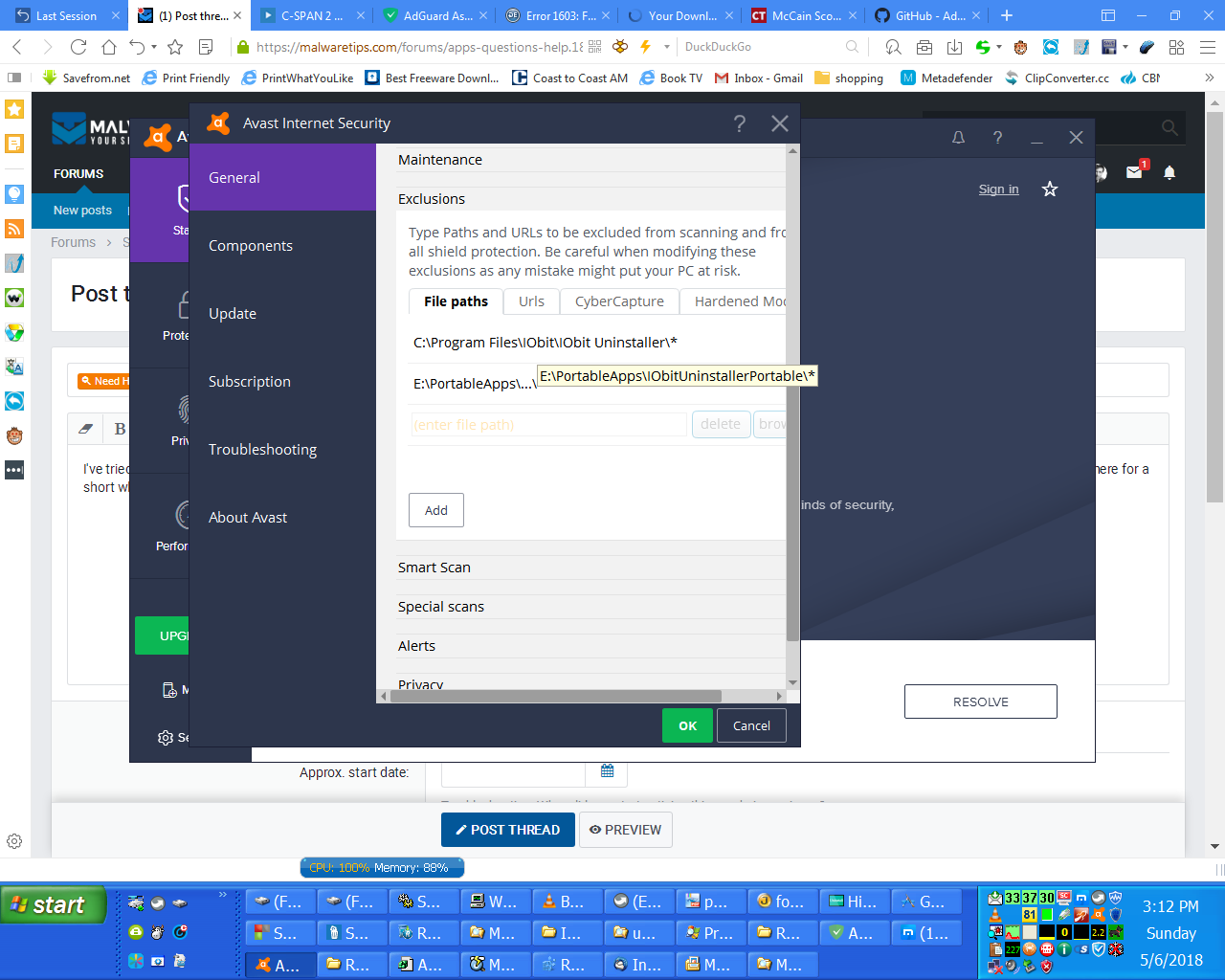
I tried excluding IObit Uninstaller in the Avast GUI.
I've tried every shortcut and every relevant executable in Windows Explorer that I can find. When I click on them and then watch in Process Explorer, the process will linger there for a short while before terminating.

After these problems were evident I made a new installation of IOIbit Unistaller in PortableApps.com, but I got the same result.

I've tried exclusion in the Avast settings as you can see here.

xoxMtP.png
 
a6Ws1p.jpg


If the icon highlighted in the red border belongs to the product I think it belongs to then I am seriously concerned... Is it the old Xvirus standalone web filter? If so, it hasn't been updated for years AFAIK.

Moving back to the original topic, can you try running IObit Uninstaller and suspending it in Process Hacker as fast as possible (hopefully fast enough to do it before it terminates itself which I imagine is the issue here).

Afterwards, if you can do it, check the modules and let me know if an Avast one is present in the list.
 
Upvote 0
Moving back to the original topic, can you try running IObit Uninstaller and suspending it in Process Hacker as fast as possible (hopefully fast enough to do it before it terminates itself which I imagine is the issue here).

Afterwards, if you can do it, check the modules and let me know if an Avast one is present in the list.

ngKIza.png


I don't detect anything from Avast.

When I resumed Uninstaller_SkipUAC.exe it hung around about 18 seconds before disappearing.

If the icon highlighted in the red border belongs to the product I think it belongs to then I am seriously concerned... Is it the old Xvirus standalone web filter? If so, it hasn't been updated for years AFAIK.

Yea, that's it. I'll take it off autostart.
 
Upvote 0
I don't detect anything from Avast.
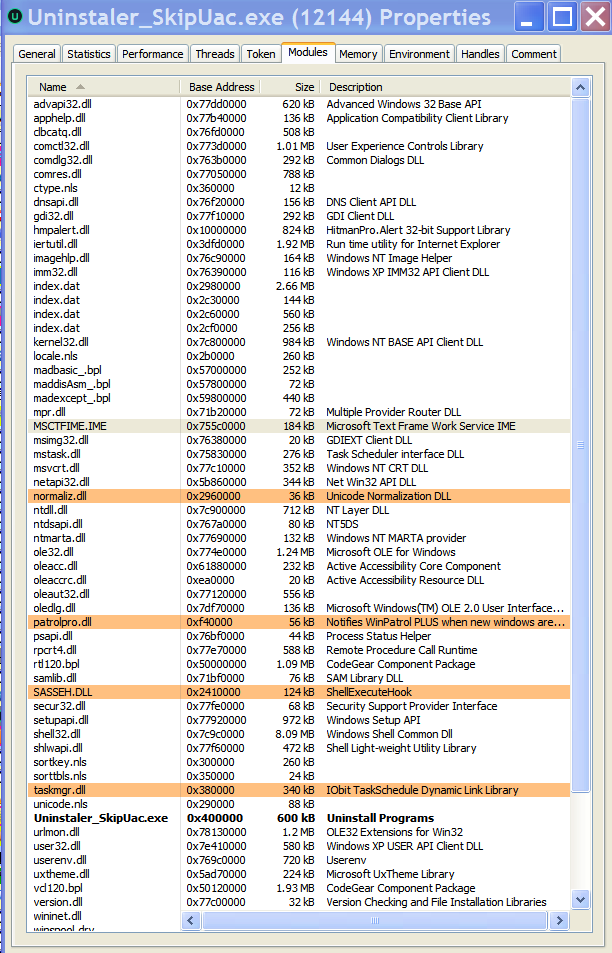
patrolpro.dll, SASSEH.dll. Third-party DLLs which are being injected into that IObit process you showed me the modules list of.

Uninstall WinPatrol and I assume SASSEH.dll is from Super Anti-Spyware? Uninstall that as well.

Afterwards, Uninstall IObit Uninstaller.

Then install IObit Uninstaller again.

There's a HitmanPro.Alert module also injected into that IObit process. You can try disabling HitmanPro.Alert and excluding IObit in it prior to trying the above. Make sure when you do exclusions to apply it for all the IObit binaries say on case.

Then try and open it and see if it works and let me know.

Side comment: How many damn security solutions do you have on that machine? ...
 
Upvote 0
patrolpro.dll, SASSEH.dll. Third-party DLLs which are being injected into that IObit process you showed me the modules list of.

Uninstall WinPatrol and I assume SASSEH.dll is from Super Anti-Spyware? Uninstall that as well.

Afterwards, Uninstall IObit Uninstaller.

Then install IObit Uninstaller again.

There's a HitmanPro.Alert module also injected into that IObit process. You can try disabling HitmanPro.Alert and excluding IObit in it prior to trying the above. Make sure when you do exclusions to apply it for all the IObit binaries say on case.

Then try and open it and see if it works and let me know.
.

WinPatrol is a good program. Last year it caught some bad stuff that other programs didn't catch. But I'll close it out for these purposes.

I really don't know why an HPA module is showing up. I noticed that and was very surprised. A good while ago I took it off autostart because it didn't play well with SpyShelter.
 
Upvote 0
It might very well be a bug on avast's side. I had some issues using avast as well since they included the the IDP/BB from AVG, it causes an error and blocks every single program from running including avast itself. But usually it's accompanied by an error message which you don't seem to be getting.

In any case you can just try disabling all Avast's shields and running iOrbit uninstaller to see if it works then slowly enable avast's shields one by one to see which one is blocking it from running
 
Upvote 0
It might very well be a bug on avast's side. I had some issues using avast as well since they included the the IDP/BB from AVG, it causes an error and blocks every single program from running including avast itself. But usually it's accompanied by an error message which you don't seem to be getting.

In any case you can just try disabling all Avast's shields and running iOrbit uninstaller to see if it works then slowly enable avast's shields one by one to see which one is blocking it from running

I turned off WinPatrol. I disabled all the Avast shields but the Mail Shield. After that I disabled SpyShelter. Found to my surprise that a service of SUPERAntispyware was automatic; ended that.

I get the same results. Strange. I have used IObit Uninstaller plenty. The only thing different now is Avast.
 
Last edited:
Upvote 0
You probably don't want to answer but I agree with others on using XP in 2018? Why? Is there some software you need and doesn't work in later Windows versions?
 
Upvote 0
I intend to delete my portable IObit Uninstaller and reinstall my IObit Uninstaller Pro giveaway, and then if necessary, uninstall and reinstall the latter.

There's a HitmanPro.Alert module also injected into that IObit process. You can try disabling HitmanPro.Alert and excluding IObit in it prior to trying the above.

I still get hmpalert.dll on Process Hacker even after disabling thje service, so I believe the problem is the system32 folder drivers, hmpalert.sys and/or hmpnet.sys. My past experience suggests that just unchecking the Autoruns box won't work, that I would have to edit it out of the registry.

Make sure when you do exclusions to apply it for all the IObit binaries say on case.

I don't understand "say on case".

I am in the business of uninstalling programs; that's why I went to the trouble of posting a thread about getting my IObit Uninstaller working again.

i'm going to uninstall Zemana Anti-Malware next or very shortly. I see on a FileMonitor log that the driver ZAM_Guard is shockingly active. I hate to get rid of a renowned program like this, but the last few times I tried to run it, it blue-screened me.

I'm not a lover of Windows XP and I intend to switch to a computer that allows me to elevate as soon as is feasible; unforunately I've had a lot else on my plate. For one thimng, I've got my lifelong very best friend fighting cancer and I'm trying to help him..
 
Upvote 0
I intend to delete my portable IObit Uninstaller and reinstall my IObit Uninstaller Pro giveaway, and then if necessary, uninstall and reinstall the latter.
e7109327e8a8f6e35137b4587d4c2a825ea8e754447a5f8ae648f189fe879f37.jpg


Now seriously, dump XP if your hardware allows you because sooner or later the one after another program will stop working and it is very hard to find the real reason why it happened.
 
Upvote 0
The cancer thing must be hard to cope with, I have had family/friends to catch it before. However, hope for the best and I hope whoever it is in your life with it will survive, they are strong!

About IObit Uninstaller... Uninstall all security solutions on the machine immediately. All of them. Literally, uninstall. Don't go around messing with startup, services, etc... because you don't know what you're doing with it.

When they are all uninstalled, try IObit again and then setup a proper security configuration which will be reliable and won't conflict nor cause problems.
 
Upvote 0

Recently browsing

Members who viewed this thread in the last 5 minutes

Back
Top