Hawk Eye Analysis Tool (Formerly Orion Malware Cleaner)- by Trident [Deleted]

Status
Not open for further replies.

Trident

From Hawk Eye
Thread author
Verified
Top Poster
Developer
Well-known
Feb 7, 2023
4,324
28,001
5,289
hea-p.com
Trident submitted a new resource:

Orion Malware Cleaner - by Trident - Removes Active and Persistent Malware, and Restores Health

Orion Malware Cleaner uses signatureless technology and aggressive heuristics to eradicate active malware. It comes a script for maximum performance, and the recommended PowerShell version is 7.5.3 which is the latest stable at the moment. This version supports high-performance parallel scanning. The script is not packed as an executable as this will require digital signature and will create more than 20 times larger file.

To use Orion, save the script somewhere.

Use the cd... to change...

Read more about this resource...
 
Trident updated Orion Malware Cleaner - by Trident with a new update entry:

New Update: 1.8.1

Orion 1.81 has been released with the following changes:

Major improvements to the UI.

The report is now much more beautiful. Just because we are working with a script, doesn't mean we can't enjoy a pristine UI.

View attachment 291094

View attachment 291095

In addition, select everything you wish to remove on this report and press this button.

[ATTACH type="full" width="255px"...

Read the rest of this update entry...
 
Trident updated Orion Malware Cleaner - by Trident with a new update entry:

New and Improved!

The new update brings several improvements:

Bug fixes, added remediation file validation, hardened heuristics

New, cleaner menu

View attachment 291123

Improved diagnostic report visual presentation
View attachment 291124

Improved details page for easy copying
View attachment 291125

Added heuristic and detections explanations/recommendations
[ATTACH...

Read the rest of this update entry...
 
Trident updated Orion Malware Cleaner - by Trident with a new update entry:

OMC 1.15.1 Ready!

Hello,

I am excited to announce the Orion 1.15 update.

In this update, the report visuals are once again enhanced, the remediation button is moved for better visibility and full paths for detections are now displayed.

View attachment 291183

New static analysis engine starts paving its way. The engine works on executables, scripts, pdf files. modules and shortcuts. Because this is an aggressive malware cleaning tool and not a real-time antivirus...

Read the rest of this update entry...
 
First off, very nice work and effort with this PS Scanner. :)

I do want to bring to attention something that might be helpful, or might not. The Mismatched Extension: Declared .gif, Actual .exe/.dll on my Windows 11 Home under downloads populated a ton of INACCURACIES as HIGH. And here is the why i think. I purposely have ALL my image file associations in Win 11 NOT MS DEFAULT PHOTO VIEW but instead use Irfanview. So it's my guess that ORION Script Heuristics currently is strictly hard wired to Windows own default program association in this discovery. By design i am sure. However you can be assured this is no problem with the script. Clicking on the tagged GIF's/PNG'S on my system in (DOWNLOADS FOLDER) activates the Irfanview EXE for display locally, which this ORION Script RIGHTLY DETERMINES as SUSP separated from Win 11 default image view to display those associated images.

Looking forward to further additions/improvements. No real bugs to pass along for assistance yet. Good Job!


Other improvements:
Added new heuristics and hardened some of the existing ones.

Known issues: modal texts need label mapping, will be fixed in next version.
 
First off, very nice work and effort with this PS Scanner. :)

I do want to bring to attention something that might be helpful, or might not. The Mismatched Extension: Declared .gif, Actual .exe/.dll on my Windows 11 Home under downloads populated a ton of INACCURACIES as HIGH. And here is the why i think. I purposely have ALL my image file associations in Win 11 NOT MS DEFAULT PHOTO VIEW but instead use Irfanview. So it's my guess that ORION Script Heuristics currently is strictly hard wired to Windows own default program association in this discovery. By design i am sure, However you can be assured this is no problem with the script. Clicking on the tagged GIF's/PNG'S on my system in (DOWNLOADS FOLDER) activates the Irfanview EXE for display locally, which this ORION Script RIGHTLY DETERMINES as SUSP separated from Win 11 default image view to display those associated images.

Looking forward to further additions/improvements. No real bugs to pass along for assistance yet. Good Job!
Thanks for your feedback.
Very happy to hear from you.

With static analysis, that heuristic is going away. In version 1.18 (which will be released soon), it was removed.

Did you use the latest version?
 
Last edited:
Thanks for your feedback.
Very happy to hear from you.

With static analysis, that heuristic is going away. In version 1.18 (which will be released soon), it was removed.

Did you use the latest version?
Yes. 146Kb. Of note after Remediation File (JSON) found a blank file on desktop named 0. I have no idea. Zip PW of susp also returns Wrong Password every time for me. I hope others are trying this out to confirm or deny. I will redo again anew and see what pans out to be sure same or diff results.
 
Yes. 146Kb. Of note after Remediation File (JSON) found a blank file on desktop named 0. I have no idea. Zip PW of susp also returns Wrong Password every time for me. I hope others are trying this out to confirm or deny.
I changed the password to “infected”, it is more standard. There is a user manual coming as well, it will be built in with the script. I will edit the thread soon with that and the user manual. I’ll investigate the blank file. It will all be fixed tomorrow probably. The network monitor will also appear.
 
I changed the password to “infected”, it is more standard. There is a user manual coming as well, it will be built in with the script. I will edit the thread soon with that and the user manual. I’ll investigate the blank file. It will all be fixed tomorrow probably. The network monitor will also appear.
Thanks @Trident that explains it. You been busy!

On the very first introduction with or.ps1, the script brought my attention to a couple of orphaned reg entries where i had been testing a Fileless Malicious script. Glad that it alerted on it.

2nd run today COMPLETED. Same bunches of image files. Obviously it hits on the different non default MS images produced by Irfanview. Hee Hee no biggie.

Perfecto! Below you see a small portion of my desktop and the 0 named blank file after doing the Remediation.

Orion:SuspFile!MismatchExtC:\Users\magic\Downloads\windows-update-feature-image.jpgMismatched Extension: Declared .jpg, Actual .exe/.dll

sshot-2025-09-22-19-04-31.jpg
 
Last edited:
Thanks @Trident that explains it. You been busy!

On the very first introduction with or.ps1, the script brought my attention to a couple of orphaned reg entries where i had been testing a Fileless Malicious script. Glad that it alerted on it.
The password is printed in the log, but it’s a good idea to add it to the report as well.

I already had experience with the heuristics, as well as with Microsoft VBA in word/excel generating HTML reports with user.

This project just combined everything together.

The fileless scan was executed the way I like it and the way most AVs won’t do it… you know when you don’t like something you just gotta do it yourself at the end.

Btw this script is just a sidekick to Analyse-it! which is the bigger project. The main engine there is also called Orion.

IMG_2755.jpeg
 
The 0 file was the correlational scan which looks for shortcuts on the desktop. When there is no shortcut, it was still instructing 7zip to quarantine a shortcut and 7zip saves null on the desktop (which is its way to communicate errors). The issue is now fixed by wrapping everything in the proper try-catch block.
 
The fileless scan was executed the way I like it and the way most AVs won’t do it… you know when you don’t like something you just gotta do it yourself at the end.

Btw this script is just a sidekick to Analyse-it! which is the bigger project. The main engine there is also called Orion.
Total 'erfecto and positive implications there. Marvelous.

I just (only today) looked over the awesome main Analyse-It! A very thoughtful project!
 
Trident updated Orion Malware Cleaner - by Trident with a new update entry:

Network Monitor Integrated

Hello,

Version 1.17 is now quality tested and ready.

The network monitor is now out (requires PowerShell 7.5.3).

Network monitor starts at the beginning of the scan with 3 threads - one is the collector, second one is the resolver and third one performs the whois lookup. When the scan is finished, the network sampling ends too.

For these informational detections to be previewed, this must be ticked
View attachment 291212

[ATTACH type="full"...

Read the rest of this update entry...
 
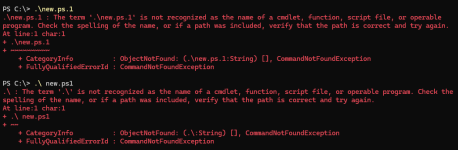
But did you save the script in C:\?

You need to use cd and then type the directory where the script is.

Your chosen directory there is C:\ so it is looking for the script there.

Also, if you haven’t already, it is recommended to get PowerShell 7.5.3
 
Last edited:
If onedrive syncing is enabled your desktop path is C:\Users\YourName\OneDrive\Desktop

PowerShell starts with C:\Users\YourName (usually)
You need to type cd onedrive\desktop

Otherwise if no OneDrive syncing was enabled at installation of Windows, it is just cd desktop.

Then type . \new.ps1

Because it is downloaded script, PowerShell may throw an error. You need to right click on the script, then view the properties and unblock the script. This is the recommended way, I don’t advise users to loosen their script execution policies.
 
Last edited:
Status
Not open for further replies.