Hawk Eye Analysis Tool (Formerly Orion Malware Cleaner)- by Trident [Deleted]

Status
Not open for further replies.
Because it is downloaded script, PowerShell may throw an error. You need to right click on the script, then view the properties and unblock the script. This is the recommended way, I don’t advise users to loosen their script execution policies.
Okay...I'll try to get er done
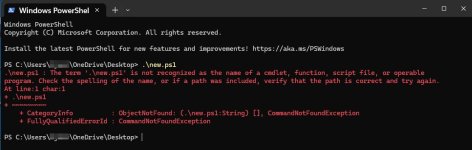
just found Open in Terminal
2501.jpg
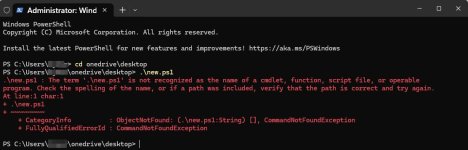
Administrator
2502.jpg
 
Last edited:
Or to save yourself a lot of time just use notepad and Select All then Paste into Powershell. It will run just fine here like that.
It will but with the rapid expansion of functions this monolithic structure will soon change and components like orConfig.json, orRemediate.ps1, orUI.html, orManual.html will appear... copy/pasting then won't work.
 
Restores Health?!!! How the hell do I install it into my brain?!!!

This morning I sneezed and I threw my back out.
Not sure about your brain, but I am obviously way ahead of this version in development and future versions include a CPR Box (Clean, Protect, Revive). This box contains quite a lot of tools to optimize and fix systems. Without installing heavy tuneups.
 
Not sure about your brain, but I am obviously way ahead of this version in development and future versions include a CPR Box (Clean, Protect, Revive). This box contains quite a lot of tools to optimize and fix systems. Without installing heavy tuneups.
You should patreon it for like $1/month
 
Version 1.17 is now quality tested and ready.

The network monitor is now out (requires PowerShell 7.5.3).

Network monitor starts at the beginning of the scan with 3 threads - one is the collector, second one is the resolver and third one performs the whois lookup. When the scan is finished, the network sampling ends too.

For these informational detections to be previewed, this must be ticked

Saw that. Nice touch.
 
The previous and INCORRECT flagging of Irfanview images abated. However "some" few .TXT detections persist. Example:


Orion:SuspFile!MismatchExtC:\Users\Technician\Downloads\ContextMenuManager\Readme.txtMismatched Extension: Declared .txt, Actual .exe/.dllDetected
Yeah, that heuristic is going away very soon. On the other hand, the script and executable hunting heuristics are very aggressive.
 
You done a great job with it @Trident
The next version 1.18 is the one where the script structure is refactored. It started as a single file but when I realised most of my ideas, this single file became hard to maintain and over 2500 long lines of code.

Apart from the refactor, it introduces the CPR box (Clean, Protect, Revive) and slightly improved report visuals. The 0 file bug proved more stubborn, but I’ve taken care of it another way.
 
AWESOME WORK! The UI animation adds such a clear WOW factor.

View attachment 291341
Now that the UI is more pristine than what it was, I am exploring the potential of integrating VT (with user-pasted key) and/or cloud-based engine (proprietary) that will enhance botnet detection, and potentially introduce YARA rules scanning. Potentially also verify digital signatures on the cloud (that one is likely to be first). This will add dynamic intelligence to the static heuristics but we'll see how it will play out.
 
Status
Not open for further replies.