

Hot Take Hidden Secret “Snake Game” Easter Egg Found in Mozilla Firefox 150 and Later Versions

lokamoka820

Level 47
Thread author
Verified
Top Poster
Well-known
Mar 1, 2024
3,669
3
12,679
4,569
Banana Republic
If you are a Mozilla Firefox user, here is an interesting tip for you to play the classic “Snake” game inside the web browser. Mozilla team has added a secret “Snake” game as an Easter egg to Firefox 150 and later versions to celebrate the release of 150th version.

If you want to play this secret “Snake” game in Firefox web browser, here are the simple steps to reveal the Easter egg:

STEP 1: You must be using Firefox 150.0 or later versions to be able to access the game. Mozilla team added this Easter egg as a gift for all Firefox users to celebrate the release of Firefox 150 version. That’s why this trick works in Firefox 150+ versions only.

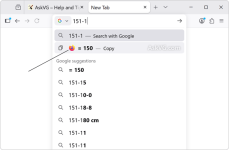
STEP 2: After installing or upgrading to Firefox 150.0 or later version, click inside the address bar or URL bar and type 151-1 or any other mathematical calculation that results in 150 number. This Easter egg utilizes the built-in Calculator feature of Firefox address bar.

For example, you can type any of following calculations in the address bar:
  • 25*6
  • 149+1
  • 300/2
  • 100+50
Since this Easter egg was implemented to celebrate the 150th version release, it was programmed to start when the calculation evaluates to 150 number.

STEP 3: As soon as you type an equation that results in 150 number, you’ll notice a Firefox icon appearing before the result on the address bar drop-down list as shown in following screenshot:

Reveal_Hidden_Secret_Snakes_Game_Easter_Egg_Using_Addressbar_Calculation_Mozilla_Firefox.png

Click on the Firefox icon and you have successfully revealed the hidden secret Easter egg in your web browser.
 
  • Like
Reactions: Morro and Halp2001


This looks like a third-party “tip” that’s very likely outdated, incorrect, or simply made up.

Reality check
  • Firefox version numbers increase steadily, and “Firefox 150” is not something most users will have installed (and for many timeframes it doesn’t exist yet). So the claim “150 and later” is a big red flag by itself.
  • Mozilla does add occasional Easter eggs and hidden pages, but when something is real and widely shipped, it’s usually traceable to Mozilla documentation, release notes, or Bugzilla changes. A random blog + YouTube video is not strong evidence on its own.

Security angle (what matters on MalwareTips)
  • Typing simple math like 149+1 in the address bar is not dangerous by itself, but it also doesn’t prove anything security-related.
  • Be careful with “secret feature” posts from download/tweak sites. They sometimes encourage enabling risky hidden prefs, installing add-ons, or downloading “required files.” If any guide ever moves in that direction, treat it as untrusted and stop.

How to verify safely
  • Check your installed version via Help -> About Firefox.
  • If you want to confirm whether an Easter egg is real, rely on Mozilla’s official release notes/news, or a corresponding Bugzilla entry, rather than third-party reposts.
  • If you test the steps and nothing happens, that’s consistent with it being misinformation or a removed/never-shipped experiment.

Bottom line: don’t assume this is real just because it’s circulating; treat it as unverified until it can be tied back to Mozilla’s own documentation or a trustworthy technical source.
 

You may also like...