


If you are a Mozilla Firefox user, here is an interesting tip for you to play the classic “Snake” game inside the web browser. Mozilla team has added a secret “Snake” game as an Easter egg to Firefox 150 and later versions to celebrate the release of 150th version.
If you want to play this secret “Snake” game in Firefox web browser, here are the simple steps to reveal the Easter egg:
STEP 1: You must be using Firefox 150.0 or later versions to be able to access the game. Mozilla team added this Easter egg as a gift for all Firefox users to celebrate the release of Firefox 150 version. That’s why this trick works in Firefox 150+ versions only.
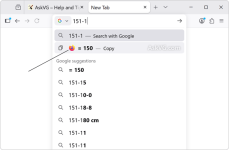
STEP 2: After installing or upgrading to Firefox 150.0 or later version, click inside the address bar or URL bar and type 151-1 or any other mathematical calculation that results in 150 number. This Easter egg utilizes the built-in Calculator feature of Firefox address bar.
For example, you can type any of following calculations in the address bar:
Since this Easter egg was implemented to celebrate the 150th version release, it was programmed to start when the calculation evaluates to 150 number.
- 25*6
- 149+1
- 300/2
- 100+50
STEP 3: As soon as you type an equation that results in 150 number, you’ll notice a Firefox icon appearing before the result on the address bar drop-down list as shown in following screenshot:
Click on the Firefox icon and you have successfully revealed the hidden secret Easter egg in your web browser.

Hidden Secret “Snake Game” Easter Egg Found in Mozilla Firefox 150 and Later Versions
If you are a Mozilla Firefox user, here is an interesting tip for you to play the classic “Snake” game inside the web browser. Mozilla team has adde


