How do I change Windows 10 1803 automatic update to manual update?

Status
Not open for further replies.

SumTingWong

Level 28
Thread author
Verified
Top Poster
Well-known
Apr 2, 2018
1,753
1
5,845
2,668
FLorida
How do I change Windows 10 1803 automatic update to manual update? I tried adding AUOptions Value 2 and NoAutoUpdate DWORD 32 keys in HKEY_LOCAL_MACHINE\SOFTWARE\Policies\Microsoft\Windows\WindowsUpdate, but Windows 10 still automatic check for update by itself. I disabled automatic update in Microsoft Store and Microsoft Office 365, but Windows still automatic check for update. Funny thing is I never get any notification at all even thought I added AUOptions Value 2 DWORD 32 into the registry.
 
  • Like
Reactions: oldschool
I use this, it stops auto-checking for updates, but manual check works, if not, you can always reset it:
Code:
takeown /f "%WINDIR%\System32\UsoClient.exe" /a
icacls "%WINDIR%\System32\UsoClient.exe" /inheritance:r /grant:r Administrators:F /c
icacls "%WINDIR%\System32\UsoClient.exe" /remove "Administrators"
Code:
icacls "%WINDIR%\System32\UsoClient.exe" /reset
 

Attachments

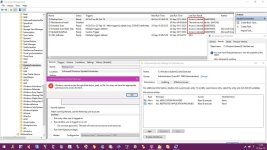
  • capture-09232018-115646.jpg
    capture-09232018-115646.jpg
    129.4 KB · Views: 453
I use this, it stops auto-checking for updates, but manual check works, if not, you can always reset it:
Code:
takeown /f "%WINDIR%\System32\UsoClient.exe" /a
icacls "%WINDIR%\System32\UsoClient.exe" /inheritance:r /grant:r Administrators:F /c
icacls "%WINDIR%\System32\UsoClient.exe" /remove "Administrators"
Code:
icacls "%WINDIR%\System32\UsoClient.exe" /reset
I use this, it stops auto-checking for updates, but manual check works, if not, you can always reset it:
Code:
takeown /f "%WINDIR%\System32\UsoClient.exe" /a
icacls "%WINDIR%\System32\UsoClient.exe" /inheritance:r /grant:r Administrators:F /c
icacls "%WINDIR%\System32\UsoClient.exe" /remove "Administrators"
Code:
icacls "%WINDIR%\System32\UsoClient.exe" /reset

When you say I can reset it, how can i reset it?
 
How do I change Windows 10 1803 automatic update to manual update? I tried adding AUOptions Value 2 and NoAutoUpdate DWORD 32 keys in HKEY_LOCAL_MACHINE\SOFTWARE\Policies\Microsoft\Windows\WindowsUpdate, but Windows 10 still automatic check for update by itself. I disabled automatic update in Microsoft Store and Microsoft Office 365, but Windows still automatic check for update. Funny thing is I never get any notification at all even thought I added AUOptions Value 2 DWORD 32 into the registry.
Why did you do it?
 
  • Like
Reactions: SumTingWong
Status
Not open for further replies.