Guide | How To How do you secure PowerShell?

The associated guide may contain user-generated or external content.
When i open my PowerShell with my standard account ( SUA ) i get this
View attachment 148149
When i try to open PowerShell modules with my admin password i get this
View attachment 148150
Can you tell if my PowerShell is secured?

You have disabled PowerShell script execution. So yes, if the exploit cannot use the PowerShell in the interactive mode to run:
Get-Content malware.ps1 | PowerShell.exe -noprofile -
Of course, if one will run malware (not PowerShell script) as administrator, then it can change the registry and allow to run powerShell scripts.
 
In Windows XP and Vista, only PowerShell 1 and 2 can be installed.
In Windows 7+, PowerShell 2.0 is the built-in system component, and can be updated to version 5.1.
In Windows 8, PowerShell 3.0 is the built-in system component, and cannot be updated to version 5.0.
In Windows 8.1+, PowerShell 5+ is the built-in system component.
Why can PowerShell be updated in windows 7 but not windows 8? Just strange to me.
 
  • Like
Reactions: AtlBo and Andy Ful
One word to keep the proper balance. Blocking access to powershell.exe and powershell_ise.exe (by SRP, VoodooShield, Process Lasso, anti-exe, sandbox, etc.) is a quite good protection for home users. But, users should understand that it is kind of a 'baby sitter' protection. Mostly, it protects the user against infecting himself. It does not protect well when the attacker uses exploit kits. Microsoft guys understand this, so they found out the 'Constrained Language' and 'No Language' modes.:)
 
Looking at the poll results, I am a little surprised, that simple and effective '__PSLockDownPolicy', is so uncommon in users' setups. It is a good security supplement to the popular blocking of powershell.exe and powershell_ise.exe . It can be easily adopted in Windows 7 : Install and configure WMF 5.1 , and it is trivial, when using Windows 8+ (Reg-tweak, PowerShell 3.0+ built-in the system).
 
Last edited:
  • Like
Reactions: shmu26 and askmark
Looking at the poll results, I am a little surprised, that simple and effective '__PSLockDownPolicy', is so uncommon in users' setups. It is a good security supplement to the popular blocking of powershell.exe and powershell_ise.exe . It can be easily adopted in Windows 7 : Install and configure WMF 5.1 , and it is trivial, when using Windows 8+ (Reg-tweak, PowerShell 3.0+ built-in the system).
Because I didn't know about it. I do now, so will be using it from now on. Thanks @Andy Ful :)
 
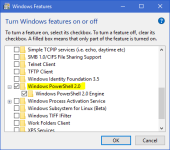
Does this have any affect, or do users still need to apply one of the provided instructions?
upload_2017-4-29_13-29-54.png

Thanks. :)
 
Does this have any affect, or do users still need to apply one of the provided instructions?
View attachment 148157

Thanks. :)
No effect. You can see the actual PowerShell version using the below command in PowerShell console:
$PSVersionTable
and look at PSVersion value.:)
 
  • Like
Reactions: askmark and frogboy
what if you uninstall powershell?
It cannot be uninstalled. But, in XP and Vista it may be not installed.:)
.
Edit
PowerShell cannot be removed from the Windows 7+. In Windows XP and Vista it is not installed by default, but may be installed/uninstalled by the user.
PowerShell can be practically disabled, using software that can block DLLs. Then one should block System.Management.Automation.dll and the native image System.Management.Automation.ni.dll.
.
Post edited to add System.Management.Automation.ni.dll .
 
Last edited:
If you have PowerShell disabled, it still works in interactive mode. That can be exploited to run PowerShell scripts. In this case, '__PSLockDownPolicy' reg-tweak can help.
If you have software&system hard to be exploited, then it is OK.
 
I think that in your case, even using AppGuard only, is an overkill. But, of course 3 bullets in the head can kill with more confidence, than any single one.:)
 
Last edited:
  • Like
Reactions: AtlBo and tonibalas
I don't think Constrained language mode is all that restrictive. I wouldn't rely upon it - at least not all by itself.

A lot of people don't understand that a lot of PowerShell shenanigans are post-exploit = no exploit = no worries.

It seems that creating the file 'c:\Windows\System32\WindowsPowerShell\v1.0\profile.ps1' that contains only one command:
$ExecutionContext.SessionState.LanguageMode='NoLanguage'
forces running all PowerShell scripts with 'No Language' mode.
So, If one is going to run powershell, then 'profile.ps1' script is always run first, and set 'No Language' mode.
But, one have to enable script execution and set ExecutionPolicy to "Remote signed' or 'Unrestricted'.
It can be done easily by the reg tweaks
:
[HKEY_LOCAL_MACHINE\SOFTWARE\Microsoft\PowerShell\1\ShellIds\Microsoft.PowerShell]
"ExecutionPolicy"="RemoteSigned"
[HKEY_LOCAL_MACHINE\SOFTWARE\Policies\Microsoft\Windows\PowerShell]
"EnableScripts"=dword:00000001

If one wants to run scripts again, then renaming 'profile.ps1' to (for example) '!!profile.ps1', make it possible.
.
Edit
The above can be bypassed using '-noprofile' option in PowerShell, so it is not recommended.:(
 
Last edited:
  • Like
Reactions: AtlBo and tonibalas