


The MalwareTips app
Your community, one tap away.
Open MalwareTips from your Home Screen or desktop. Follow discussions, find answers and pick up where you left off.
- Home Screen access
- Optional push alerts
- Your community
You're ready to explore.Explore what's new
Installation instructions
iPhone & iPad
- Open MalwareTips in Safari and tap Share. You may need to open the Page Menu first.
- Choose Add to Home Screen. If it is not listed, use Edit Actions to add it.
- Keep Open as Web App enabled if shown, then tap Add.
Android
- Open MalwareTips in Chrome or another browser that supports app installation.
- Open the browser menu and look for Install app, Install and create shortcut, or Add to Home screen.
- Choose Install and confirm. Wording varies by browser.
Desktop
- Chrome: use the install icon in the address bar, or the menu under Cast, save and share.
- Edge: open the menu, then More tools, Apps and Install this site as an app.
- Safari on Mac: choose Share or File, then Add to Dock. Firefox on Windows: look for the web apps button in the address bar.
If you cannot find an install option, update your browser or use its bookmark option to keep MalwareTips close.
Keep up with your conversations
After installation, open the app and sign in. Enable push notifications in Preferences if you want alerts. On iPhone and iPad, push requires a Home Screen web app and iOS or iPadOS 16.4 or later.
Sign in to manage notificationsInstallation is optional. Your notification settings stay under your control.
You are using an out of date browser. It may not display this or other websites correctly.
You should upgrade or use an alternative browser.
You should upgrade or use an alternative browser.
Troubleshooting How to create a Windows 10 USB ISO on Samsung Chromebook W?
-
 Thread starter
Duane Blomberg
Thread starter
Duane Blomberg
- Start date
- 7 Replies
- 2,925 Views
D
Deleted member 65228
You can install Windows 10 on a Chromebook but you'll require another system for preparation.
Anyway, why would you want to install Windows on a Chromebook? They're designed to use ChromeOS, it comes with the package for it to be a secure environment. ChromeOS has less attack vectors than Windows, OS X and traditional Linux because it provides less usability and features which are enabled/supported, it's also a custom Linux (all Google's OS's are, including Android).
I recommend you get another normal system for using Windows if you need to use Windows and keep your Chromebook running ChromeOS for normal tasks you do not require Windows for; you can also remotely connect to the Windows machine from your Chromebook with the aid of an extension.
Unless you really need to use Windows, I recommend against using it. If ChromeOS is capable of doing what you need to do (e.g. web-browsing and online banking, some document editing (you can use Google Docs), listening to some online music) then it should be sufficient.
Stay cautious of malicious Android applications, rogue Google Chrome extensions and online phishing attacks though - those attack vectors will still be present.
Anyway, why would you want to install Windows on a Chromebook? They're designed to use ChromeOS, it comes with the package for it to be a secure environment. ChromeOS has less attack vectors than Windows, OS X and traditional Linux because it provides less usability and features which are enabled/supported, it's also a custom Linux (all Google's OS's are, including Android).
I recommend you get another normal system for using Windows if you need to use Windows and keep your Chromebook running ChromeOS for normal tasks you do not require Windows for; you can also remotely connect to the Windows machine from your Chromebook with the aid of an extension.
Unless you really need to use Windows, I recommend against using it. If ChromeOS is capable of doing what you need to do (e.g. web-browsing and online banking, some document editing (you can use Google Docs), listening to some online music) then it should be sufficient.
Stay cautious of malicious Android applications, rogue Google Chrome extensions and online phishing attacks though - those attack vectors will still be present.
Upvote
0
F
ForgottenSeer 58943
Unless you really need to use Windows, I recommend against using it. If ChromeOS is capable of doing what you need to do (e.g. web-browsing and online banking, some document editing (you can use Google Docs), listening to some online music) then it should be sufficient.
Stay cautious of malicious Android applications, rogue Google Chrome extensions and online phishing attacks though - those attack vectors will still be present.
Agreed. Interestingly, we're finding Chromebooks to be highly capable. My daughter is into graphic design and is now exclusively using Chromebook as there are some powerful design apps on it now. The best part, her school uses them, so she can login to the same Chromebook with her school credentials and function just like she is at school.

The only vectors are limited to what you mention, a good powerwash will clean everything up nicely though in the event a bad extension or android app gets thrown on. Bit Defender Traffic Light works perfectly on Chromebooks to provide that link/phishing protection.
Upvote
0
i was wanting to find a program for icloud unlock program
Couldnt find any other then for windows os
Couldnt find any other then for windows os
Upvote
0
D
Deleted member 65228
What do you mean?i was wanting to find a program for icloud unlock program
Couldnt find any other then for windows os
Upvote
0
I know iOS will prompt for your iCloud password when accessing your account details in the Settings, or purchasing apps from the App Store when TouchID is not active.
Recover Your Apple ID - Apple
There's always a risk by sharing your IMEI number, so you can check if the device has been Stolen or not:
IMEI Check / ESN Check | Swappa
Sounds to me, something to Unlock an iCloud account on an Apple product, by where the password is unknown (second-hand product).What do you mean?
"You must know that iCloud prevents you from using your iPhone or iPad if you forgot login details or if you have bought it from Amazon, Ebay etc, and the original owner also forgot his login information. But, with our software you can Unlock/Bypass iCloud by yourself in less than 10 minutes."
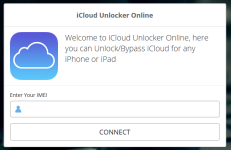
If the Apple device is legally yours, then why not perform a password reset?i was wanting to find a program for icloud unlock program
Couldnt find any other then for windows os
Recover Your Apple ID - Apple
There's always a risk by sharing your IMEI number, so you can check if the device has been Stolen or not:
IMEI Check / ESN Check | Swappa
Upvote
0
Recently browsing
Members who viewed this thread in the last 5 minutes


