


How to fix any computer
- Thread starter iPanik
- Start date
You are using an out of date browser. It may not display this or other websites correctly.
You should upgrade or use an alternative browser.
You should upgrade or use an alternative browser.
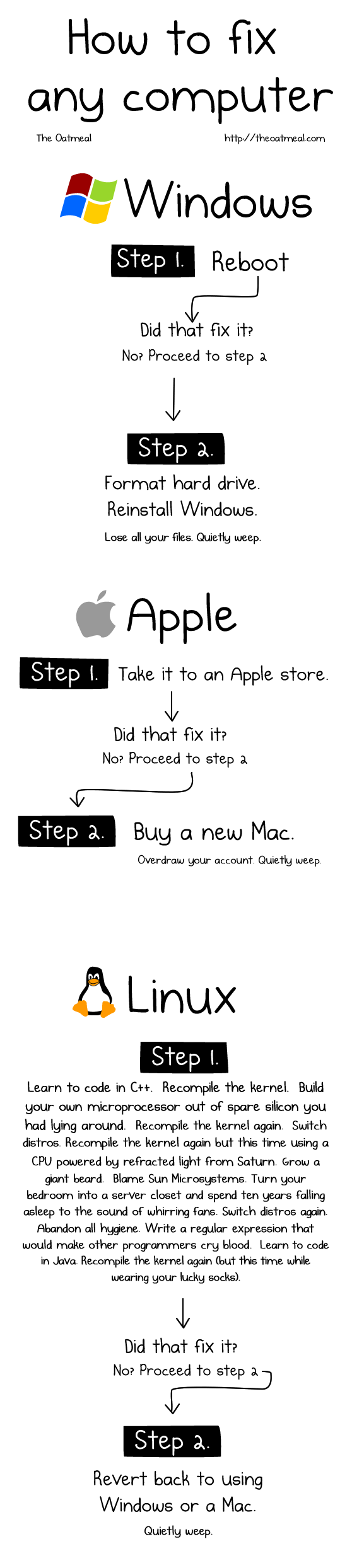

Well I know how to fix in Windows but in Apple? If it didn't fix in Apple Store you need to buy a new Mac seems a waste of money for that.


The best part is that it comes from a a true placeMcLovin said:hahahahahaha....love these kind of jokes..
 ) ....
 +1 iPanik lol-ed for 1 minute at this post;D

V
Vextor
How to fix any computer; Windows, Mac and Linux
How to fix any computer; Windows, Mac and Linux.
I think LittleBits will agree.

Posted on Kingsoft Security's | Facebook Page
How to fix any computer; Windows, Mac and Linux.
I think LittleBits will agree.
Posted on Kingsoft Security's | Facebook Page
RE: How to fix any computer; Windows, Mac and Linux
Seen this picture before, quite true as well.
Seen this picture before, quite true as well.

D
Deleted member 178
RE: How to fix any computer; Windows, Mac and Linux
before i wanna use Linux and tried to installed WOW, 1h later , i reinstalled Windows
before i wanna use Linux and tried to installed WOW, 1h later , i reinstalled Windows
P
Plexx
RE: How to fix any computer; Windows, Mac and Linux
For any beginner, Linux is not a walk in the park. It becomes easier (depending on the distro) if you happen to have internet access on another system and you are willing to google some troubleshoot, such has how to install applications on WINE, how to run SUDO commands etc...
For any beginner, Linux is not a walk in the park. It becomes easier (depending on the distro) if you happen to have internet access on another system and you are willing to google some troubleshoot, such has how to install applications on WINE, how to run SUDO commands etc...
D
Deleted member 178
RE: How to fix any computer; Windows, Mac and Linux
Yes i mostly use Linux to do a backup of the files in a damaged unbootable Windows.
Yes i mostly use Linux to do a backup of the files in a damaged unbootable Windows.
RE: How to fix any computer; Windows, Mac and Linux
I always have problem with mbr whenever I tried linux with windows.
I always have to manually set mbr,format whole disc and reinstall windows
So i dont use linux now.
I always have problem with mbr whenever I tried linux with windows.
I always have to manually set mbr,format whole disc and reinstall windows
So i dont use linux now.

RE: How to fix any computer; Windows, Mac and Linux
Never tried a Mac, but Linux though, well never had to install it again.
Never tried a Mac, but Linux though, well never had to install it again.

RE: How to fix any computer; Windows, Mac and Linux
That pretty much sums it up lol...I think it's alot faster to just re-install windows then spend hours sometimes days of scanning trying to remove all the virus's on one's pc (for a badly infected machine that is) and it still might not be completely free of gremlins and/or you may not be able to boot after all the virus removal or certain things in windows may not work right...re-installing will take roughly 30min to 1 hour depending on what OS your installing and if the drivers are easy to find not too much longer after that....now some computers took me all dang day to find the correct driver and in rare occasions a few days.
backup,backup, backup I say!
Earth said:How to fix any computer; Windows, Mac and Linux.
I think LittleBits will agree.
Posted on Kingsoft Security's | Facebook Page
That pretty much sums it up lol...I think it's alot faster to just re-install windows then spend hours sometimes days of scanning trying to remove all the virus's on one's pc (for a badly infected machine that is) and it still might not be completely free of gremlins and/or you may not be able to boot after all the virus removal or certain things in windows may not work right...re-installing will take roughly 30min to 1 hour depending on what OS your installing and if the drivers are easy to find not too much longer after that....now some computers took me all dang day to find the correct driver and in rare occasions a few days.
backup,backup, backup I say!
You may also like...
-
 Promotional Vidmore Video Fix 1yr for free
- Started by Brownie2019
- Replies: 1
-
 Security News Claude Opus 4.6 Finds 500+ High-Severity Flaws Across Major Open-Source Libraries
- Started by Miravi
- Replies: 2
-
Question How to make sure my computer is free from infections?
- Started by ByteSentinel
- Replies: 35
-
-
 Hot Take Latest Windows Update Problems and How to Fix Them
- Started by lokamoka820
- Replies: 3