

The MalwareTips app
Your community, one tap away.
Open MalwareTips from your Home Screen or desktop. Follow discussions, find answers and pick up where you left off.
- Home Screen access
- Optional push alerts
- Your community
You're ready to explore.Explore what's new
Installation instructions
iPhone & iPad
- Open MalwareTips in Safari and tap Share. You may need to open the Page Menu first.
- Choose Add to Home Screen. If it is not listed, use Edit Actions to add it.
- Keep Open as Web App enabled if shown, then tap Add.
Android
- Open MalwareTips in Chrome or another browser that supports app installation.
- Open the browser menu and look for Install app, Install and create shortcut, or Add to Home screen.
- Choose Install and confirm. Wording varies by browser.
Desktop
- Chrome: use the install icon in the address bar, or the menu under Cast, save and share.
- Edge: open the menu, then More tools, Apps and Install this site as an app.
- Safari on Mac: choose Share or File, then Add to Dock. Firefox on Windows: look for the web apps button in the address bar.
If you cannot find an install option, update your browser or use its bookmark option to keep MalwareTips close.
Keep up with your conversations
After installation, open the app and sign in. Enable push notifications in Preferences if you want alerts. On iPhone and iPad, push requires a Home Screen web app and iOS or iPadOS 16.4 or later.
Sign in to manage notificationsInstallation is optional. Your notification settings stay under your control.
You are using an out of date browser. It may not display this or other websites correctly.
You should upgrade or use an alternative browser.
You should upgrade or use an alternative browser.
Solved How to remove duplicate files?
- Status
- Not open for further replies.


kaljukass
Level 2
You know, these are so many ways, that whole this forum could full write of them. And certainly, there are also a number of already installed on your computer.
Find out, what You have already installed and for the end - You need by Yourself to decide what to do and how to do it. The programs can only help you to find only some duplicated files which have similar names or similar name, type and size.
And if you then will delete them, you doing themselves for yourself pretty much evil.
Find out, what You have already installed and for the end - You need by Yourself to decide what to do and how to do it. The programs can only help you to find only some duplicated files which have similar names or similar name, type and size.
And if you then will delete them, you doing themselves for yourself pretty much evil.
Upvote
0
If you have CCleaner installed, it also has a File Finder.
https://www.piriform.com/docs/ccleaner/using-ccleaner/finding-duplicate-files
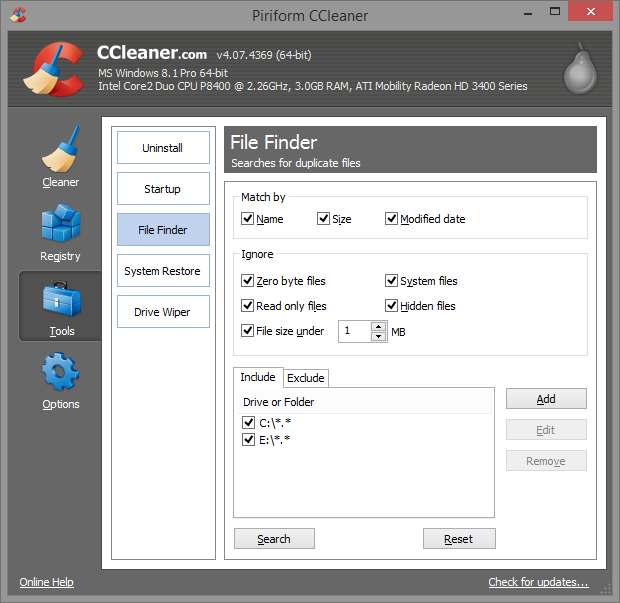
https://www.piriform.com/docs/ccleaner/using-ccleaner/finding-duplicate-files
Upvote
0


You all are wrongthe best is Auslogics Duplicate File Finder
Altho it did alot better than Treesize Professional (Payware),it didn't cut it. I'm trying to find something better right now.
Upvote
0
kaljukass
Level 2
Altho it did alot better than Treesize Professional (Payware),it didn't cut it. I'm trying to find something better right now.
I think, that surely you're do not think of that freeware don't cost anything at all? Or how?
I've heard, that free lunches doesn't exist. The only question is who pays.
Upvote
0


Re-birth of this thread. Is it safe to "delete" all duplicate files of every kind ??
This is one PC clean up I haven't done yet.
Any Advice on which trustworthy free program works the best for this..., I see a few suggestions above, but noones agreeing with each other.
Maybe Auslogics ? Portable File Finder ? DuplicateCleaner?
This is one PC clean up I haven't done yet.
Any Advice on which trustworthy free program works the best for this..., I see a few suggestions above, but noones agreeing with each other.
Maybe Auslogics ? Portable File Finder ? DuplicateCleaner?
Upvote
0


Setup PCPC setup
I have a lot of music, photos and documents on my HDD (D partition). On C partition only OS, programs and games. So whenever I used some duplicate file finder, I never checked C drive to be scanned. It's too risky that you may delete something that some program needs.Re-birth of this thread. Is it safe to "delete" all duplicate files of every kind ??
This is one PC clean up I haven't done yet.
Any Advice on which trustworthy free program works the best for this..., I see a few suggestions above, but noones agreeing with each other.
Maybe Auslogics ? Portable File Finder ? DuplicateCleaner?
With Auslogics I never had problem.
Upvote
0
No matter which program you use, don't just delete everything blindly. Take time to identify everything, and only delete what you are sure to be a useless copy.
Yeah.
The one scan I did, I chickened out as it said it found 1GB of duplicate files. I wasn't sure if it was safe to delete all these.... I wasn't 100% what I was looking at, which brought me to the question if these programs are safe to use.
Has it ever deleted improtant files, or are they infact, just deleting a copy only?
Upvote
0

Deleting duplicate files can be a good idea, but it won't save you all the time. It is mostly useful when you may have gotten the same file twice, especially music, movies, photos, and large files in general. They should comprise a list of a few duplicates that are really using some unneeded space.
But duplicate cleaners look for files in an entire disk unless you specify otherwise. They will probably not know the difference between a temporary folder you created and the actual folder you use for your files. If you have your duplicate cleaner simply delete every duplicate leaving the "originals", you may be left with the file you want being left only in the folder you don't want.
Other files may be present in more than one program folder, and be equally necessary in all of them. That's why some cleaners, including my suggestion in an above post, excludes Windows and programs folders by default (which does not include program folders you created like C:\Games or C:\My Programs).
If you really need more space, and especially if 1GB will make such a difference for you, it may be better to simply copy some big rarely used files like music and movies, etc, into an external media.
But duplicate cleaners look for files in an entire disk unless you specify otherwise. They will probably not know the difference between a temporary folder you created and the actual folder you use for your files. If you have your duplicate cleaner simply delete every duplicate leaving the "originals", you may be left with the file you want being left only in the folder you don't want.
Other files may be present in more than one program folder, and be equally necessary in all of them. That's why some cleaners, including my suggestion in an above post, excludes Windows and programs folders by default (which does not include program folders you created like C:\Games or C:\My Programs).
If you really need more space, and especially if 1GB will make such a difference for you, it may be better to simply copy some big rarely used files like music and movies, etc, into an external media.
Upvote
0
Rachella Smith
New Member
According to my point of view duplicate cleaner is free tool to help in cleaning up the contents of personal hard drive or network.
Upvote
0

Is there any programs which automatically detects and deletes such called Duplicate Files ?
Because manual detection and deletion would be pain for many inexperienced users.
Because manual detection and deletion would be pain for many inexperienced users.
Upvote
0
- Status
- Not open for further replies.
Recently browsing
Members who viewed this thread in the last 5 minutes
You may also like...
-

-
-
-
-
 Advice Request How can I remove all restrictions from a PDF?