

The MalwareTips app
Your community, one tap away.
Open MalwareTips from your Home Screen or desktop. Follow discussions, find answers and pick up where you left off.
- Home Screen access
- Optional push alerts
- Your community
You're ready to explore.Explore what's new
Installation instructions
iPhone & iPad
- Open MalwareTips in Safari and tap Share. You may need to open the Page Menu first.
- Choose Add to Home Screen. If it is not listed, use Edit Actions to add it.
- Keep Open as Web App enabled if shown, then tap Add.
Android
- Open MalwareTips in Chrome or another browser that supports app installation.
- Open the browser menu and look for Install app, Install and create shortcut, or Add to Home screen.
- Choose Install and confirm. Wording varies by browser.
Desktop
- Chrome: use the install icon in the address bar, or the menu under Cast, save and share.
- Edge: open the menu, then More tools, Apps and Install this site as an app.
- Safari on Mac: choose Share or File, then Add to Dock. Firefox on Windows: look for the web apps button in the address bar.
If you cannot find an install option, update your browser or use its bookmark option to keep MalwareTips close.
Keep up with your conversations
After installation, open the app and sign in. Enable push notifications in Preferences if you want alerts. On iPhone and iPad, push requires a Home Screen web app and iOS or iPadOS 16.4 or later.
Sign in to manage notificationsInstallation is optional. Your notification settings stay under your control.
You are using an out of date browser. It may not display this or other websites correctly.
You should upgrade or use an alternative browser.
You should upgrade or use an alternative browser.
how to revert to free firewall
-
 Thread starter
shmu26
- Start date
- 8 Replies
- 2,995 Views
- Status
- Not open for further replies.
D
Deleted Member 333v73x
You need to change the settings from 'Internet Security' to 'Firewall Security' I can't go into much detail or tell you where it is because I have not used COMODO in a while.
Did you do a Default installation of Comodo? Then you may have more unwanted software such as Chromodo and GeekBuddy.
Open Control Panel > Program and Features > Comodo Internet Security Premium > Modify/Change/Repair.
You may want to check for Comodo Chromodo / Dragon and GeekBuddy.
@Tornado Those are the CIS configuration profiles. OP wants to remove Comodo Antivirus from their system.
Open Control Panel > Program and Features > Comodo Internet Security Premium > Modify/Change/Repair.
You may want to check for Comodo Chromodo / Dragon and GeekBuddy.
@Tornado Those are the CIS configuration profiles. OP wants to remove Comodo Antivirus from their system.

great, now I was able to uninstall the antivirus. that is exactly what I wanted to do.Did you do a Default installation of Comodo? Then you may have more unwanted software such as Chromodo and GeekBuddy.
Open Control Panel > Program and Features > Comodo Internet Security Premium > Modify/Change/Repair.
You may want to check for Comodo Chromodo / Dragon and GeekBuddy.
@Tornado Those are the CIS configuration profiles. OP wants to remove Comodo Antivirus from their system.

Did you do a Default installation of Comodo? Then you may have more unwanted software such as Chromodo and GeekBuddy.
Open Control Panel > Program and Features > Comodo Internet Security Premium > Modify/Change/Repair.
You may want to check for Comodo Chromodo / Dragon and GeekBuddy.
@Tornado Those are the CIS configuration profiles. OP wants to remove Comodo Antivirus from their system.
Latest version of Comodo by default have GeekBuddy and Chromodo un-check.
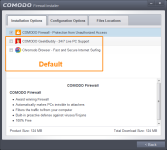
Good to know they have acknowledged this, hopefully they don't try and sneak these PUA in in-program Product Updates.Latest version of Comodo by default have GeekBuddy and Chromodo un-check.
@shmu26 It's always recommended to perform a custom installation of any future software, that way you know exactly what is being put on your PC.
good advice, for sure.Good to know they have acknowledged this, hopefully they don't try and sneak these PUA in in-program Product Updates.
@shmu26 It's always recommended to perform a custom installation of any future software, that way you know exactly what is being put on your PC.
But in this particular case,comodo doesn't give you any options.
I wanted to install the comodo "free" firewall on windows 10, but the downloaded file is not executable on win10. I found somewhere on their forum, in an old post, that you have to unpack the downloaded file, using 7-zip or the like, and then, buried deep deep inside, is an exe file that installs the full paid program without asking any questions.
Not only that, but it does not turn off windows firewall, so you end up with both running at the same time, until you manually turn off WF. I was told by geek buddy to leave both running, but that is obviously bad advice.
I wonder what else is wrong about the default installation? Any important tweaks or corrections I should do?

@shmu26:
Source: Comodo HelpCOMODO - Proactive Security - This configuration turns CIS into the ultimate protection machine. All possible protections are activated and all critical COM interfaces and files are protected. During the setup, if only Comodo Firewall installation option is selected, the next screen allows users to select this configuration as default CIS configuration. If selected, Firewall is always set to Safe mode. But according to the malware scanning results performed during the setup process, if no malware is found, HIPS is set to Clean PC mode. Otherwise, the default is Safe mode.
- Status
- Not open for further replies.
Recently browsing
Members and guests who viewed this thread in the last 5 minutes
You may also like...
-

-
 Serious Discussion Is Defender enough with Malwarebytes Free on Windows 11?
-
M
Advice Request comodo firewall version recommendation for windows 7 sp1.
-

-
