

Advice Request How to turning off bitlocker encryption on OS drive only

Please provide comments and solutions that are helpful to the author of this topic.

Oten

Level 2
Thread author
Verified
Mar 12, 2018
76
386
65
Earth
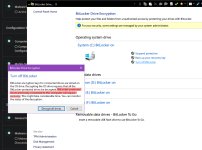
HI, my drives encrypted with bitlocker and TPM 2.0 on the motherboard. Just like the title, how do i turn off bitlocker encryption on OS drive only? This is what poped out when i clecked turn off bitlocker (see attachment file). Do i have to decrypt all drives again? Also is the screenshot, the text i highlighted, what is recovery mean? does it mean my drives will corrupt/data loss or?

The os drive is an M2 nvme drive with UEFI, and GPT partition type on all drives, if that's help.
 

Attachments
  • bitlocker.jpg
    bitlocker.jpg
    332 KB · Views: 224
Last edited:
1- Means you have to decrypt all drives first, then re-encrypt the non-system drives one by one.
2- means if you had drives connected at the time of encryption but not connected when you will decrypt, a recovery will be necessary for those drives, since the decryption key won't works anymore (it is how i understand it, i didn't use bitlocker the way you did).
 
1- Means you have to decrypt all drives first, then re-encrypt the non-system drives one by one.
2- means if you had drives connected at the time of encryption but not connected when you will decrypt, a recovery will be necessary for those drives, since the decryption key won't works anymore (it is how i understand it, i didn't use bitlocker the way you did).

ah i see, it is clear now. thanks for your answer. Data loss is what concern me.
 
  • Like
Reactions: Venustus