Troubleshoot I need help with a old pc

Runt85

Level 1
Thread author
Verified
Jan 19, 2017
26
23
29
41
Sacramento California
I have a older 2012 Hp desktop
It came installed with windows 8,i did find a iso of windows 10 off of microsoft.com,after running windows 10 for many months i opened up task manager and seen the computer usage % was very high up to 98 percent

This is what i have installed
WINDOWS 8.1--- 64 bit
-avast free or bitdefender free,i switch back and forth
-voodoo shield free
-google chrome
-ccleaner
-geekuninstaller free

If anyone could lend a hand and help me out it would be greatly appreciated
 

Attachments

  • PC HELP.PNG
    PC HELP.PNG
    27.2 KB · Views: 556
  • Like
Reactions: SHvFl
I have a older 2012 Hp desktop
It came installed with windows 8,i did find a iso of windows 10 off of microsoft.com,after running windows 10 for many months i opened up task manager and seen the computer usage % was very high up to 98 percent

This is what i have installed
WINDOWS 8.1--- 64 bit
-avast free or bitdefender free,i switch back and forth
-voodoo shield free
-google chrome
-ccleaner
-geekuninstaller free

If anyone could lend a hand and help me out it would be greatly appreciated
A friend of me has same specs pc.. slow as .... but runs windows 10 with Avira total Package
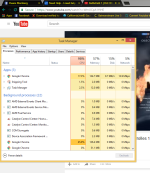
So Idk but first post a screenshot of task manager ;)
 
  • Like
Reactions: Runt85
Upvote 0
If I remember correctly the E1-1200 is on par to the Celeron processor by intel.

To start this processor is an old CPU with not much power so don't expect too much from it.

What are you doing while the usage is high?
 
  • Like
Reactions: Runt85
Upvote 0
If I remember correctly the E1-1200 is on par to the Celeron processor by intel.

To start this processor is an old CPU with not much power so don't expect too much from it.

What are you doing while the usage is high?
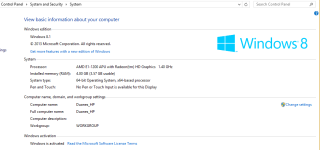
Sorry but its amd...
Look also on screenshot..
AMD E1

But for sure Avast is way too heavy for this system you should use one av so no voodooshield on this PC
I can Recommend Avira,360ts
If you dont care about privacy And like 360 then choose 360 ;)
Otherwise everything else Avira should be better ;)


Edit: Bitdefender free idk how munch it uses so i cant give a recommendation on it.
 
  • Like
Reactions: Runt85
Upvote 0
Sorry but its amd...
Look also on screenshot..
AMD E1

But for sure Avast is way too heavy for this system you should use one av so no voodooshield on this PC
I can Recommend Avira,360ts
If you dont care about privacy And like 360 then choose 360 ;)
Otherwise everything else Avira should be better ;)


Edit: Bitdefender free idk how munch it uses so i cant give a recommendation on it.
Which category of usage was close to 98%?
Was it CPU, Memory, Disk, or Network?

CPU%
 
Upvote 0
Sorry but its amd...
Look also on screenshot..
AMD E1

But for sure Avast is way too heavy for this system you should use one av so no voodooshield on this PC
I can Recommend Avira,360ts
If you dont care about privacy And like 360 then choose 360 ;)
Otherwise everything else Avira should be better ;)


Edit: Bitdefender free idk how munch it uses so i cant give a recommendation on it.

Ill look into these two ive used avira before
so is windows 8 the os to use or can i run 10?
 
Upvote 0
I don't see why windows 8 will run any better than windows 10 on your system. As long as the hardware officially supports windows 10, it will run fine.
The CPU problem needs to be solved either way, it's not because of the version of Windows.
If you have a weak processor, then it will stay at 100% usage for a while when you are trying to load a heavy web page.
I think the processor is just too weak to give good performance when viewing online video content.
It will be the same whatever OS you choose.
 
  • Like
Reactions: Runt85
Upvote 0
I don't see why windows 8 will run any better than windows 10 on your system. As long as the hardware officially supports windows 10, it will run fine.
The CPU problem needs to be solved either way, it's not because of the version of Windows.
If you have a weak processor, then it will stay at 100% usage for a while when you are trying to load a heavy web page.
I think the processor is just too weak to give good performance when viewing online video content.
It will be the same whatever OS you choose.

I had no idea,thanks for the info i like windows 10 alot more anyways
 
  • Like
Reactions: shmu26
Upvote 0
Sorry but its amd...
Look also on screenshot..
AMD E1

But for sure Avast is way too heavy for this system you should use one av so no voodooshield on this PC
I can Recommend Avira,360ts
If you dont care about privacy And like 360 then choose 360 ;)
Otherwise everything else Avira should be better ;)


Edit: Bitdefender free idk how munch it uses so i cant give a recommendation on it.

avira free? and nothing else?
 
Upvote 0
I have a older 2012 Hp desktop
It came installed with windows 8,i did find a iso of windows 10 off of microsoft.com,after running windows 10 for many months i opened up task manager and seen the computer usage % was very high up to 98 percent

This is what i have installed
WINDOWS 8.1--- 64 bit
-avast free or bitdefender free,i switch back and forth
-voodoo shield free
-google chrome
-ccleaner
-geekuninstaller free

If anyone could lend a hand and help me out it would be greatly appreciated

Windows 10 and Core2Duo\Pentium chips don't work well together. It isn't your installed programs, but instead Windows 10 memory management.

I see you have an E1 processor -- so therein lies part of the problem. Also, you have 4 GB of memory, therein lies the other part of the problem.

I use a Pentium P6100 Toshiba L655-S5096 with 3 GB RAM. Startup is very slow and some application launches are very slow. Chrome, for example, will spike physical memory usage 1o 100 %. After everything calms down after a few minutes, the average is about 50 % of RAM while browsing and some other programs open.

For ancient, low-end systems I suggest using a security solution that is very easy on the system resources.
 
Last edited by a moderator:
Upvote 0
Windows 10 and Core2Duo\Pentium chips don't work well together. It isn't your installed programs, but instead Windows 10 memory management.

I see you have an E1 processor -- so therein lies part of the problem. Also, you have 4 GB of memory, therein lies the other part of the problem.

I use a Pentium P6100 Toshiba L655-S5096 with 3 GB RAM. Startup is very slow and some application launches are very slow. Chrome, for example, will spike physical memory usage 1o 100 %. After everything calms down after a few minutes, the average is about 50 % of RAM while browsing and some other programs open.

For ancient, low-end systems I suggest using a security solution that is very easy on the system resources.


So what browser,Free av,and ect do you recommended,could you give me a list?
 
  • Like
Reactions: shmu26
Upvote 0