This probably started happening around a couple of weeks ago. I think it's important to mention that we had a site that my Discord community used, where the dev essentially went "rogue" and installed a browser-side coinhive miner. My Malware Antibyte would go crazy whenever our site was opened, and we confronted said dev about this, which led to the termination of our relationship with him and us no longer using that site.
Initially, I thought it was something to do with my mouse because my mouse would have a "lag" delay every few seconds. I tried doing a few fixes of my own: tried scanning for malware with Malware Antibytes, reinstalling drivers for the mouse, etc.
I decided to open up the taskbar and see what was going on with the resource usage. It seems that every time my computer "lags" like this, my GPU spikes up to about 100%. I also have a lot of scvhost.exe processes running. I know it's not unheard of for Windows 10 to have a bunch of these running, but this seems like I have too many. Oddly enough, the GPU usage seems to be fine if I open a full screen game of some sort that boots from an SSD, not my main HDD.
The system lags every few seconds. Input from my mouse and keyboard are delayed, and my voice will become distorted if I am talking on some voice software like Discord. My GPU usage also spikes up heavily when this happens.
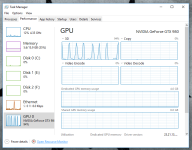
I've attached both of the requested documents below, as well as a screenshot of how my GPU spikes from idle to 100%. At the time of taking that screenshot, I only had Chrome, Discord, and Microsoft Paint open.
Initially, I thought it was something to do with my mouse because my mouse would have a "lag" delay every few seconds. I tried doing a few fixes of my own: tried scanning for malware with Malware Antibytes, reinstalling drivers for the mouse, etc.
I decided to open up the taskbar and see what was going on with the resource usage. It seems that every time my computer "lags" like this, my GPU spikes up to about 100%. I also have a lot of scvhost.exe processes running. I know it's not unheard of for Windows 10 to have a bunch of these running, but this seems like I have too many. Oddly enough, the GPU usage seems to be fine if I open a full screen game of some sort that boots from an SSD, not my main HDD.
The system lags every few seconds. Input from my mouse and keyboard are delayed, and my voice will become distorted if I am talking on some voice software like Discord. My GPU usage also spikes up heavily when this happens.
I've attached both of the requested documents below, as well as a screenshot of how my GPU spikes from idle to 100%. At the time of taking that screenshot, I only had Chrome, Discord, and Microsoft Paint open.