

The MalwareTips app
Your community, one tap away.
Open MalwareTips from your Home Screen or desktop. Follow discussions, find answers and pick up where you left off.
- Home Screen access
- Optional push alerts
- Your community
You're ready to explore.Explore what's new
Installation instructions
iPhone & iPad
- Open MalwareTips in Safari and tap Share. You may need to open the Page Menu first.
- Choose Add to Home Screen. If it is not listed, use Edit Actions to add it.
- Keep Open as Web App enabled if shown, then tap Add.
Android
- Open MalwareTips in Chrome or another browser that supports app installation.
- Open the browser menu and look for Install app, Install and create shortcut, or Add to Home screen.
- Choose Install and confirm. Wording varies by browser.
Desktop
- Chrome: use the install icon in the address bar, or the menu under Cast, save and share.
- Edge: open the menu, then More tools, Apps and Install this site as an app.
- Safari on Mac: choose Share or File, then Add to Dock. Firefox on Windows: look for the web apps button in the address bar.
If you cannot find an install option, update your browser or use its bookmark option to keep MalwareTips close.
Keep up with your conversations
After installation, open the app and sign in. Enable push notifications in Preferences if you want alerts. On iPhone and iPad, push requires a Home Screen web app and iOS or iPadOS 16.4 or later.
Sign in to manage notificationsInstallation is optional. Your notification settings stay under your control.
You are using an out of date browser. It may not display this or other websites correctly.
You should upgrade or use an alternative browser.
You should upgrade or use an alternative browser.
Solved I uninstalled WFC. now some software I use can not connect to the net
- Thread starter Brie
- Start date
Malwarebytes
14 Replies
1,995 Views

please search for leftover services and drivers and delete them manuallythe message says "could not connect to the server. please check your internet connection and proxy settings."
my internet is connected. my proxy settings seem fine. advice?

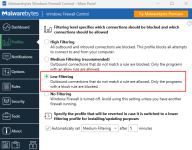
Windows Firewall Control? It's probably blocking all outbound connections, you need to change the mode.


Restore Default Windows Defender Firewall Settings in Windows 10
How to Restore Default Windows Defender Firewall Settings in Windows 10
 www.tenforums.com
Complete Internet Repair – Rizonesoft.com
Complete Internet Repair is your all-inclusive solution for swiftly remedying internet hitches. It efficiently resets TCP/IP, troubleshoots Winsock, renews connections, and flushes DNS and ARP cache to facilitate smooth web connectivity. Additionally, it serves as your personal tech expert...
 rizonesoft.com
How's Malwarebytes WFC these days? Still blocking microsoft's ant-malware services and showing pop-ups for svchost every day?

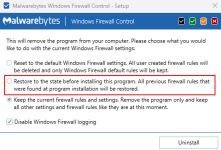
Which option did you selected while uninstalling WFC?the message says "could not connect to the server. please check your internet connection and proxy settings."
my internet is connected. my proxy settings seem fine. advice?
I always change to Low Filtering before uninstalling WFC
I get a new svchost IP only like once or twice per month, because MS changes CDN servers constantly, but it is almost tamed.How's Malwarebytes WFC these days? Still blocking microsoft's ant-malware services and showing pop-ups for svchost every day?

2.16.2.0-2.16.3.255,2.16.30.0-2.16.31.255,2.17.96.0-2.17.115.255,2.17.244.0-2.17.247.255,2.18.16.0-2.18.31.255,2.18.32.0-2.18.47.255,2.18.160.0-2.18.175.255,2.19.194.0-2.19.195.255,2.20.20.0-2.20.23.255,2.20.128.0-2.20.131.255,2.20.132.0-2.20.132.255,2.20.142.0-2.20.143.255,2.20.180.0-2.20.180.255,2.22.24.0-2.22.27.255,2.23.0.0-2.23.15.255,2.23.96.0-2.23.111.255,4.144.0.0-4.159.255.255,4.224.0.0-4.239.255.255,13.64.0.0-13.107.255.255,18.32.0.0-18.255.255.255,20.0.0.0-20.31.255.255,20.33.0.0-20.128.255.255,20.150.0.0-20.153.255.255,20.160.0.0-20.175.255.255,20.180.0.0-20.191.255.255,20.192.0.0-20.255.255.255,23.0.0.0-23.15.255.255,23.32.0.0-23.67.255.255,23.72.0.0-23.79.255.255,23.192.0.0-23.223.255.255,37.203.32.0-37.203.33.255,40.64.0.0-40.71.255.255,40.74.0.0-40.125.127.255,40.126.0.0-40.126.63.255,40.126.128.0-40.127.255.255,51.10.0.0-51.13.255.255,51.15.0.0-51.15.63.255,51.103.0.0-51.105.255.255,51.124.0.0-51.124.255.255,51.132.0.0-51.132.255.255,52.96.0.0-52.115.255.255,52.116.0.0-52.118.255.255,52.132.0.0-52.143.255.255,52.145.0.0-52.191.255.255,52.192.0.0-52.223.191.255,52.224.0.0-52.255.255.255,68.218.0.0-68.221.255.255,68.232.32.0-68.232.47.255,69.192.0.0-69.192.255.255,72.246.0.0-72.247.255.255,79.142.76.0-79.142.77.255,84.53.164.0-84.53.167.255,87.245.212.0-87.245.212.127,89.238.68.128-89.238.68.255,92.122.104.0-92.122.107.255,92.122.212.0-92.122.219.255,92.122.252.0-92.122.255.255,92.123.32.0-92.123.47.255,95.100.64.0-95.100.79.255,95.100.80.0-95.100.95.255,104.16.0.0-104.31.255.255,104.64.0.0-104.127.255.255,108.128.0.0-108.139.255.255,140.82.112.0-140.82.127.255,184.50.0.0-184.51.255.255,148.251.120.96-148.251.120.127,152.176.0.0-152.199.255.255,162.158.0.0-162.159.255.255,172.64.0.0-172.71.255.255,173.82.0.0-173.82.255.255,184.24.0.0-184.31.255.255,184.84.0.0-184.87.255.255,185.34.26.0-185.34.27.255,185.161.175.0-185.161.175.255,185.199.108.0-185.199.111.255,192.229.128.0-192.229.255.255,205.234.128.0-205.234.255.255,204.68.96.0-204.68.127.255,204.79.195.0-204.79.197.255
89.238.68.185,192.229.221.95,2.16.2.0-2.16.3.255,2.16.10.0-2.16.11.255,2.17.96.0-2.17.115.255,2.18.32.0-2.18.47.255,2.19.196.0-2.19.199.255,2.19.32.0-2.19.47.255,2.19.208.0-2.19.223.255,2.21.64.0-2.21.79.255,2.21.172.0-2.21.172.255,2.23.0.0-2.23.15.255,4.240.0.0-4.255.255.255,8.0.0.0-8.127.255.255,8.224.0.0-8.241.255.255,8.244.0.0-8.255.255.255,13.64.0.0-13.107.255.255,20.33.0.0-20.128.255.255,20.192.0.0-20.255.255.255,23.0.0.0-23.15.255.255,23.32.0.0-23.67.255.255,23.72.0.0-23.79.255.255,23.192.0.0-23.223.255.255,34.192.0.0-34.255.255.255,45.90.28.0-45.90.31.255,46.228.220.0-46.228.223.255,52.0.0.0-52.79.255.255,52.145.0.0-52.191.255.255,67.24.0.0-67.31.255.255,68.232.32.0-68.232.47.255,81.171.68.0-81.171.69.255,87.245.215.0-87.245.215.95,84.53.161.0-84.53.161.255,92.123.0.0-92.123.15.255,93.184.220.0-93.184.223.255,94.46.144.0-94.46.159.255,95.100.144.0-95.100.159.255,95.140.224.0-95.140.239.255,100.20.0.0-100.31.255.255,104.16.0.0-104.31.255.255,104.64.0.0-104.127.255.255,152.176.0.0-152.199.255.255,168.61.0.0-168.63.255.255,172.64.0.0-172.71.255.255,178.79.192.0-178.79.255.255,178.79.226.0-178.79.227.255,184.24.0.0-184.31.255.255,209.197.0.0-209.197.31.255

It's not a bad windows firewall UI. I do get MS Teams ones every time I open teams for a meeting and there's an update. Oh and I get repeated ones for different services. I find it really useful and either using WFC or CF.How's Malwarebytes WFC these days? Still blocking microsoft's ant-malware services and showing pop-ups for svchost every day?

I turned WFC off before I uninstalled it. I think I turned it to low filtering before I turned it off.Which option did you selected while uninstalling WFC?
View attachment 282154
I always change to Low Filtering before uninstalling WFC
View attachment 282155
That's why I uninstalled it a couple years ago, so annoying. Repeated pop-ups and also many duplicate rules. But I noticed that the software has been getting new updates, so I was wondering if that has improved.Oh and I get repeated ones for different services.
Less so once you've used it for awhile. I like to export my rules between installs so I don't have to train it again. I tend to turn off notifications if I'm working or watching or gaming and then just whitelisting what's been blocked while I've had notifications turned off. Would be interesting to see the option for port sets. e.g. Dynamic/Private Ports (49152-65535) instead of getting an alert for each one of those for one application connecting out to port 443. It's good though.That's why I uninstalled it a couple years ago, so annoying. Repeated pop-ups and also many duplicate rules. But I noticed that the software has been getting new updates, so I was wondering if that has improved.
It's sad like Avast has a completely automated free firewall but MWFC still has all these issues.

I started using WFC on one or two VM a couple of months ago, been working ok, not bothersome here fwiwThat's why I uninstalled it a couple years ago, so annoying. Repeated pop-ups and also many duplicate rules. But I noticed that the software has been getting new updates, so I was wondering if that has improved.
silversurfer is right. great post! When uninstalling WFC select restore to windows firewall default rules. That should do the trick. as he said make sure low filtering is selected, even though I never had that problem when I used WFC.
Recently browsing
Members who viewed this thread in the last 5 minutes


