
New Update ImageGlass - Updates Thread

lokamoka820

Level 54
Thread author
Verified
Top Poster
Well-known
Mar 1, 2024
4,367
3
15,753
5,269
Banana Republic
ImageGlass is a lightweight software designed for seamless viewing of images in a clean and intuitive interface. With support for over 80 common image formats including WEBP, GIF, SVG, PNG, JXL, HEIC,... ImageGlass also offers advanced features that cater to the needs of both regular users and designers, making it the excellent tool to enhance workflow efficiency.
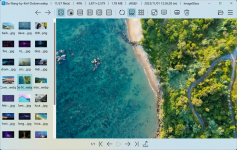
Screenshot 2024-12-08 at 16-43-29 GitHub - d2phap_ImageGlass 🏞 A lightweight versatile image v...png
Features:
  • 80+ Formats Support Works great with WEBP, GIF, SVG, HEIC, RAW formats and more
  • Lightweight & Versatile Fast switch between images
  • Personalization Easily install new languages, themes and icon packs
  • Intuitive UI Design Combines seamless functionality with a beautiful design
  • Flexible Customization Customize app layout, toolbar buttons, and more with ease
  • Seamless Integration Easily integrate third-party apps for a cohesive experience
 
  • Like
Reactions: Khushal
ImageGlass 9.2.0.1208
Dec 7, 2024

🌱 New Features​

  • Added a new tool: Resize Image (#1458)
    • Access via Main Menu > Tools > Resize image, or Alt+R
    • Compatible with single-frame, non-animated image formats
    • Supports scaling from 1px to 16384px
    • Supports variety of resampling methods powered by PhotoSauce.MagicScaler library
    • Note: Similar to other editing features, saving the resized image does not include its metadata such as exif profile.
  • Crop tool v2 (#1795, #1882, #2027, #2028):
    • Updates the mouse cursor when Crop tool is open
    • Selection now aligns with the image source
    • Zooming/panning doesn't affect selection
    • Supports resizing the selection by dragging any edge, not just anchor points
    • Supports panning image with middle mouse during cropping
    • Supports snap-to-pixel selection with pixel-level precision
    • Selection stays intact when clicking outside it
    • Default selection respects Crop settings and Aspect Ratio
  • Slideshow mode: Added Custom zoom (Z) feature (#2021)
  • Custom toolbar button: Added support for hotkeys
  • Added new API: IG_ApplySettings(string json) to apply settings from the Settings window via JSON format (#2010, #2042)

🔮 Improvements​

  • Updated Magick.NET to v14.2
  • Made WebView2 Runtime optional:
    • Launch ImageGlass without bypassing the Quick Setup dialog
    • Quick Setup displays a warning with unavailable features and a download link (#2029)
    • SVG viewing reverts to the native renderer
    • About and Check for Update dialogs use the native Task Dialog
    • Settings opens the igconfig.json file in the associated app (or Notepad)
    • MSI installer: Remove WebView2 Runtime check
  • Maximum image dimensions, for those images larger than 16,384 pixels:
    • Removed the limit on maximum image dimensions
    • Supports rendering images in full resollution (#1863, #1949)
    • Uses Direct2D software rendering
  • Added support for automatically sorts new images based on the current sort order (#1467)
  • Removed alert sound on image deletion confirmation popup (#1997)
  • Allows user to set slideshow interval less than 1 second (#2047)
  • Added support for app protocol for Custom Toolbar buttons, Tools, and Edit apps (#2002)
    • Enter the app protocol in the Executable box (must end with :)
    • Use the Argument box for parameters; <file> passes the current image path
    • Verify your setting in the "Command preview"
  • Added a "Learn more" link to image interpolation settings, thanks to @stevencaiOR (#1982)
  • Improved the method for retrieving image files in the directory
  • Enabled dark mode for tooltips in the Crop Tool and Color Picker
  • Enabled dark mode and accent color for the progress bar in the Export Frame dialog

🐛 Bugfixes​

  • Fixed hotkey parsing issues for non-English languages (#1988)
  • Fixed malformed characters displayed for hotkeys in non-English languages (#1999)
  • Fixed layout issues in the Settings window caused by a new Microsoft Edge version
  • Fixed the Settings window staying inactive when reopened
  • Fixed an issue where SVG image were blinking when opened with the WebView2 option enabled
  • Fixed the duplication of values in the Arguments field of the "ToolbarButtons" setting on each app launch
 
ImageGlass 9.3.0.514
May 12, 2025

Changelog​

🔵 New Requirements​

This version is now self-contained (#1427) — it no longer requires the .NET Desktop Runtime to run.
Minimum system requirements:
  • Windows 10/11 64-bit, version 1809 (build 17763) or later
  • (Optional) WebView2 Runtime 64-bit v119.0.2151 or later (for enhanced SVG support)

🟢 New Features​

  • Invert Colors: Quickly invert image colors with a single click (#2048)
  • New Format Support: Added support for SVGZ, JXR, HDP, and WDP image formats (#1047, #2066)
  • Live Photo Support: View motion/live photos embedded in JPEG files (#1927)
  • Explorer Sort Order V2 (#404, #544, #635, #1683, #2024, #2093):
    • Full compatibility with Explorer's sort orders, including search result ordering
    • Supports following sort order from saved search file: .search-ms
    • Supports refreshing the image list with Explorer's sort order
    • Limitation: The Explorer window or tab must be open (it can be minimized)

🟡 Improvements​

  • Upgraded to .NET 9
  • Updated Magick.NET to v14.6
  • Updated "Set default photo viewer" feature to use per-machine level (#1938 #2102 #1855)
  • Updated HEIC format read setting MaxChildrenPerBox up to 500 to suppress error "Memory allocation error: Security limit exceeded" (#2099)
  • Updated SVGs viewed via WebView2 to display checkerboard backgrounds only within the image bounds (#2076)
  • Updated Frame Navigation tool to remember its last-used state between sessions (#2072)
  • Disabled "Window Backdrop" setting for Windows 10 (#2083)
  • Disabled "Use Explorer sort order if possible" for the Standard user profile in Quick Setup dialog
  • Added "Use Explorer sort order if possible" to the "Loading orders" context menu
  • Removed the deprecated setting: "Enable image transition" in Settings > Image > Image loading
  • Improved thumbnail extraction of Gallery Bar

🔴 Bugfixes​

  • Fixed: Rapid zooming with the mouse wheel misaligned the focus point
  • Fixed: Image Booster did not preload images before switching between images (#1482)
  • Fixed: Could not change "Toolbar icon size" and "Image quality" setting (#2058, #2059, #2070)
  • Fixed: App crashed when opening Crop tool and Color Picker tool on a second monitor with different DPI (#1758, #1868, #2063)
  • Fixed: The Copy button in the Color Picker didn't fit within the modal boundaries (#2062)
  • Fixed: JPEG XL HDR images on a non-HDR-system appeared dark and dull (#1677)
 
ImageGlass 9.3.1.518
May 16, 2025

📌 Changelog​

🟡 Improvements​

  • Updated app shortcut to Start Menu\Programs folder (#2135)
  • Updated behaviour of "Set Default Viewer" not to use per-machine scope for portable mode (#2131)

🔴 Bugfixes​

  • Fixed: ImageGlass crashed and failed to launch when other third-party apps that use IShellView API are opening (#2137, #2140)
  • Fixed: ImageGlass crashed in certain cases on Windows Server (#2132)
  • Fixed: Could not use "Save As" after cropping image (#2138)
 
ImageGlass 9.3.2.520

📌 Changelog​

🔴 Bugfixes​

  • Fixed: Could not open image when ShouldUseExplorerSortOrder setting is not enabled (#2142)
  • Fixed: Opening a folder opened the "last" image in the folder instead of the "first" image (#2139)
 
ImageGlass 9.4.0.1120

🟢 New features​

  • Added support for viewing relative path of the embedded image in SVG format when using WebView2 (#2198)
  • Added non-UI setting: MinDimensionToUseWIC = 16000 to define the minimum image dimension to use WIC decoder instead of Magick.NET (#2168)
  • Added .HIF extension to the default file extensions list (#2174)

🟡 Improvements​

  • Upgraded to .NET 10
  • Updated Magick.NET to v14.9.1, resolved CVE issues: CVE-2025-53015, CVE-2025-55004, CVE-2025-55154, CVE-2025-55298, CVE-2025-62594
  • Updated libwebp to v1.6
  • Updated the behavior of "Set default photo viewer" function to respect the per-user installation (#2187)
  • Updated the app to show error message while rendering image
  • Updated the GIF animator to set frame delay as 10ms if this value is 0
  • Updated font size of Web UI windows (Quick Setup, Settings, About, Check for Update) to follow system font size
  • Improved dark mode for native controls

🔴 Bugfixes​

  • Fixed: Could not drag-n-drop gallery thumbnail after renaming the viewed image
  • Fixed: Individual color channel views were not rendered properly in a certain scenario (#2195)
  • Fixed: Could not print and page through a multipage TiffG4 if it has file extension FAX (#2182)
  • Fixed: Gallery bar was crashed in certain cases when loading thumbnails (#2217)
  • Fixed: Changing View channels after rotate caused image display stretched and cropped (#2220)
  • Updated DXControl to v4.2.0 to attempt to fix the issue that causes Win32Exception (0x8899000C) (#1970, #2092, #2171), kudo to @ArchangelWTF
 
ImageGlass 9.4.1.15
Improvements:
  • Updated Magick.NET to v14.10.1
  • Renamed the folder of the portable releases (ZIP files) from ImageGlass_<version>_<architecture> to ImageGlass_<architecture>
Bugfixes:
  • Fixed: ImageGlass was crashed on Windows 10 LTSC 2021 Compatibility and could not run, thanks @nomoemptypointer (#2251)
  • Fixed: Typo error for image interpolation method: "Antisotropic" => "Anisotropic" (#2250)
 
ImageGlass 9.5.0.515

New features​

  • Added DPI to image information tags, kudo to @Poley4229 for #2299
  • Added setting to auto-switch to sibling directory when reaching the end of image list, kudo to @ThingOfNull for #2298

Improvements​

  • Updated Magick.NET to v14.13.0

Bugfixes​

  • Fixed: App window shrank progressively every time it was opened on a secondary monitor (#2061)
  • Fixed: Error when opening ImageGlass from Windows Search results (#2189)
 
  • Like
Reactions: Khushal
ImageGlass 9.6.0.801

Improvements​

  • Updated Magick.NET to v14.16.0
  • Increased the default value of ImageBoosterCacheMaxDimension to 9000 (#2370)

Bugfixes​

  • Fixed: Could not open multiframe heic due to Magick MaxItems policy limit (#2354)
  • Fixed: Could not load some certain JXL images (#2371)
  • Fixed: Crop tool could not select whole image after edited (#2282)
Full Changelog: 9.5.0.515...9.6.0.801
 
ImageGlass 9.6.1.807

Bugfixes​

  • Fixed: Could not open multiframe TIF format (#2391)
  • Fixed: Could not print single-frame GIF format
  • Fixed: MSI installer for 9.6.0.801 is signed with an invalid certificate (#2389)
Full Changelog: 9.6.0.801...9.6.1.807
 
ImageGlass 10.0.4.819 – Official Release
Important

About MSI Installer​

The MSI installer is intended exclusively for Pro Business license holders. If you do not have a Pro Business subscription, please download the standard MSIX or ZIP package instead.
Important

Before upgrading to v10 from v9.x, you need to:​

1. Disable the Startup Boost:​

  • Open Settings > General > Startup, click "Disable Startup Boost" button
  • Click "Open Startup apps setting", it will open Windows App Startup Settings, ImageGlass should be removed from the list.

2. Remove the Default photo viewer:​

  • Open Settings > File type associations, click "Remove default" button
  • Or click on Main menu > Help > Remove default photo viewer

3. Back up your​

  • Open Settings > General, click "Configuration location", go to ImageGlass folder
  • Copy, back up the igconfig.json file

4. Uninstall v9​

5. Delete the Configuration folder (from Step 2) to clean up the trash​

New​

  • core: Introduce Classic and Pro edition
  • core: Added trust-based License management
    • Access via main menu > Help, or app Settings
    • Option to export license file for Pro Store release
  • core: Pro edition only ⭐
    • Main Menu > Tools: Added HDR Tone Mapper tool
    • Settings > Mouse: Added support for custom mouse click actions
    • Settings > Image: Added File watcher options
    • Settings > Viewer: Added Free Panning and Panning Margin option
    • igconfig.json: Added support for settings lock using igconfig.admin.json
    • igconfig.json: Added support for features lock using LockedFeatures setting
  • core: Added Settings > Image > Browsing modes:
    • Turbo (default): Super-fast advancing images in the list
    • Sequential: Only advance image after the previous one is fully rendered #2355
  • core: Added option to clear thumbnails cache in Gallery setting
  • core: Added option to see what is sent to server during Update check in Settings > General
  • core: Added support for creating custom action with App APIs
  • core: Added support for portable mode with a marker file .igportable located in startup folder #2411
    • Not avaiable for Pro Store and MSIX package because the install folder is read-only
  • win: Added new extension icon pack
    • Not available for Store release due to sandbox limitations

Improvements​

  • core: Improved the default tone curve for HDR tone mapping
  • core: Improved plugin support
    • ImageGlass.SDK: Added support for encoding codec plugins
    • Settings > Plugins: Allowed users to choose which file types to open and save with plugin
    • Settings > File type associations: Displayed plugin name used for decoding or encoding
    • Save file picker dialog: Displayed plugin name used for encoding
    • Export frames: Used current plugin decoder to extract image frames
    • Displayed error when a plugin fails to install
  • core: Added support for rendering multi-frame / animated image formats with variable frame size
  • core: Improved mipmap tiles loading asynchronously by @YelovSK in #2394
  • core: Reduced gallery I/O and improve responsiveness by @YelovSK in #2408
  • core: Auto-scaled down the image if its dimension is bigger than what could render
  • core: Double-click to zoom: constrain image within viewport #2387
  • win: Improved Default photo viewer setting:
    • MSIX: Auto-register supported file types
    • ZIP: Auto-detect scope (per-user or per-machine) when register/unregister the supported file types
    • Not available for Pro Store release due to sandbox limitations

Bugfixes​

  • core: Half-pixel rendering issue when the viewport-minus-image size difference was an odd number of device pixels #2369
  • core: Photo was reloaded when dragging app window to different monitor
  • core: VRAM leaked when panning large images by @YelovSK in #2388
  • core: Could not see app window if the window bounds value from config file too small
  • core: Child window was always behind app main window in top most
  • core: Thumbnails generator ignored plugin decoder
  • core: Could not change language of Toolbar and main menu
  • core: Crashed when setting slideshow interval to 0
  • core: Browsing always displays images of hidden folders #2380
  • core: Show app icon setting didn't work #2382
  • core: Gallery state restored incorrectly when toggling Full screen mode #2412
  • mac/linux: Slideshow notification sound didn't work
  • win: Moving sibling folder didn't restore explorer shell order
  • win: Could not open Share dialog
  • win: Keyboard shortcuts are intercepted by Chinese IME #2404
  • win: Thumbnail size and scaling incorrectly when EnableGalleryShellThumbnail=true #2335 #2363
  • linux: Single-instance did not work
  • linux: Could not open output dir after exporting frames
  • misc: Dead Crowdin invite link in CONTRIBUTING by @FirmaSpring in #2410
 
  • +Reputation
Reactions: Halp2001
ImageGlass 10.0.5.825
Important

MSI Installer Is Now Available for Everyone!​

However, for Windows, I recommend the modern MSIX package for a better installation experience,
or the ZIP package for a portable version that runs without installation.

New​

  • core: Added new API IG_ApplySettings to allow user to update app settings via a custom action (such as toolbar button) #2042
  • core: Added support for platform dragging operation for Gallery thumbnails to share to other apps
  • doc: Published a tool for Migrating Settings From ImageGlass 9
  • misc: MSI installer is available for all Windows users. However, I recommend the modern MSIX package for a better installation experience, or the ZIP package for a portable version that runs without installation.

Improvements​

  • mac: Hid "Cut file" menu because it's not supported

Bugfixes​

  • core: Changing menu hotkeys caused app config error when reopening app in the second time #2425
  • core: Background color was reset when changing the opacity value when using Kobe theme #2426
  • core: Cut image file didn't work correctly #2422
  • core: LastSeenImagePath was still written when EnableLastSeenImage setting is disabled #2421
  • core: Could not restore maximized window state from secondary monitor #2417
  • win: "Open image location" always opened a new Explorer window in the background #2424
  • win: Folder shortcuts showed errors with mixed drag & drop #2429
  • win: Windows file type associations did not distinguish between specific image formats #2427
  • win: App frame was white in dark mode in Windows 10 #2420
Full Changelog: 10.0.4.819...10.0.5.825
 
  • Like
Reactions: Virtuoso
v10.0.6.906 – Linux .AppImage Support

New​

  • ImageGlass.SDK 1.2.0:
    • Bumped plugin ABI version from 1.0.0 to 1.2.0
    • Added photo metadata IGHdrTransferFn.ScRgb to support rendering HDR images from codec plugins
    • Added new API DecodeStaticRasterScaled to request scaled image for thumbnails from codec plugins
  • linux: Added support for .AppImage package #2433

Improvements​

  • core: Updated Avalonia 12.1.2
  • core: Updated Magick.NET 14.17.1
  • core: Improved scrolling distance of Gallery when having large thumbnail size #2438
  • core: Allowed non-Executable custom toolbar button to create a gap on toolbar #2001
  • core: Added a placeholder icon for toolbar buttons without an icon
  • core: Disabled viewer navigation buttons when window is inactive
  • core: Improved UI of Update window, Manage license window and About window
  • core: Auto-hide inactive mouse cursor automatically when in slideshow mode
  • core: HDR tone mapping
    • Added support for HDR tone mapping from codec plugins, requires plugins built with SDK ABI 1.2.0+
    • Improved tone mapping for content peak nits
    • Renamed "White point" to "Reference white"

Bugfixes​

  • core: Instantly closing when saving could cause image corrupted #2444
  • core: Slideshow mode didn't keep system awake #2442
  • core: Mouse thumb buttons (XButton1/XButton2) were unreliable for image navigation #2393
  • core: Multiple instances caused igconfig.json access error when saving #2431
  • core: Going through gallery of images in full screen it sometimes displayed a black screen #2443
  • core: Crashed due to monitor color profile #2445
  • core: Memory leak due to gallery thumnbail metadata loading
  • core: Built-in tool background became black when using black background
  • win: MSI user scope wan't detected correctly
  • win: MSI skipped older version of Magick library

Other updates​

Full Changelog: 10.0.5.825...10.0.6.910
 
  • Thanks
Reactions: Marko :)

You may also like...