

The MalwareTips app
Your community, one tap away.
Open MalwareTips from your Home Screen or desktop. Follow discussions, find answers and pick up where you left off.
- Home Screen access
- Optional push alerts
- Your community
You're ready to explore.Explore what's new
Installation instructions
iPhone & iPad
- Open MalwareTips in Safari and tap Share. You may need to open the Page Menu first.
- Choose Add to Home Screen. If it is not listed, use Edit Actions to add it.
- Keep Open as Web App enabled if shown, then tap Add.
Android
- Open MalwareTips in Chrome or another browser that supports app installation.
- Open the browser menu and look for Install app, Install and create shortcut, or Add to Home screen.
- Choose Install and confirm. Wording varies by browser.
Desktop
- Chrome: use the install icon in the address bar, or the menu under Cast, save and share.
- Edge: open the menu, then More tools, Apps and Install this site as an app.
- Safari on Mac: choose Share or File, then Add to Dock. Firefox on Windows: look for the web apps button in the address bar.
If you cannot find an install option, update your browser or use its bookmark option to keep MalwareTips close.
Keep up with your conversations
After installation, open the app and sign in. Enable push notifications in Preferences if you want alerts. On iPhone and iPad, push requires a Home Screen web app and iOS or iPadOS 16.4 or later.
Sign in to manage notificationsInstallation is optional. Your notification settings stay under your control.
You are using an out of date browser. It may not display this or other websites correctly.
You should upgrade or use an alternative browser.
You should upgrade or use an alternative browser.
Infected?? Not sure
-
 Thread starter
cloud3213
Thread starter
cloud3213
- Start date
- 16 Replies
- 3,777 Views

Fiery
Level 1
Hi and welcome 
If you reformatted, it's highly unlikely that you still have malware on your PC. Please post the combofix log in your next reply.
Also,
If you reformatted, it's highly unlikely that you still have malware on your PC. Please post the combofix log in your next reply.
Also,
- Download aswmbr.exe from the below link:
aswMBR DOWNLOAD LINK <em>(This link will automatically download aswMBR on your computer)</em> - Double click the aswMBR.exe to run it.
- Click the [Scan] button to start scan
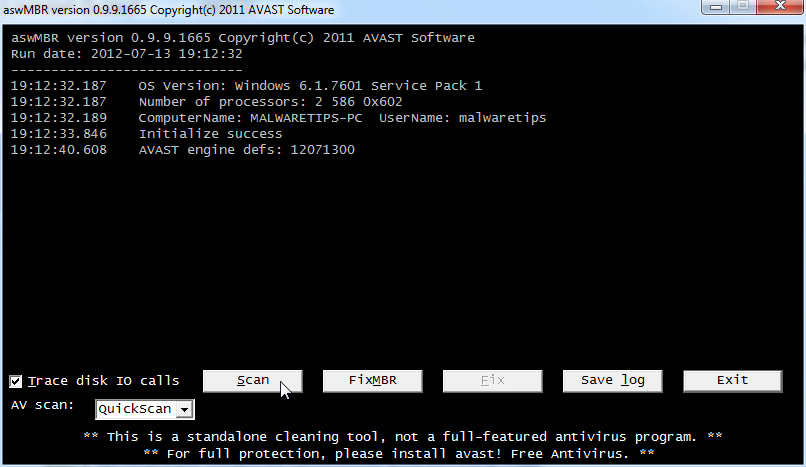
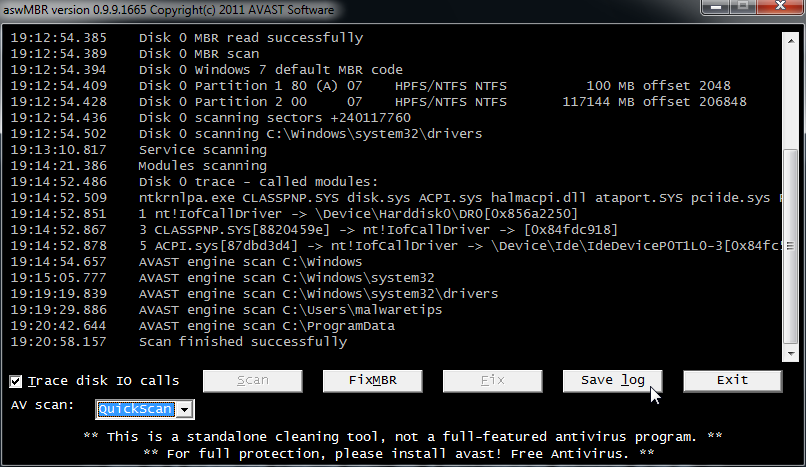
- On completion of the scan click [Save log], save it to your desktop and post in your next reply.
Fiery
Level 1
Download Farbar Recovery Scan Tool from the below link:
<ul><li>For 64 bit systems download <a title="External link" href="http://download.bleepingcomputer.com/farbar/FRST64.exe" rel="nofollow external"><>Farbar Recovery Scan Tool x64</></a> and save it to a USB/flash drive.</li>
Also download Listparts 64 bit and save it to the USB/flash drive also.
<li>Plug the flashdrive into the infected PC.</li>
<li>Enter <>System Recovery Options</>.</li>
<>To enter System Recovery Options from the Advanced Boot Options:</>
<ul>
<li>Restart the computer.</li>
<li>As soon as the BIOS is loaded begin tapping the<> F8</> key until Advanced Boot Options appears.</li>
<li>Use the arrow keys to select the <>Repair your computer</> menu item.</li>
<li>Select <>US</> as the keyboard language settings, and then click <>Next</>.</li>
<li>Select the operating system you want to repair, and then click <>Next</>.</li>
<li>Select your user account an click <>Next</>.</li>
</ul>
<li>On the System Recovery Options menu you will get the following options:</span>
<pre>Startup Repair
System Restore
Windows Complete PC Restore
Windows Memory Diagnostic Tool
Command Prompt</pre>
<ol>
<li>Select <>Command Prompt</></li>
<li>In the command window type in <[b]>notepad</[b]> and press <[b]>Enter</[b]>.</li>
<li>The notepad opens. Under File menu select <[b]>Open</[b]>.</li>
<li>Select "Computer" and find your flash drive letter and close the notepad.</li>
<li>In the command window type <[b]><span style="color: #ff0000;">e</span>:\frst64</[b]> and press <[b]>Enter</[b]>
<[b]>Note:</[b]><span style="color: #ff0000;"> Replace letter <[b]>e</[b]> with the drive letter of your flash drive.</span></li>
<li>The tool will start to run.</li>
<li>When the tool opens click <[b]>Yes</[b]> to disclaimer.</li>
<li>Press <[b]>Scan</[b]> button.</li>
<li><[b]>FRST</[b]> will let you know when the scan is complete and has written the <[b]>FRST.txt</[b]> to file, close the message.
<li>Back in the command prompt, type <[b]><span style="color: #ff0000;">e</span>:\listparts64.exe</[b]> and press <[b]>Enter</[b]>
<li>ListParts will start to run. Check the box beside [b]List BCD and click Scan
<li>When finished scanning it will make a log Result.txt on the flash drive
<li>Type exit</li>
<li>Please copy and paste both FRST.txt and Result.txt logs in your next reply</li></li>
</ol>
</ul>
<ul><li>For 64 bit systems download <a title="External link" href="http://download.bleepingcomputer.com/farbar/FRST64.exe" rel="nofollow external"><>Farbar Recovery Scan Tool x64</></a> and save it to a USB/flash drive.</li>
Also download Listparts 64 bit and save it to the USB/flash drive also.
<li>Plug the flashdrive into the infected PC.</li>
<li>Enter <>System Recovery Options</>.</li>
<>To enter System Recovery Options from the Advanced Boot Options:</>
<ul>
<li>Restart the computer.</li>
<li>As soon as the BIOS is loaded begin tapping the<> F8</> key until Advanced Boot Options appears.</li>
<li>Use the arrow keys to select the <>Repair your computer</> menu item.</li>
<li>Select <>US</> as the keyboard language settings, and then click <>Next</>.</li>
<li>Select the operating system you want to repair, and then click <>Next</>.</li>
<li>Select your user account an click <>Next</>.</li>
</ul>
<li>On the System Recovery Options menu you will get the following options:</span>
<pre>Startup Repair
System Restore
Windows Complete PC Restore
Windows Memory Diagnostic Tool
Command Prompt</pre>
<ol>
<li>Select <>Command Prompt</></li>
<li>In the command window type in <[b]>notepad</[b]> and press <[b]>Enter</[b]>.</li>
<li>The notepad opens. Under File menu select <[b]>Open</[b]>.</li>
<li>Select "Computer" and find your flash drive letter and close the notepad.</li>
<li>In the command window type <[b]><span style="color: #ff0000;">e</span>:\frst64</[b]> and press <[b]>Enter</[b]>
<[b]>Note:</[b]><span style="color: #ff0000;"> Replace letter <[b]>e</[b]> with the drive letter of your flash drive.</span></li>
<li>The tool will start to run.</li>
<li>When the tool opens click <[b]>Yes</[b]> to disclaimer.</li>
<li>Press <[b]>Scan</[b]> button.</li>
<li><[b]>FRST</[b]> will let you know when the scan is complete and has written the <[b]>FRST.txt</[b]> to file, close the message.
<li>Back in the command prompt, type <[b]><span style="color: #ff0000;">e</span>:\listparts64.exe</[b]> and press <[b]>Enter</[b]>
<li>ListParts will start to run. Check the box beside [b]List BCD and click Scan
<li>When finished scanning it will make a log Result.txt on the flash drive
<li>Type exit</li>
<li>Please copy and paste both FRST.txt and Result.txt logs in your next reply</li></li>
</ol>
</ul>
Last edited by a moderator:

Heres the thing...originially my laptop running Win 8 pro was infected and I'm not really sure if the infection is saved in the skydrive. Because from a fresh install Online armor informed me of a keylogger. Should I just log in locally instead of my Microsoft account? Thats where I think this is coming from and has been driving me crazy. Thank you for helping me!
Fiery
Level 1
You may have to enable hidden files and folders. Go to Start > Computer > organize > Folder and search options > View > select show hidden files and folders > Click Ok.
Upload a File to Virustotal
Please visit Virustotal.com
Do the same for the following as well:
C:\Users\Jared\Downloads\D.exe
Upload a File to Virustotal
Please visit Virustotal.com
- Click the Choose file... button
- Navigate to the file C:\Users\Jared\Downloads\7fu551kf.exe
- Click the Open button
- Click the Scan It button
- Copy and paste the results back here.
Do the same for the following as well:
C:\Users\Jared\Downloads\D.exe
Fiery
Level 1
Nothing is really jumping out..
Download Malwarebytes Anti-Rootkit from here to your Desktop
Download Malwarebytes Anti-Rootkit from here to your Desktop
- Unzip the contents to a folder on your Desktop.
- Open the folder where the contents were unzipped and run mbar.exe
- Follow the instructions in the wizard to update and allow the program to scan your computer for threats.
- Make sure there is a check next to Create Restore Point and click the Cleanup button to remove any threats. Reboot if prompted to do so.
- After the reboot, perform another scan with Malwarebytes Anti-Rootkit to verify that no threats remain. If there are threats, click Cleanup once more and reboot.
- When done, please post the two logs in the MBAR folder(mbar-log.txt and system-log.txt)
Hey I really appreciate you taking time to help me out with this but I found a much easier solution. Since ZeroAccess or Blackhole returned after a format and reinstall, I just downloaded Hiren's 15.1 and booted into Linux and formatted my HD there. Even got rid of the locked X:/ where it was hiding. Hopefully this post can help other people desperate for a solution. Thanks again!
Recently browsing
Members who viewed this thread in the last 5 minutes


