

The MalwareTips app
Your community, one tap away.
Open MalwareTips from your Home Screen or desktop. Follow discussions, find answers and pick up where you left off.
- Home Screen access
- Optional push alerts
- Your community
You're ready to explore.Explore what's new
Installation instructions
iPhone & iPad
- Open MalwareTips in Safari and tap Share. You may need to open the Page Menu first.
- Choose Add to Home Screen. If it is not listed, use Edit Actions to add it.
- Keep Open as Web App enabled if shown, then tap Add.
Android
- Open MalwareTips in Chrome or another browser that supports app installation.
- Open the browser menu and look for Install app, Install and create shortcut, or Add to Home screen.
- Choose Install and confirm. Wording varies by browser.
Desktop
- Chrome: use the install icon in the address bar, or the menu under Cast, save and share.
- Edge: open the menu, then More tools, Apps and Install this site as an app.
- Safari on Mac: choose Share or File, then Add to Dock. Firefox on Windows: look for the web apps button in the address bar.
If you cannot find an install option, update your browser or use its bookmark option to keep MalwareTips close.
Keep up with your conversations
After installation, open the app and sign in. Enable push notifications in Preferences if you want alerts. On iPhone and iPad, push requires a Home Screen web app and iOS or iPadOS 16.4 or later.
Sign in to manage notificationsInstallation is optional. Your notification settings stay under your control.
You are using an out of date browser. It may not display this or other websites correctly.
You should upgrade or use an alternative browser.
You should upgrade or use an alternative browser.
Ask MalwareTips Is Core Isolation nessicary?
-
 Thread starter
Xeno1234
Thread starter
Xeno1234
- Start date
- 21 Replies
- 2,943 Views

Core isolation is a security feature in Windows 10 that helps protect your computer from various types of attacks, such as those targeting the operating system's kernel. It works by isolating sensitive processes and data in a protected virtual environment called a "virtualization-based security" (VBS) container. While core isolation can enhance security, it's not absolutely necessary for every user.
Regarding performance, enabling core isolation may have a slight impact on your PC's performance, especially if your hardware doesn't support certain virtualization features. However, the impact is generally minimal and may not be noticeable in everyday use. If you have a modern computer with decent hardware, the performance impact should be negligible.
It is true that some overclocking (OC) applications may not work properly with core isolation enabled. This is because core isolation relies on virtualization features that may conflict with certain OC software. If you heavily rely on OC applications and experience compatibility issues, you may consider disabling core isolation temporarily while using those applications. However, keep in mind that disabling this security feature comes with some level of risk.
The risk of having core isolation disabled depends on your specific usage and security requirements. With core isolation disabled, your computer may be more vulnerable to certain types of attacks that target the kernel. If you frequently visit potentially unsafe websites, download files from untrusted sources, or engage in activities that increase your exposure to malware, then the risk of having core isolation disabled is higher.
Ultimately, it's a trade-off between security and performance/compatibility. If you prioritize security and are concerned about potential attacks, it's recommended to keep core isolation enabled. However, if you encounter compatibility issues with OC software or prioritize performance over security, you may consider disabling it, but be aware of the associated risks.
Regarding performance, enabling core isolation may have a slight impact on your PC's performance, especially if your hardware doesn't support certain virtualization features. However, the impact is generally minimal and may not be noticeable in everyday use. If you have a modern computer with decent hardware, the performance impact should be negligible.
It is true that some overclocking (OC) applications may not work properly with core isolation enabled. This is because core isolation relies on virtualization features that may conflict with certain OC software. If you heavily rely on OC applications and experience compatibility issues, you may consider disabling core isolation temporarily while using those applications. However, keep in mind that disabling this security feature comes with some level of risk.
The risk of having core isolation disabled depends on your specific usage and security requirements. With core isolation disabled, your computer may be more vulnerable to certain types of attacks that target the kernel. If you frequently visit potentially unsafe websites, download files from untrusted sources, or engage in activities that increase your exposure to malware, then the risk of having core isolation disabled is higher.
Ultimately, it's a trade-off between security and performance/compatibility. If you prioritize security and are concerned about potential attacks, it's recommended to keep core isolation enabled. However, if you encounter compatibility issues with OC software or prioritize performance over security, you may consider disabling it, but be aware of the associated risks.

So, is this the same as QUBES Linux functionailty? Or, to a lesser extent, Whonix, which runs a seperate, but integrated, Gateway and Workstation VM.
I am trying to setup a QUBES test machine but my processor's are too old to run the required virtulisation software.
Whonix is great if you can put up with TOR network speeds.
Maybe QUBES in VMWare rather than Virtual Box.
I think this approach is very interesting though.
I am trying to setup a QUBES test machine but my processor's are too old to run the required virtulisation software.
Whonix is great if you can put up with TOR network speeds.
Maybe QUBES in VMWare rather than Virtual Box.
I think this approach is very interesting though.
Last edited:

Xeno1234
Level 14
Im not sure. I'm pretty sure its a type of process isolation but I've noticed it provide some slowdowns. My CPU got about 10% faster with this turned off.So, is this the same as QUBES Linux functionailty? Or, to a lesser extent, Whonix, which runs a seperate, but integrated, Gateway and Workstation VM.
I am trying to setup a QUBES test machine but my processor's are too old to run the required virtulisation software.
Whonix is great if you can put up with TOR network speeds.
Maybe QUBES in VMWare rather than Virtual Box.
I think this approach is very interesting though.

If your game server participants don't complain about the speed, then why disable core isolation? My core i5 2015 ran astonishingly fast when I applied ReviOS to Win 11 23H2 - it totally removed Windows Defender plus some other things. But I missed the secure feeling of having core isolation so I re-installed Win 11.
Last edited:
Xeno1234
Level 14
I've noticed for me it causes stutters and my cpu runs about 10% slower. I'd rather keep it off, and I think im fine security wise with Kaspersky and Default Deny.If your game server participants don't complain about the speed, then why disable core isolation? My core i5 2015 ran astonishingly fast when I applied ReviOS to Win 11 23H2 - it totally removed Windows Defender plus some other things. But I missed the secure feeling of having core isolation so I re-installed Win 11.
What is your CPU's model number ? I sorta remember you mentioning about getting a new machine ?my cpu runs about 10% slower
Well when I posted my ReviOS Win 11 configuration, and I mentioned the loss of core isolation; halan4096 just commented on my Comodo Firewall Beta 2024 and said using beta was insecure. And he didn't mention anything about core isolation virtualized security.
Xeno1234
Level 14
i9-14900k and 4090 as my gpu. Its overkill but im extremely happy using it, its amazing.What is your CPU's model number ? I sorta remember you mentioning about getting a new machine ?
Well when I posted my ReviOS Win 11 configuration, and I mentioned the loss of core isolation; halan4096 just commented on my Comodo Firewall Beta 2024 and said using beta was insecure. And he didn't mention anything about core isolation virtualized security.

Core Isolation on a relatively new machine that supports all the security specifications required by W11: TPM, Secure Boot, etc. should always be activated.
I'm using Kaspersky Premium 21.15a, and I have it enabled, of course I had to give up on keeping Kaspersky virtualization enabled, since only 1 Hypervisor can be enabled in the system, so I decided to keep W11 Core Isolation enabled in my new machine.
I'm using Kaspersky Premium 21.15a, and I have it enabled, of course I had to give up on keeping Kaspersky virtualization enabled, since only 1 Hypervisor can be enabled in the system, so I decided to keep W11 Core Isolation enabled in my new machine.

I disable it mainly because I play games on my non-gaming PC. Enabling it reduces gaming performance. If I didn't play games and my PC was one of the newer and much faster CPUs, I would've enabled it.
Xeno1234
Level 14
I do have the Kaspersky Isolation on.Core Isolation on a relatively new machine that supports all the security specifications required by W11: TPM, Secure Boot, etc. should always be activated.
I'm using Kaspersky Premium 21.15a, and I have it enabled, of course I had to give up on keeping Kaspersky virtualization enabled, since only 1 Hypervisor can be enabled in the system, so I decided to keep W11 Core Isolation enabled in my new machine.
How much of a performance impact would the K isolation give? I already have enough performance, I'm just curious.
I don't know, I don't use my system to play, I have not noticed any degradation in performance.
Xeno1234
Level 14
I might try a benchmark with and without there isolation, but my performance is already good, there is no noticeable decrease.I don't know, I don't use my system to play, I have not noticed any degradation in performance.
For me with gaming, I can put every single game to max settings and have it run perfectly.
Xeno1234
Level 14
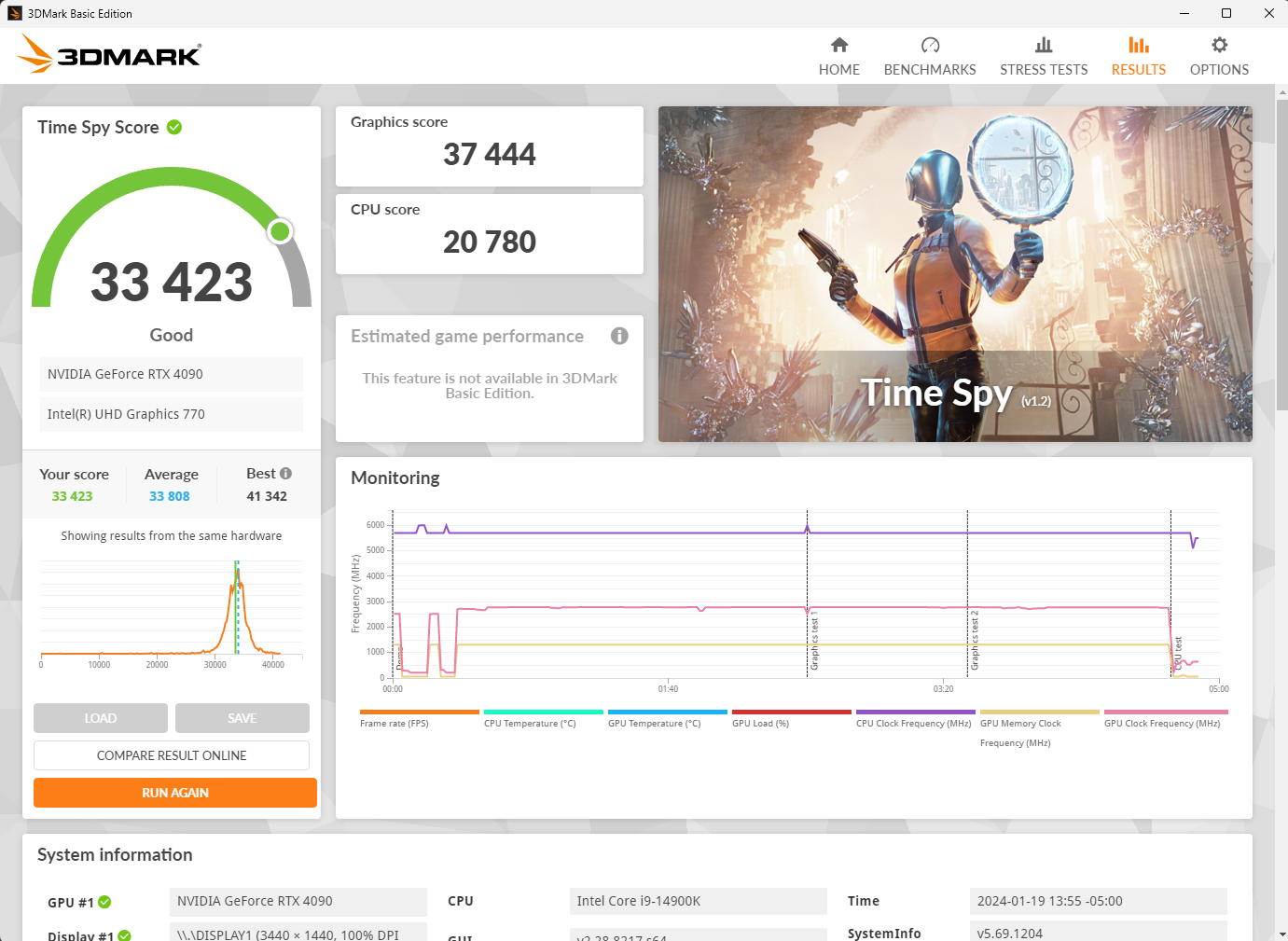
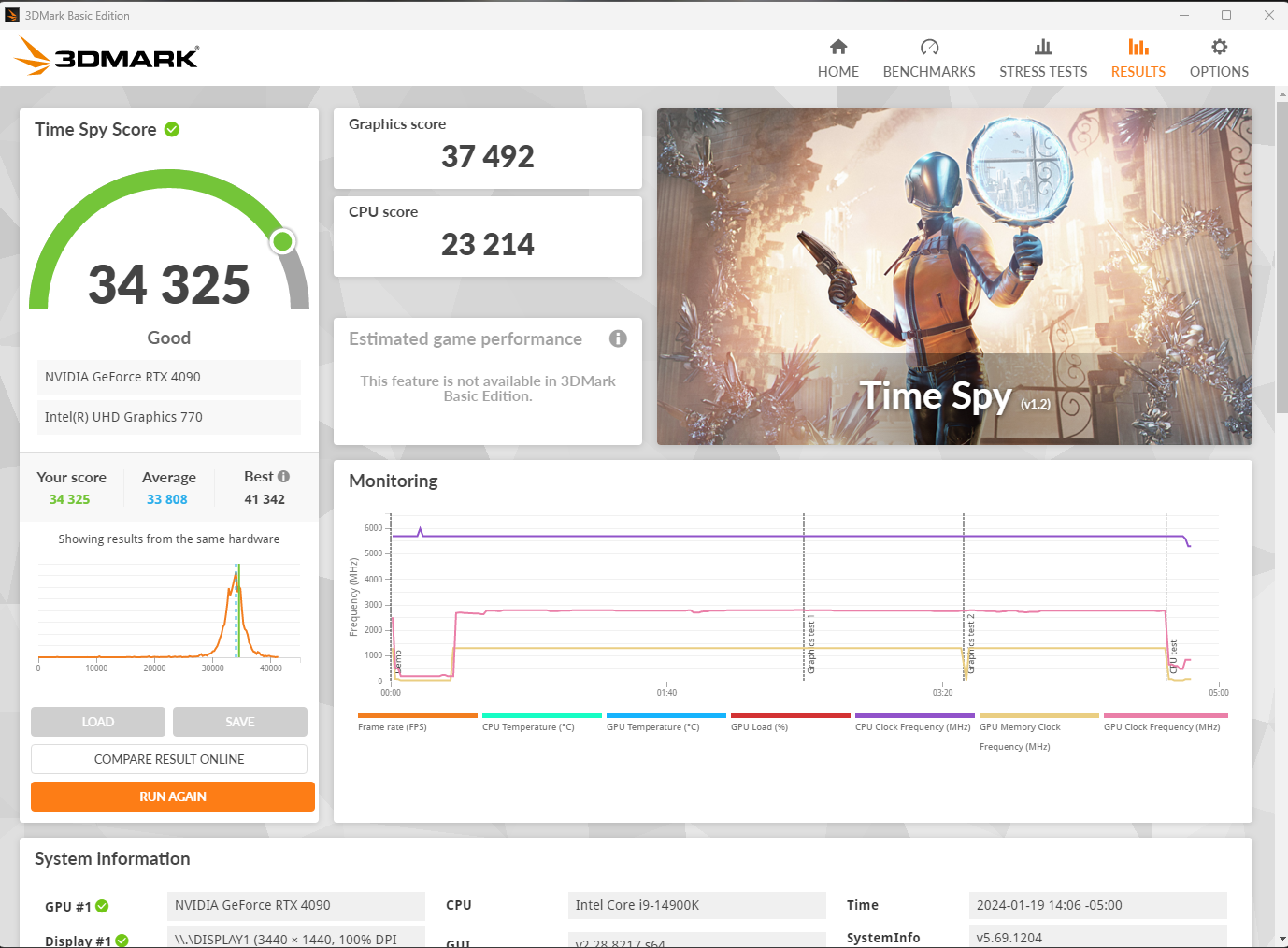
I did a little benchmarking, and the results actually suprised me alot.
Hardware Virtulization on or off in Kaspersky didnt change anything, but I'm suprised that turning off Kaspersky and using defender made my cpu 10-25% faster.
With Kaspersky and Hardware Virtulization On (Off was basically same score):
With Defender:
@harlan4096 do you have any performance tweaks I can try on K to make it lighter?
Hardware Virtulization on or off in Kaspersky didnt change anything, but I'm suprised that turning off Kaspersky and using defender made my cpu 10-25% faster.
With Kaspersky and Hardware Virtulization On (Off was basically same score):
With Defender:
@harlan4096 do you have any performance tweaks I can try on K to make it lighter?
No, I don't have such tweaks, because that would means decrease security...
Also:
So, that's not a actually CPU performance test, so irrelevant if You don't play with that system, and You will not notice any difference in normal daily working, anyway who wants security with an antivirus, has to make a small sacrifice... just live the life, be happy
Also:
Time Spy is a DirectX 12 simulation test for gaming PCs running Windows 10. Time Spy, with the DirectX 12 engine intact, designed from the ground up to support new API features like asynchronous computing, explicit multi-adapter, and multi-threading, is the perfect simulator for testing the DirectX 12 performance of modern graphics cards.
So, that's not a actually CPU performance test, so irrelevant if You don't play with that system, and You will not notice any difference in normal daily working, anyway who wants security with an antivirus, has to make a small sacrifice... just live the life, be happy
Xeno1234
Level 14
They have it set to be like CPU at 100% usage, gpu at 100% usage - add scores then divide by 2. Unless im doing rendering (which I'm not), or intense video editing, you wont really need that extra cpu performance. I've tested it in games and so far, there doesnt appear to be a difference in performance between the two. Ill test out a few CPU bound games and see if there is any noticable change, but I will keep Kaspersky and Default Deny for the time being unless I switch to Checkpoint + Xcitium.No, I don't have such tweaks, because that would means decrease security...
Also:
So, that's not a actually CPU performance test, so irrelevant if You don't play with that system, and You will not notice any difference in normal daily working, anyway who wants security with an antivirus, has to make a small sacrifice... just live the life, be happy
Xeno1234
Level 14
Tested a few games, appear to be VERY similar in results, since most of the time my GPU is doing the heavy lifting. I'd rather have Kaspersky than 1-2 less fps when my PC is pushing 100-200+ in every game.They have it set to be like CPU at 100% usage, gpu at 100% usage - add scores then divide by 2. Unless im doing rendering (which I'm not), or intense video editing, you wont really need that extra cpu performance. I've tested it in games and so far, there doesnt appear to be a difference in performance between the two. Ill test out a few CPU bound games and see if there is any noticable change, but I will keep Kaspersky and Default Deny for the time being unless I switch to Checkpoint + Xcitium.
Last edited:
tobythomas
New Member
Core isolation is not strictly necessary, but it enhances security by isolating critical system processes from potential attacks. While it can slightly impact PC performance and may not be compatible with certain overclocking applications, the trade-off for increased security is generally worthwhile. Disabling it may introduce some risks, but the extent depends on individual usage and the level of sensitivity to potential security threats.

RoboMan
Level 39
Verified
Honorary Member
Top Poster
Content Creator
Well-known
High Reputation
Forum Veteran
Does Kaspersky's virtualization add any security to the machine? Or is it necessary for any module to perform correctly? Or what's its purpose?Core Isolation on a relatively new machine that supports all the security specifications required by W11: TPM, Secure Boot, etc. should always be activated.
I'm using Kaspersky Premium 21.15a, and I have it enabled, of course I had to give up on keeping Kaspersky virtualization enabled, since only 1 Hypervisor can be enabled in the system, so I decided to keep W11 Core Isolation enabled in my new machine.
Kaspersky use their own hypervisor for kernel hooking. Without it, Kaspersky's protection quality for its behavior blocker may decrease against certain types of malware. But I don't know to what extent and also don't know if enabling Core Isolation disables Kaspersky's kernel hooking. It seems Kaspersky doesn't share enough info about it anywhere and for good reasons I assume.Does Kaspersky's virtualization add any security to the machine? Or is it necessary for any module to perform correctly? Or what's its purpose?
Recently browsing
Members who viewed this thread in the last 5 minutes
You may also like...
-

-

-
 Serious Discussion BYOVD attacks, prevention, and Core Isolation.
 -
 Serious Discussion Core Isolation / Memory Integrity sanfu
 -
