

The MalwareTips app
Your community, one tap away.
Open MalwareTips from your Home Screen or desktop. Follow discussions, find answers and pick up where you left off.
- Home Screen access
- Optional push alerts
- Your community
You're ready to explore.Explore what's new
Installation instructions
iPhone & iPad
- Open MalwareTips in Safari and tap Share. You may need to open the Page Menu first.
- Choose Add to Home Screen. If it is not listed, use Edit Actions to add it.
- Keep Open as Web App enabled if shown, then tap Add.
Android
- Open MalwareTips in Chrome or another browser that supports app installation.
- Open the browser menu and look for Install app, Install and create shortcut, or Add to Home screen.
- Choose Install and confirm. Wording varies by browser.
Desktop
- Chrome: use the install icon in the address bar, or the menu under Cast, save and share.
- Edge: open the menu, then More tools, Apps and Install this site as an app.
- Safari on Mac: choose Share or File, then Add to Dock. Firefox on Windows: look for the web apps button in the address bar.
If you cannot find an install option, update your browser or use its bookmark option to keep MalwareTips close.
Keep up with your conversations
After installation, open the app and sign in. Enable push notifications in Preferences if you want alerts. On iPhone and iPad, push requires a Home Screen web app and iOS or iPadOS 16.4 or later.
Sign in to manage notificationsInstallation is optional. Your notification settings stay under your control.
You are using an out of date browser. It may not display this or other websites correctly.
You should upgrade or use an alternative browser.
You should upgrade or use an alternative browser.
Question is ESET good for computer noobs?
Help answer the author's question with clear explanations and useful steps.


While those rules may be helpful for those who know what they're doing and why, could you provide, do you have a link or two from the forum about why they were added and for what reason, to help @Aglos as @RoboMan mentioned?I have a complete Set of HIPS and Firewall rules if anyone interested ?
LOLBINS block is included. I take no responsibility for the use of it. I made this with @Victor M last year.
When using just tweak to your liking.

Secure File Sharing - Filemail
Share files of any size, any format, any type, securelywww.filemail.com
Link is valid for 7 days.
F
ForgottenSeer 123960
While designed to stop living-off-the-land (LOLBin) attacks, this configuration is dangerously over-tuned and acts as a self-inflicted Denial of Service (DoS) for standard Windows environments.
Do not apply this to a daily-driver PC unless you want to break core OS functionality.
Here is the breakdown of the forensic extraction and capability mapping.
The intent behind this XML file is clear: paranoid system lockdown. However, the engineering hygiene is amateur. It applies brute-force blocking to native Windows binaries without accounting for the catastrophic functional degradation these rules cause to daily operations.
Extracted Rules & Breakage Vectors
My kernel extraction pulled several highly aggressive custom HIPS rules from the XML. Here is what they do and why they are dangerous to your system:
Rule: Block Conhost V2 (Critical Failure)
Mechanism
Blocks the execution of the Console Window Host (`conhost.exe`).
The Problem
`conhost.exe` is strictly required for any console-based application to render on modern Windows. Blocking it will crash any background process, updater, or administrative tool attempting to spawn a command-line interface.
Rule: LOLBins Block
Mechanism
Blocks over 90 system executables including `schtasks.exe`, `control.exe`, `msedge.exe`, and `winget.exe`.
The Problem
Complete system degradation. Blocking `schtasks.exe` kills OS maintenance and scheduled updates. Blocking `control.exe` removes access to the Control Panel. Blocking `msedge.exe` disables the primary built-in web browser, requiring constant exceptions just to navigate the web.
Rule: Block child processes for `rundll32.exe
Mechanism
Stops `rundll32.exe` from spawning `cmd[.]exe`, `powershell[.]exe`, etc.
The Problem
Breaks legitimate legacy installers and native Windows control panel applets that proxy execution through this binary.
Rule: Registry Protect
Mechanism
Locks down `HKCU` and `HKLM` Run/RunOnce registry keys.
The Problem
Will generate massive alert fatigue. It blocks virtually all legitimate software (browsers, GPU drivers, chat clients) from establishing normal startup routines.
Rule: Block Powershell V2 & Script Executables
Mechanism
Kills `powershell[.]exe`, `powershell_ise[.]exe`, `cscript[.]exe`, `wscript[.]exe`, and `mshta[.]exe`.
The Problem
Destroys modern Windows administration. It breaks logon scripts, Group Policy processing, and the Windows Script Host.
Vulnerability & Hygiene Notes
Architectural Misunderstanding
Blocking `conhost.exe` demonstrates a fundamental lack of understanding of Windows architecture.
Obsolescence
The rules specifically target `ntvdm.exe` (the 16-bit subsystem), which doesn't even exist on modern 64-bit Windows installations. This indicates the creator is copying and pasting legacy rulesets without auditing them.
(The "Benefit of the Doubt")
The strongest possible legitimate interpretation of this configuration is that it was custom-built for an extreme high-security kiosk, a dedicated honeypot, or a heavily restricted jump-server where absolutely zero administrative tasks, browser usage, or script execution is ever permitted by local user profiles.
Final Verdict
You will spend more time fighting your own antivirus to allow basic Windows functions to run than you will actually defending against malware.

Sorry no time go to deeply in the rules. Just take them or leave them.
@Morro is (was) also using this set.
Nonsense. I use it daily on 2 machines without any issues. Think before you write this.While designed to stop living-off-the-land (LOLBin) attacks, this configuration is dangerously over-tuned and acts as a self-inflicted Denial of Service (DoS) for standard Windows environments.
Do not apply this to a daily-driver PC unless you want to break core OS functionality.
Here is the breakdown of the forensic extraction and capability mapping.
The intent behind this XML file is clear: paranoid system lockdown. However, the engineering hygiene is amateur. It applies brute-force blocking to native Windows binaries without accounting for the catastrophic functional degradation these rules cause to daily operations.
Extracted Rules & Breakage Vectors
My kernel extraction pulled several highly aggressive custom HIPS rules from the XML. Here is what they do and why they are dangerous to your system:
Rule: Block Conhost V2 (Critical Failure)
Mechanism
Blocks the execution of the Console Window Host (`conhost.exe`).
The Problem
`conhost.exe` is strictly required for any console-based application to render on modern Windows. Blocking it will crash any background process, updater, or administrative tool attempting to spawn a command-line interface.
Rule: LOLBins Block
Mechanism
Blocks over 90 system executables including `schtasks.exe`, `control.exe`, `msedge.exe`, and `winget.exe`.
The Problem
Complete system degradation. Blocking `schtasks.exe` kills OS maintenance and scheduled updates. Blocking `control.exe` removes access to the Control Panel. Blocking `msedge.exe` disables the primary built-in web browser, requiring constant exceptions just to navigate the web.
Rule: Block child processes for `rundll32.exe
Mechanism
Stops `rundll32.exe` from spawning `cmd[.]exe`, `powershell[.]exe`, etc.
The Problem
Breaks legitimate legacy installers and native Windows control panel applets that proxy execution through this binary.
Rule: Registry Protect
Mechanism
Locks down `HKCU` and `HKLM` Run/RunOnce registry keys.
The Problem
Will generate massive alert fatigue. It blocks virtually all legitimate software (browsers, GPU drivers, chat clients) from establishing normal startup routines.
Rule: Block Powershell V2 & Script Executables
Mechanism
Kills `powershell[.]exe`, `powershell_ise[.]exe`, `cscript[.]exe`, `wscript[.]exe`, and `mshta[.]exe`.
The Problem
Destroys modern Windows administration. It breaks logon scripts, Group Policy processing, and the Windows Script Host.
Vulnerability & Hygiene Notes
Architectural Misunderstanding
Blocking `conhost.exe` demonstrates a fundamental lack of understanding of Windows architecture.
Obsolescence
The rules specifically target `ntvdm.exe` (the 16-bit subsystem), which doesn't even exist on modern 64-bit Windows installations. This indicates the creator is copying and pasting legacy rulesets without auditing them.
(The "Benefit of the Doubt")
The strongest possible legitimate interpretation of this configuration is that it was custom-built for an extreme high-security kiosk, a dedicated honeypot, or a heavily restricted jump-server where absolutely zero administrative tasks, browser usage, or script execution is ever permitted by local user profiles.
Final Verdict
You will spend more time fighting your own antivirus to allow basic Windows functions to run than you will actually defending against malware.
So @Aglos you may be on your own regarding this reply. Do a Search through the forum in the Eset threads, and online for more information, unless someone else here can post more day to day use of, and why (HIPS rules).Sorry no time go to deeply in the rules. Just take them or leave them.
@Morro is (was) also using this set.
And always, keep in mind what may work easily on "one" persons PC who is more proficient, may not always play nicely on another's, as a general rule.
Last edited:

Sorry no time go to deeply in the rules. Just take them or leave them.
@Morro is (was) also using this set.
That is correct, and personally I have no problems whatsoever.
When I need to make a password or use UniGet, I need to temporarily disable the PowerShell rule. And when NVCleanstall has an update for NVIDIA, I need to temporarily disable all HIPS rules, but I only need to do these things maybe once every 2 to 3 months. So it is not a problem for me, not even a bit.

F
ForgottenSeer 123960
"I take no responsibility for the use of it."Nonsense. I use it daily on 2 machines without any issues. Think before you write this.
This is classified as a Liability Deflection Indicator.
You are implicitly acknowledging that the configuration is destructive to standard operating environments. You know it will break systems, and you are washing your hands of the ensuing damage.

I probably have a friendlier shareable ESET config file where all the rules HIPS and Firewall are in Ask mode, instead of Block. So a user always has the ability to allow actions by trusted apps if prompted. It also has quite a few allow rules for regular apps one may use now and then, like Winget, ping, nslookup, etc.
I have been wanting to share the rules here on MT for years but I keep forgetting. But a couple of rules need to be modified to make it noob friendly.
I have been wanting to share the rules here on MT for years but I keep forgetting. But a couple of rules need to be modified to make it noob friendly.
@TuxTalk I also had this in mind regarding @Aglos post:
So I don't know if she would want to be dealing with or in trying to understand when something isn't functioning correctly and that some/all HIPS rules may need to be disabled at times as per @Morro's post? But @SeriousHoax above post sounds like another option
I don't know if you know of any examples or tutorials in case I decide to install Eset for her.
It's a computer with some sensitive information, although she also likes to play video games on it...
So I don't know if she would want to be dealing with or in trying to understand when something isn't functioning correctly and that some/all HIPS rules may need to be disabled at times as per @Morro's post? But @SeriousHoax above post sounds like another option
The problem with HIPS rules are that at the end of the day, overall, I find it hard to recommend to a very average a.k.a. noob user since there could be time while installing an app or a game where the HIPS rule will trigger and in ask mode, the user will have to allow that legit action or in block mode, it will get blocked and the user wouldn't know what to do.@TuxTalk I also had this in mind regarding @Aglos post:
So I don't know if she would want to be dealing with or in trying to understand when something isn't functioning correctly and that some HIPS rules may need to be disabled at times as per @Morro's post? But @SeriousHoax above post sounds like another option
So for noobs, I think the best thing to do would be to set the Detection responses sensitivity to Aggressive for the first three options. PUA should be Balanced or maybe even Cautious.
And for the Real-Time protection, set the cleaning level to Always remedy detection.

RoboMan
Level 39
Verified
Honorary Member
Top Poster
Content Creator
Well-known
High Reputation
Forum Veteran
Here are some pretty safe rules against ransomware provided by ESET: [KB6119] Configure HIPS rules for ESET business products via ESET PROTECT or ESET PRTOECT On-PremThank you for responding. I have Emsusoft installed on my personal computer, and it has always worked well for me, but my wife has always liked Eset. I'm not very knowledgeable about this, to be honest, but I've always read that Eset has always been a little weak in behavior control and that you have to configure things to make it more secure, especially Hips. I don't know if you know of any examples or tutorials in case I decide to install Eset for her.
It's a computer with some sensitive information, although she also likes to play video games on it...
Also, check this thread for Hosts File protection: ESET 9 HIPS Hosts File Protection Settings
And this can be an issue even when using WFC in Ask mode (even after learning mode), of what am I allowing and why, of "prompt mode fatigue".The problem with HIPS rules are that at the end of the day, overall, I find it hard to recommend to a very average a.k.a. noob user since there could be time while installing an app or a game where the HIPS rule will trigger and in ask mode, the user will have to allow that legit action or in block mode, it will get blocked and the user wouldn't know what to do.
So for noobs, I think the best thing to do would be to set the Detection responses sensitivity to Aggressive for the first three options. PUA should be Balanced or maybe even Cautious.
And for the Real-Time protection, set the cleaning level to Always remedy detection.
Excellent recommendations, IMO, @SeriousHoax Bookmarked
F
ForgottenSeer 123960
This configuration is a textbook example of excellent engineering hygiene. These are correctly separated surgical blocks (targeting specific malware behaviors like credential dumping and shadow copy deletion) from behavioral monitoring (asking the user before allowing scripts or registry modifications). This provides a robust security posture that does not break native Windows updates, administrative tasks, or daily user operations.Here are some pretty safe rules against ransomware provided by ESET: [KB6119] Configure HIPS rules for ESET business products via ESET PROTECT or ESET PRTOECT On-Prem
View attachment 296249
Also, check this thread for Hosts File protection: ESET 9 HIPS Hosts File Protection Settings
The strongest possible critique of this configuration is that the "Ask" rules rely on the end-user having enough technical literacy to know when to click "Allow" or "Deny." A non-technical user experiencing alert fatigue might blindly click "Allow" on a malicious script, bypassing the HIPS protection. However, the architectural foundation of the ruleset remains completely sound.
While the configuration demonstrates excellent engineering hygiene and surgical precision, this still comes with a disclaimer on the ESET website.
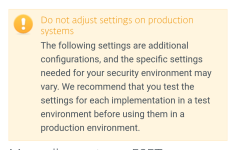
Why does ESET issue this warning?
Because HIPS operates at the Ring-0 (Kernel) level of the operating system. Even with a well-designed ruleset like the one analyzed above, the capability to completely freeze system components exists.
The "Ask" rule vulnerability. If a user configures a rule to "Ask" during the execution of a critical background Windows service, and the user is away from the keyboard or ignores the prompt, the service will time out and fail.
False positives. Legitimate software occasionally exhibits malware-like behavior (e.g., highly aggressive DRM in video games, or complex enterprise backup solutions interacting with shadow copies). A custom "Block" rule will kill these processes without warning.
ESET’s disclaimer is not a reflection of a bad configuration, but rather a universal legal and technical safeguard. It acknowledges Guiding Principle 2.1: Context Over Capability. A rule blocking lsass.exe access is safe and highly recommended for preventing credential theft, but if an obscure, legacy enterprise application relies on a non-standard authentication hook, the custom rule will break it. ESET provides the tools, but shifts the responsibility of system stability entirely to the user creating or importing the rules.

Aglos
New Member
I'm going to think about this for a while and see if I venture to start learning with Eset or install Emsisoft for my wife, which has always worked well for me without causing too much trouble, except for the classic false positives of a 0 instance.
On the one hand, it's always an incentive to learn more and have more control over security, but on the other hand, it's a bit daunting.
On the one hand, it's always an incentive to learn more and have more control over security, but on the other hand, it's a bit daunting.
Or use McAfee. Install and forget.I'm going to think about this for a while and see if I venture to start learning with Eset or install Emsisoft for my wife, which has always worked well for me without causing too much trouble, except for the classic false positives of a 0 instance.
On the one hand, it's always an incentive to learn more and have more control over security, but on the other hand, it's a bit daunting.

perhaps she should consider NOT mixing sensitive info with playing video games...Thank you for responding. I have Emsusoft installed on my personal computer, and it has always worked well for me, but my wife has always liked Eset.
It's a computer with some sensitive information, although she also likes to play video games on it...
 just sayin'
Aglos
New Member
I tell him that every day, but...perhaps she should consider NOT mixing sensitive info with playing video games...
F
ForgottenSeer 123960
We can only do so much to protect users who choose not to utilize security recommendations. However, you can heavily mitigate your own risk by strictly adhering to security best practices. Secure your accounts with 2FA, isolate sensitive accounts under a dedicated email address, and refrain from accessing them on personal device used for gaming if possible. I also strongly advise keeping offline backups of your vital data on removable drives so that, in the event of a system breach, your most important information is untouched.I tell him that every day, but...
If you are stuck sharing a single computer, do not use the same OS login. Create a separate, password-protected User Account for yourself.
Last edited by a moderator:

Personally, I would choose sth like AVG/Avast with Hardened Mode on if that is still available (I have not checked it for a while). Another option would by Trend Micro with Hybersensitive Mode.
Recently browsing
Members who viewed this thread in the last 5 minutes
You may also like...
-

-
K
Advice Request computer security for a beginner
-

-

-
