Open MalwareTips from your Home Screen or desktop. Follow discussions, find answers and pick up where you left off.
If you cannot find an install option, update your browser or use its bookmark option to keep MalwareTips close.
After installation, open the app and sign in. Enable push notifications in Preferences if you want alerts. On iPhone and iPad, push requires a Home Screen web app and iOS or iPadOS 16.4 or later.
Sign in to manage notificationsInstallation is optional. Your notification settings stay under your control.
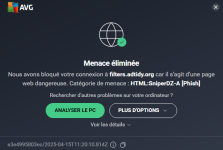
AdGuard connects to two hosts: api.adguard.org and filters.adtidy.org. Make sure that both servers are available.
AVG is blocking this conection when I launch EdgeDoes this occur when you're surfing the web? Does this happen while visiting a specific website?
I can think of a couple of reasons this would happen.
First, you could be visiting an infected website that's redirecting you to a phishing/malicious site (the one AVG is blocking).
Also, this could be malvertising, but your adblocker should be blocking that.
As well, your browser may be compromised. You may be victim of a malicious extension or DNS.
I suggest you download & run ADWCleaner.
Thanks @SeriousHoax for the report.It's a false positive as mentioned in the previous two comments.
Submit a false positive report here:
Edit: I have submitted a false positive report to Avast.![]()
Report False Positive
www.avast.com
Do you think it is useful to report this at AVG ?It's a false positive as mentioned in the previous two comments.
Submit a false positive report here:
Edit: I have submitted a false positive report to Avast.![]()
Report False Positive
www.avast.com
Yeah, you can use either Avast or AVG's page for submission, whichever you prefer.Do you think it is useful to report this at AVG ?
Formulaire de faux positifs
www.avg.com
Members who viewed this thread in the last 5 minutes