Kaspersky Application Control - KIS 2017 bug?

  • Thread starter Thread starter Deleted member 2913
  • Start date Start date
Status
Not open for further replies.
In fact I never had it because I don't have a license, so I use the trial/freeware part of HMPro.

Also, don't like so many resident protection running in my system at the same time, tweaking with strong settings KTS/KIS is enough for me, and many others well known not resident second opinion scanners :)
 
Yes but Application Control does NOT work on zero-day malware, cruelsister proved this, even of max settings as they do not have boot-time protection, so it's basically useless against these attacks.
 
  • Like
Reactions: Deleted member 2913
Yes but Application Control does NOT work on zero-day malware, cruelsister proved this, even of max settings as they do not have boot-time protection, so it's basically useless against these attacks.
Okay, so if you want to use Kaspersky as your sole protection, then disable trust of digital sigs, and enable TAM, and set unknown applications to high restricted, as per Harlan's recommended settings. Then let's talk.
 
Cruelsister had everything set at untrusted, zero-day malware that instantly reboots the computer loads upon reboot which Kaspersky does not provide protection.
Any AV suite can be defeated, if you try hard enough. None of them are bullet-proof. However, Kaspersky consistently does very well in MT malware testing, as compared to the other AV suites, so I would not dismiss it so quickly.
You can combo it with voodooshield, if you like, for tighter protection.
 
AppGuard stops it straight away, ESET and even Bitdefender free has boot-time protection, so the best in the world is unable to provide this service?
I would love to see boot-time protection too. Please suggest it to KL.
But I would not rely on any security soft starting up before the malware, in order to provide effective boot-time protection. That is playing a game of russian roulette. If you need boot-time protection, you are already in a losing position. You gotta stop the dropper, not just the payload.
BTW, AppGuard is tops. I don't use it personally, but I hear great things about it.
 
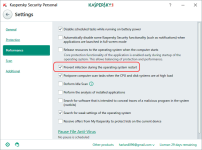
CS only set to untrusted unknown applications in Application Control, but for example others settings as: Trust in digitally signed application or "Release resources to the operating system when the computer starts" were both on...

Also, We don't know much about the malware She used ¿digitally signed? We don't know...

Anyway it seems in KL have taken into account it, and in the new beta K2018:
Sin título.png
Only time will say how well will perform that new feature, still early betas...
 
Just a little test...Please test yourself & check...I am just mentioning what I tried & results I got.
Win 10 64 Pro
KIS 2017 Default Settings with PUP Enabled
Chrome 64 Bits Installed (Kaspersky Protection)
Vivaldi 64 Bits Portable (No Kaspersky Protection)
Spyshelter Test Tools - Tested Keylogging Only
Kaspersky Virtual Keyboard was not used i.e Laptop Keyboard was used.

Spyshelter Test Tools was detected as "User activity monitoring software detected" with the options...Delete, Skip & Exclude.
Selected "Delete" And Advanced Disinfection alert appeared And I selected "Delete without restart" And was deleted successfully.

Tried again And this time selected "Skip". Alert appeared 3 times And every time selected "Skip".
Started Keylogging Test And entered fake Username & Password on one bank website.
Vivaldi 64 Bits Portable (No Kaspersky Protection) - Keylogging test window showed Username & Password entered on the bank website.
Chrome 64 Bits Installed (Kaspersky Protection) - Keylogging test window showed nothing i.e blank.


Moved Spyshelter Test Tools entry from Low Restricted to Trusted
Vivaldi 64 Bits Portable (No Kaspersky Protection) - Keylogging test window showed Username & Password entered on the bank website.
Chrome 64 Bits Installed (Kaspersky Protection) - Keylogging test window showed nothing i.e blank.

Removed Spyshelter Test Tools entry from Application Control And ran Test Tools again And got the alert And selected "Exclude".
Vivaldi 64 Bits Portable (No Kaspersky Protection) - Keylogging test window showed Username & Password entered on the bank website.
Chrome 64 Bits Installed (Kaspersky Protection) - Keylogging test window showed nothing i.e blank.
 
Just a little test...Please test yourself & check...I am just mentioning what I tried & results I got.
Win 10 64 Pro
KIS 2017 Default Settings with PUP Enabled
Chrome 64 Bits Installed (Kaspersky Protection)
Vivaldi 64 Bits Portable (No Kaspersky Protection)
Spyshelter Test Tools - Tested Keylogging Only
Kaspersky Virtual Keyboard was not used i.e Laptop Keyboard was used.

Spyshelter Test Tools was detected as "User activity monitoring software detected" with the options...Delete, Skip & Exclude.
Selected "Delete" And Advanced Disinfection alert appeared And I selected "Delete without restart" And was deleted successfully.

Tried again And this time selected "Skip". Alert appeared 3 times And every time selected "Skip".
Started Keylogging Test And entered fake Username & Password on one bank website.
Vivaldi 64 Bits Portable (No Kaspersky Protection) - Keylogging test window showed Username & Password entered on the bank website.
Chrome 64 Bits Installed (Kaspersky Protection) - Keylogging test window showed nothing i.e blank.

Moved Spyshelter Test Tools entry from Low Restricted to Trusted
Vivaldi 64 Bits Portable (No Kaspersky Protection) - Keylogging test window showed Username & Password entered on the bank website.
Chrome 64 Bits Installed (Kaspersky Protection) - Keylogging test window showed nothing i.e blank.

Removed Spyshelter Test Tools entry from Application Control And ran Test Tools again And got the alert And selected "Exclude".
Vivaldi 64 Bits Portable (No Kaspersky Protection) - Keylogging test window showed Username & Password entered on the bank website.
Chrome 64 Bits Installed (Kaspersky Protection) - Keylogging test window showed nothing i.e blank.
so sounds like Kaspersky keystroke encryption is working.
Good job.
 
Kaspersky Total Security Boot Time Protection
cruelsister1
  • 9 months ago
  • 2,356 views
That is the reason I said what i said, because anything that happened in that video which was 9 months ago is not valid for Kaspersky 2017,look how much time has pass since then. If i upload a video on this forum showing Eset,Avast or emsisoft failure to protect from 9 months ago you will not hear the end of it,so how can it be valid for Kaspersky 2017?:confused:
 
Status
Not open for further replies.

You may also like...