Question Kaspersky Plus: What do you guys think I have to configure?

Please provide comments and solutions that are helpful to the author of this topic.
No, still has to be done manually... but can be enabled in any recent stable version, even in KES.

I created a small tutorial:

Nice! Thanks.
Thanks, bro! I'll get right on it. I'm not going to disable secure connections. That's not a good solution. I noticed that too, because then, unfortunately, things slip through from the web. But I'll take care of the rest and get back to you. I really appreciate your help.
Let us know if you notice any speed improvement by changing from the default medium scanning to light scanning.
SuperMITM could also improve performance. It does in the case of Avast so maybe for Kaspersky as well.
 
No, still has to be done manually... but can be enabled in any recent stable version, even in KES.

I created a small tutorial:

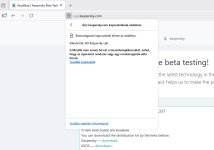
I followed your tutorial, but unfortunately, I didn't get the same result you posted in the documentation.
What is the problem??

Sorry. Now it is working on FireFox. But, not working on Edge and Chrome. Why??
 

Attachments

  • Képernyőkép 2026-04-03 151355.png
    Képernyőkép 2026-04-03 151355.png
    41.5 KB · Views: 42
Last edited:
I followed your tutorial, but unfortunately, I didn't get the same result you posted in the documentation.
What is the problem??

Sorry. Now it is working on FireFox. But, not working on Edge and Chrome. Why??
Now is not working again. sometimes it works, sometimes it doesn't. Why?
3 times restart and reboot my computer, and 2 times power off, and power on.
 

Attachments

  • Képernyőkép 2026-04-03 151834.png
    Képernyőkép 2026-04-03 151834.png
    57.6 KB · Views: 51
Last edited:
Nice! Thanks.

Let us know if you notice any speed improvement by changing from the default medium scanning to light scanning.
SuperMITM could also improve performance. It does in the case of Avast so maybe for Kaspersky as well.
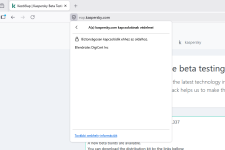
Browsing has noticeably sped up. But this SuperMITm is just a gimmick for now. It doesn't work, even though I did everything right. I created the two strings and even restarted the system, but it still doesn't work.
 
Browsing has noticeably sped up. But this SuperMITm is just a gimmick for now. It doesn't work, even though I did everything right. I created the two strings and even restarted the system, but it still doesn't work.
You might have to remove browser's cookies and cache to make it work. Sometimes, after uninstalling an AV with HTTPS scanning, the AV certificate still appears on some websites in a browser if cookies and cache are not deleted. Or maybe this feature is still buggy, hence not enabled by default.
 
You might have to remove browser's cookies and cache to make it work. Sometimes, after uninstalling an AV with HTTPS scanning, the AV certificate still appears on some websites in a browser if cookies and cache are not deleted. Or maybe this feature is still buggy, hence not enabled by default.
I did all that too, bro. Just 5 minutes ago. And it still doesn't work. I checked everything according to the instructions. Everything is exactly as harlan4096 described. It just won't work.
 
I did all that too, bro. Just 5 minutes ago. And it still doesn't work. I checked everything according to the instructions. Everything is exactly as harlan4096 described. It just won't work.
So you still see Kaspersky's certificate on every website on Edge and Chrome?
 
So you still see Kaspersky's certificate on every website on Edge and Chrome?
Yes, that's exactly what I see. The Kaspersky certificate. In every browser. Edge, Chrome, and Firefox.
By the way, I really don't get why they've been promising for several versions now that it'll be included in the final releases, but so far it hasn't made it into any of them. What are they doing?
 
Egyelőre nem ígértek semmit a végleges verzióban, a verzió még a béta tesztelés fázisában van...

A FF-ben itt mindig működik...

Jelentenem kell, hogy az Edge/Chrome viselkedése...
Rendben, igazad van. Nem ígérték, de vicces, hogy ilyen régóta nem volt benne egyetlen verzióban sem. Még mindig mindenhol látom a K. Tanúsítványt.
És nálam sem működik a FF-ben.
 
I just tried Chrome in 3 different Spanish sites, and it worked in all...
If you have a solution, please let me know. But I assume you're using KES. It might work there. It doesn't work with K. Premium. It works in two cases:
1. If I turn off the "Check Encrypted Connections" option
2. For checking the encrypted connections of apps with their own certificate store, use the following: I uncheck this option here.
In these two cases, it works consistently in FF. I turn off either one or the other.
If both are turned on, it still doesn't work

By the way, this kind of thing can be really annoying. Sometimes it works, sometimes it doesn't. It works for some people, but not for others. It's really funny, but also really frustrating. But there's no solution.
 
No, currently I'm using KPremium 21.24b (reinstalled some days ago)... and of course Scan of Encrypted Connections is here by default upon request.