Question Kaspersky Plus: What do you guys think I have to configure?

Please provide comments and solutions that are helpful to the author of this topic.

Victor M

Level 25
Thread author
Verified
Top Poster
Well-known
Oct 3, 2022
1,420
5,214
2,369
Hi Everybody,

Just got my hands on Kaspersky Plus a few days ago. The reason I bought it is for it's ability to stop Process Injection / Memory Injection. Picus's 2026 Red Report says process injection attacks occurs in ~30% of all the malware it studied (1.1 million) So I think it is high noon that they be stopped. Another reasson I bought K is because it has App Updater which is vulnerability scanning I hope, because I don't like running Nessus with Administrator rights.

So I did what AppGuard does - stop injection originating from Office and PDF apps which has macros, javascript, vbscript what not.
Then I stopped networking for Office, Macrium, Intel apps, other useless driver related apps. Only allowing updaters and browsers network access.

What else do you guys configure ?
 
Last edited:
Hi Everybody,

Just got my hands on Kaspersky Plus a few days ago. The reason I bought it is for it's ability to stop Process Injection / Memory Injection. Picus's 2026 Red Report says process injection attacks occurs in ~38% of all the malware it studied (1.1 million) So I think it is high noon that they be stopped. Another reasson I bought K is because it has App Updater which is vulnerability scanning I hope, because I don't like running Nessus with Administrator rights.

So I did what AppGuard does - stop injection originating from Office and PDF apps which has macros, javascript, vbscript what not.
Then I stopped networking for Office, Macrium, Intel apps, other useless driver related apps. Only allowing updaters and browsers network access.

What else do you guys configure ?
Process/memory injection is definitely a common technique, so hardening “high-risk” apps (Office/PDF/script hosts) and tightening outbound access is a sensible approach.

A few important expectations (so you don’t over-rely on one knob)
Kaspersky’s “injection/exploit” protections are layered (behavior blockers, exploit prevention, application control, etc.). Blocking injection from specific apps helps, but you still want strong defaults elsewhere (cloud reputation, behavior monitoring, ransomware rollback, and patching), because attackers can shift to other processes/LOLBins.

Also, Kaspersky’s App Updater is closer to “patch awareness + assisted updating” than a full vulnerability scanner like Nessus. It’s useful for reducing common known-vulnerable app exposure, but it won’t enumerate and score everything the way a scanner does.

Kaspersky Plus: settings that tend to matter most
  • Make sure KSN/cloud and reputation features are enabled (Kaspersky Security Network / cloud lookups). This has a big impact on blocking new droppers and “first-seen” samples.
  • Keep System Watcher enabled (behavior monitoring + ransomware remediation/rollback). If you disable parts of this for compatibility/performance, you often lose meaningful protection.
  • Application Control / Default Deny posture: keep unknown applications in Low Restricted/Untrusted (wording varies by version). This is one of the few “big lever” settings that can materially reduce damage if something executes.
  • Exploit prevention: if there’s a per-application exploit prevention list, ensure browsers, Office apps, PDF readers, and Java/WMI/script hosts are covered.
  • Enable detection of “legitimate tools used by criminals” (often phrased as detecting other software that can be used by criminals). This helps with LOLBins/dual-use tools abuse, but may increase alerts in admin-heavy environments.
  • Firewall: prefer “prompt/learn” only briefly, then lock down. Learning modes can accidentally bless bad behavior if something runs during that period.
  • Don’t over-tune heuristics blindly. Aggressive heuristic settings can increase false positives and train you to ignore prompts. It’s usually better to harden Application Control + keep cloud/behavior on than to crank heuristics to maximum.

Your current approach: what I’d tweak
  • Blocking Office networking is fine for many home setups, but realize it can break legitimate workflows (templates, cloud docs, licensing, add-ins). A safer alternative is “Office can reach only what it needs” (allow specific domains/IPs if you can) rather than blanket allow/deny.
  • Be careful blocking networking for vendor updaters (Intel, driver components). If you block the wrong component, you can silently stop security updates. If you’re going to restrict, explicitly allow the updater executable(s) and services, not just the UI.
  • Process injection restrictions: don’t only apply this to Office/PDF. Attack chains often pivot through script hosts and LOLBins (PowerShell, wscript/cscript, mshta, rundll32, regsvr32, installutil, etc.). If Kaspersky lets you create rules around these, they’re worth including.

Windows-side hardening that complements Kaspersky well
These usually provide a bigger real-world reduction in Office/PDF infection paths than lots of per-app micro-rules:
  • Office macros: keep “Block macros from the Internet” enabled (Mark-of-the-Web). Disable VBA macros unless you truly need them.
  • PDF reader: disable JavaScript if your workflow allows it.
  • Use a Standard User account for daily work (keep admin only for installs/maintenance).
  • Turn on Windows exploit protections (system defaults are fine). If you’re comfortable, Windows Defender Application Control / AppLocker / SRP can be a strong “default deny” layer, but it’s more complex.
  • Backups: keep offline or versioned backups (ransomware is still the “you only notice it when it hurts” scenario).

Operational “sanity checks”
  • After you harden rules, do a quick controlled test: verify Office updates still work, PDF viewing still works, and your backup/imaging (Macrium) still functions normally.
  • If Kaspersky starts showing repeated blocks/alerts, don’t just whitelist—identify which parent process spawned the blocked behavior (that’s often the real clue).

If you want the best return on effort, the highest-impact next step is: keep KSN/cloud + System Watcher + Application Control strong, then harden script hosts/LOLBins and macro policies, rather than only focusing on Office/PDF injection rules.
 
When I used Kaspersky, it helped me to strengthen the firewall for rarely used apps and enable the interactive control of permissions. It’s also worth checking the antiexploit and antiphishing modules. These are the adjustments I used; surely other members with more experience will have extra tricks to share. In the end, it’s like a castle: many walls protect, but you still need doors to let life in. 🔒🛡️🏰
 
Last edited:
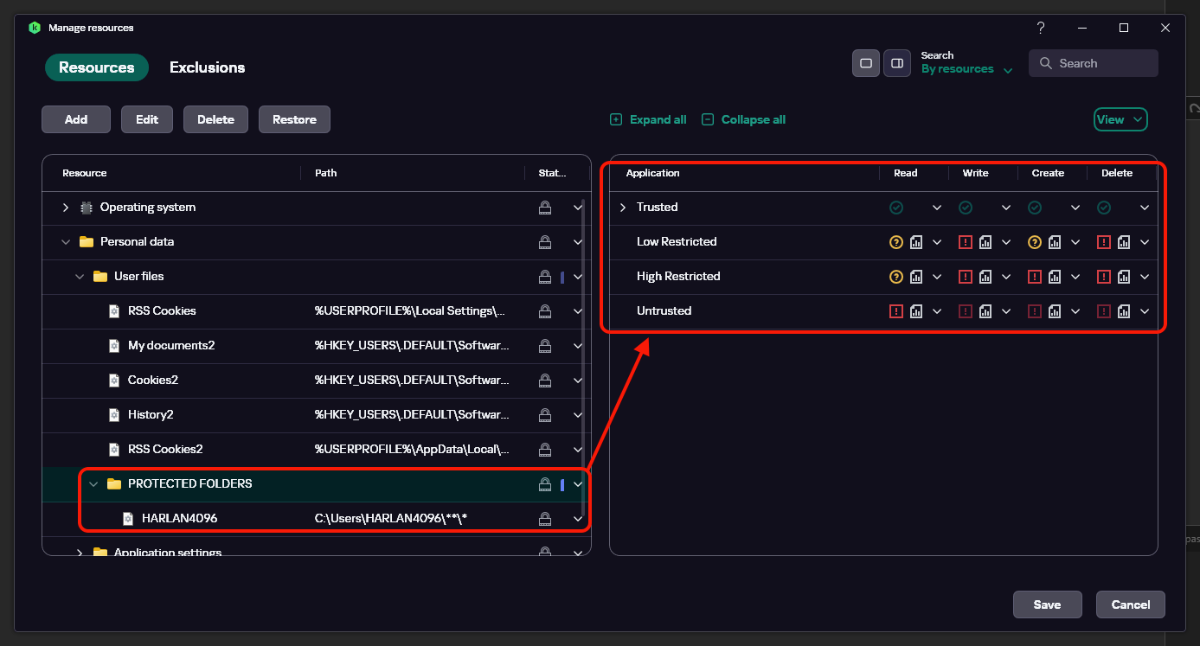
1. Hot Take - KIS/KTS/KSCloud/KStandard/KPlus/KPremium - Implementing Protected Folders via Manage Resources (+ Default Deny Mode)
2. Hot Take - RoboMan's Kaspersky 2023 Light & Solid Settings
3. Configure notification settings.
Settings> Interface settings> click on "configure notifications" and configure "warning notifications"
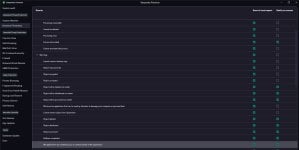
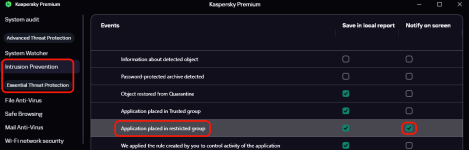
3. now if you have enabled protected folders, and if you want a notification that an app has prevented by "intrusion prevention" module, then in "configure notifications" click on "intrusion prevention" on left side and enable "We applied a rule created by you......application" under "warnings".
 

Attachments

  • 1.jpg
    1.jpg
    185 KB · Views: 111
Last edited:
1. Hot Take - KIS/KTS/KSCloud/KStandard/KPlus/KPremium - Implementing Protected Folders via Manage Resources (+ Default Deny Mode)
2. Hot Take - RoboMan's Kaspersky 2023 Light & Solid Settings
3. Configure notification settings.
Settings> Interface settings> click on "configure notifications" and configure "warning notifications"
3. now if you have enabled protected folders, and if you want a notification that an app has prevented by "intrusion prevention" module, then in "configure notifications" click on "intrusion prevention" on left side and enable "We applied a rule created by you......application" under "warnings".
1771402826673.png
 
Hi Everybody,

Just got my hands on Kaspersky Plus a few days ago. The reason I bought it is for it's ability to stop Process Injection / Memory Injection. Picus's 2026 Red Report says process injection attacks occurs in ~30% of all the malware it studied (1.1 million) So I think it is high noon that they be stopped. Another reasson I bought K is because it has App Updater which is vulnerability scanning I hope, because I don't like running Nessus with Administrator rights.

So I did what AppGuard does - stop injection originating from Office and PDF apps which has macros, javascript, vbscript what not.
Then I stopped networking for Office, Macrium, Intel apps, other useless driver related apps. Only allowing updaters and browsers network access.

What else do you guys configure ?
Unrelated but how heavy do you find it as compared to the other solution's?
 
This one could also be helpful:

 
Another reasson I bought K is because it has App Updater which is vulnerability scanning I hope.

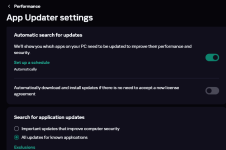
Kaspersky Plus has an integrated App Updater, that checks a database of known apps and warns and/or auto updates them:

1771409716335.png

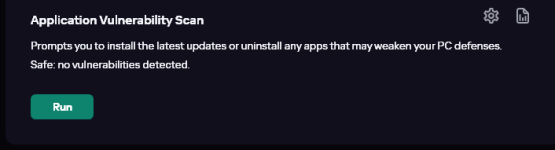
About vulnerabilities, apart from the Anti-Exploit tech integrated in System Watcher, there is an on demand (or scheduled) Vulnerabilities Scan option:

1771409684949.png
 
Last edited:
I think I am OK, already have other layers that implement default deny: Hard_Configurator and CyberLock
Consider setting up Application Control as Untrusted for all unknown files, and untick "Trust a file if it has a digital signature". That should replace CyberLock. As for H_C, if you're using it for default-deny regarding app execution, you can pass on that too. Consider SWH for script protection and Windows hardening.
 
untick "Trust file if it has a digital signature". That should replace CyberLock. As for H_C, if you're using it for default-deny regarding app execution, you can pass on that too.
Thanks. (y)But then I would be placing too many eggs in one basket, don't want a single point of failure. Had that happen with ESET Protect, the red team found an explpoit that disabled HIPS entirely - none of the rules functioned. E's tech support was stumped.

Evaluating.
 
Last edited:
Thanks. (y)But then I would be placing too many eggs in one basket, don't want a single point of failure. Had that happen with ESET Protect, the red team found an explpoit that disabled HIPS entirely - none of the rules functioned. E's tech support was stumped.
While you state that you want to avoid a "single point of failure" (SPOF), this approach often backfires because, in cybersecurity, complexity is frequently the enemy of security. Effective defense relies on "true redundancy," such as pairing a network firewall like Palo Alto with a distinct endpoint agent like CrowdStrike, because they operate at different defensive layers (Network vs. Host). In contrast, what you are attempting is "bad redundancy"; running two HIPS-like behavior blockers on the same endpoint, such as stacking ESET HIPS alongside CyberLock, results in driver interference rather than reinforcement, potentially destabilizing the system and creating new vulnerabilities instead of closing them.

In cybersecurity, "Complexity is the enemy of security" is a foundational axiom (often attributed to Bruce Schneier).
 
Last edited by a moderator:
Yes I does, my mind is muddled up.

"Bad redundancy", too many eggs in one basket, overkill. Think I'll let the subconscious mind do a little untangling.
Your redundancy in this case should be
1.OS image backup and data backup at three different locations.
2. Properly configured system wide doh with filtering capabilities like a nextdns or similar
3. A browser based ad blocker
4. A good router with a strong firewall and decent update schedule like asus, mikrotik or unify.