Advice Request Kaspersky Protection Level question

Please provide comments and solutions that are helpful to the author of this topic.

Soulbound

Level 29
Thread author
Verified
Well-known
Jan 14, 2015
1,758
5,179
2,777
At the moment I do not have Kaspersky installed but before I removed I remember seeing 3 protection levels.
one of them was the performance one where protection is limited.

My question is what settings get changed when you switch to such setting. KB of Kaspersky doesnt have much info at all.

@harlan4096 you know which one I am referring to right?
 
The settings that change are these parameters, they go to maximum or minimum, according to the level of protection:

1599510061203.png


1599509939602.png


1599509974548.png


1599510010395.png
 
Ah no sorry not those.
Under the option where you can import/export settings if im not mistaken @Freud2004. Next to it on right hand side. Guess is just a shortcut to the screenshots you posted, but what does it get changed on the low compared to medium?

kscloud20_15102_0413-498164.png
I believe this are your parameters, you can save them or export, or import from another user...
 
This is only my experience and that might not be how it works at all though. But yeah Action of Threat detection, when it scans and heuristics are basically tweaked by the slider. Low scans files on direct user access, Recommended scans when another process is accessing or running the file or you enter that file's directory. Deep scan appears to scan every file that is accessed by any process. This is just my observation based on CPU and disk usage in each scenario. There is little documentation on Kaspersky's side unfortunately.
 
Ah no sorry not those.
Under the option where you can import/export settings if im not mistaken @Freud2004. Next to it on right hand side. Guess is just a shortcut to the screenshots you posted, but what does it get changed on the low compared to medium?

kscloud20_15102_0413-498164.png
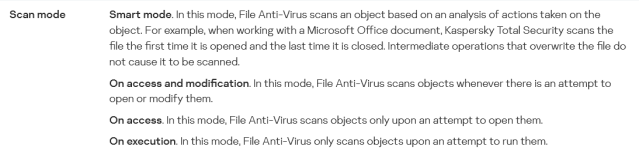
There is not so much info about it, I took this from a business product (KES), but I guess should be similar or the same:

1599549669979.png
 
There is not so much info about it, I took this from a business product (KES), but I guess should be similar or the same:

Awesome just what i needed.
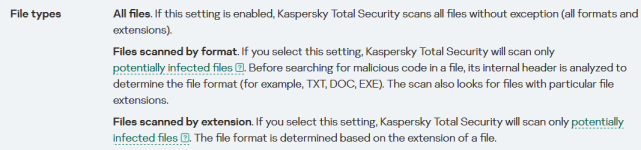
One question, difference between Files scanned by extensions vs Files scanned by formats?
I think by extensions should be fine right?
 
They are pretty much self-explanatory.
On access will cause Kaspersky to scan a file when you access it. Right clicking a file to view it’s properties, opening a document, etc. This all means you are accessing the file and Kaspersky will scan it.

On execution applies only to executables. These will be scanned only once you launch the program.

On write means everything will be scanned as created - installing a program will cause all of it’s files to be scanned. Same will be with saving documents, opening pages, downloading files.