

nonamebob567
Level 1
What does Kaspersky's default deny/zero trust mode do (in Intrusion Prevention settings)? In a few articles here it mentioned that if you set intrusion prevention to default deny (untrusted), it will basically block the execution of all applications that are not in the Kaspersky Security Network list of trusted applications. Is this true?
What I'm trying to achieve here is if someone in my family uses my computer and accidentally uses it to download and install, let's say, adware or a PUP (not necessarily malware but still untrustworthy), will Kaspersky outright block the installation because it's not in Kaspersky's list of trusted applications? I also made Kaspersky password protected so others can't modify any settings.
In short I'm trying to avoid the following scenario:
My little brother Timmy (I don't have anyone named Timmy) figured out my computer password and installed a cracked game during a day when I was not home, and I got to see a potentially harmful program installed on my computer the next day when I came home. Even if this crack were to be free of malware, I don't want this to happen.
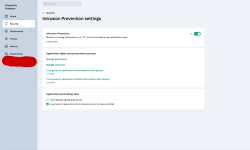
Is this the right way to set Kaspersky Premium into default deny/zero trust mode?
Please see the image.
I'm grateful for any assistance.
What I'm trying to achieve here is if someone in my family uses my computer and accidentally uses it to download and install, let's say, adware or a PUP (not necessarily malware but still untrustworthy), will Kaspersky outright block the installation because it's not in Kaspersky's list of trusted applications? I also made Kaspersky password protected so others can't modify any settings.
In short I'm trying to avoid the following scenario:
My little brother Timmy (I don't have anyone named Timmy) figured out my computer password and installed a cracked game during a day when I was not home, and I got to see a potentially harmful program installed on my computer the next day when I came home. Even if this crack were to be free of malware, I don't want this to happen.
Is this the right way to set Kaspersky Premium into default deny/zero trust mode?
Please see the image.
I'm grateful for any assistance.
Last edited by a moderator:

.png.04fcac4390b9c4837a0fe27d900af23b.png)


