

The MalwareTips app
Your community, one tap away.
Open MalwareTips from your Home Screen or desktop. Follow discussions, find answers and pick up where you left off.
- Home Screen access
- Optional push alerts
- Your community
You're ready to explore.Explore what's new
Installation instructions
iPhone & iPad
- Open MalwareTips in Safari and tap Share. You may need to open the Page Menu first.
- Choose Add to Home Screen. If it is not listed, use Edit Actions to add it.
- Keep Open as Web App enabled if shown, then tap Add.
Android
- Open MalwareTips in Chrome or another browser that supports app installation.
- Open the browser menu and look for Install app, Install and create shortcut, or Add to Home screen.
- Choose Install and confirm. Wording varies by browser.
Desktop
- Chrome: use the install icon in the address bar, or the menu under Cast, save and share.
- Edge: open the menu, then More tools, Apps and Install this site as an app.
- Safari on Mac: choose Share or File, then Add to Dock. Firefox on Windows: look for the web apps button in the address bar.
If you cannot find an install option, update your browser or use its bookmark option to keep MalwareTips close.
Keep up with your conversations
After installation, open the app and sign in. Enable push notifications in Preferences if you want alerts. On iPhone and iPad, push requires a Home Screen web app and iOS or iPadOS 16.4 or later.
Sign in to manage notificationsInstallation is optional. Your notification settings stay under your control.
You are using an out of date browser. It may not display this or other websites correctly.
You should upgrade or use an alternative browser.
You should upgrade or use an alternative browser.
New Update Kaspersky\VPN\KSOS 21.18 & KES 12.6 betas
- Thread starter harlan4096
- Start date
Kaspersky
93 Replies
14,032 Views

If You want KAV back, the suggestions should be done via Kaspersky Customer Service for home and mobile applications selecting FeedBack in the form.

These are the only options you throw up for me here:If You want KAV back, the suggestions should be done via Kaspersky Customer Service for home and mobile applications selecting FeedBack in the form.
Attachments

Select Email on the left, and fill in the form 
Type of question -> FeedBack -> I have a suggestion
Type of question -> FeedBack -> I have a suggestion
It's done. It would be nice if other people besides me would write in to say that we need KAV back.Select Email on the left, and fill in the form
Type of question -> FeedBack -> I have a suggestion

Setup PCPC setup
I think the only you can do is to get one of their business products. At least the KSOSThis is strange, because in my environment they want a smooth AV, not a bloated heavy wanker.
Kaspersky could have kept KAV. Instead they shove their fat products in people's faces.
Should we compete with Defender? Very good. Make a similarly lightweight product.
Otherwise, let the user decide what they want. Let it be basic KAV and then the rest. This way the difference between the choices is minimal. Kaspersky Premium is a completely unnecessary product.
Why are you writing this?I think the only you can do is to get one of their business products. At least the KSOS
What makes KSOS better?
Kaspersky\VPN\KSOS 21.18.3.244
Hello! A new beta build is available. You can download the distribution kit by the link: Kaspersky — Download VPN — Download KSOS — Download To test the application, activate the license embedded in the distribution kit. You should only use the beta build with this license provided for testing. I...
 forum.kaspersky.com
KES 12.6.0.244
Hello! A new beta build is available - about product. You can download the distribution kit by the link: Download Warning! turning ON full disk encryption on a hyper-V 2022 VM will result in VM failure. new test Windows11 24h2 is not supported. PC will enter in cycle BSOD after installation. To t...
forum.kaspersky.com
Setup PCPC setup
No Bloat. Just the Password Manager and VPN that can be removed.Why are you writing this?
What makes KSOS better?
And better detecting capabilities? @harlan4096
Detection capabilities in general should be similar or the same as home products.
Setup PCPC setup
Must be their cloud protection aka KSNDetection capabilities in general should be similar or the same as home products.
Not only KSN, Kaspersky heur detection in general is good as well.
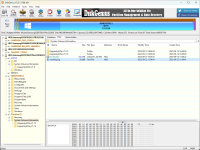

Yes, it's normal. I believe these files are related to Kaspersky's caching mechanism "iChecker and iSwift smart scan technologies". The folders you see are not deleted from System Volume Information folder even after uninstallation. They reside in every partition. You may also find a small file in those folders.I have a question:
Is what you see in the picture below normal?
Is that where Kaspersky is writing? Or is it created by Windows?
It's strange to me.
It's the same for Bitdefender and Norton.
There are ways to delete those folders/files in a non-stadard way. But you probably won't be able to delete them (at least for Kaspersky) if you for example, restore a system image (to a point before you installed Kaspersky) without uninstalling Kaspersky first.
This is not good then. Kaspersky has nothing to do with the System Volume directory. You can read it, but you shouldn't write to it, because it's the privilege of the operating system. It is created by the operating system because of system restoration. That's why I don't like it.Yes, it's normal. I believe these files are related to Kaspersky's caching mechanism "iChecker and iSwift smart scan technologies". The folders you see are not deleted from System Volume Information folder even after uninstallation. They reside in every partition. You may also find a small file in those folders.
It's the same for Bitdefender and Norton.
There are ways to delete those folders/files in a non-stadard way. But you probably won't be able to delete them (at least for Kaspersky) if you for example, restore a system image (to a point before you installed Kaspersky) without uninstalling Kaspersky first.
Or, does Windows save your Kaspersky data to the System Volume directory to restore it from there?
I don't know why they do it. But as I said, Kaspersky is not the only one. Bitdefender and Norton do it too. There must be a reason behind it but I'm not a fan of this either since they don't delete them when you uninstall the product.This is not good then. Kaspersky has nothing to do with the System Volume directory. You can read it, but you shouldn't write to it, because it's the privilege of the operating system. It is created by the operating system because of system restoration. That's why I don't like it.
Or, does Windows save your Kaspersky data to the System Volume directory to restore it from there?
harlan4096 ???What do you think?
I don't have any info about that, but in my case, even Macrium Reflect Home has put a folder there...
About Kaspersky solutions
 support.kaspersky.com
I think new info still not updated...
Recently browsing
Members who viewed this thread in the last 5 minutes
You may also like...
-

-
-
-
-
New Update Kaspersky\VPN\KSOS 21.23 & KES 12.11 betas