
@piquiteco I liked Zorin enough that when I went back to linux and used Zorin for a month or so, I donated to Zorin to get get the full pro version, but not sure I needed or used the extra features... 
Last edited:


Open MalwareTips from your Home Screen or desktop. Follow discussions, find answers and pick up where you left off.
If you cannot find an install option, update your browser or use its bookmark option to keep MalwareTips close.
After installation, open the app and sign in. Enable push notifications in Preferences if you want alerts. On iPhone and iPad, push requires a Home Screen web app and iOS or iPadOS 16.4 or later.
Sign in to manage notificationsInstallation is optional. Your notification settings stay under your control.

Okay, you need to go to system settings and download the following:Yes yes share your setup please? I'm curious...
Select the theme as your Desktop, Controls and Window Borders in the Cinnamon Themes module.
To allow the GTK2, GTK3 and Metacity1 themes to apply to GUI apps running as root run this command in your terminal after installation to create a symlink to the theme in the local system theme directory.
sudo mkdir -p /usr/local/share/themes; sudo ln -s ~/.themes/Adapta-Nokto /usr/local/share/themes/
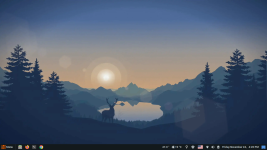

Your desktop/taskbar look fantastic, well doneOkay, you need to go to system settings and download the following:
Activate the downloaded components from the related settings (I assume you know how to change themes, icons, etc.).
- Themes:
- Adapta-Nokto.
- Applets:
- Weather
- Cinnamenu
- CPU Temperature Indicator
- Extensions:
- Cinnamon Dynamic Wallpaper
- Fonts:
- Cantarell.
- Icons:
- Papirus icon theme.
- Cursors:
- Breeze or Bibata.
What you need to take care of for Adapta-Nokto theme:
Disable the default start menu and activate Cinnamenu instead of it.
Cinnamon Dynamic Wallpaper will be changed based on time, it has a lot of wallpapers, the one on my image is lakeside:
View attachment 288795
Cantarell font, I select the bold for windows title font and regular for other, with size of 10 for all.
Papirus Dark and Breeze Light.
Other taskbar items will work automatically, just enable them and order their locations as you like from the Panel settings.


Are you still using Zorin OS?That's great @Nunzio_77 Thanks for your feedback! I can't thank you enough, it filled my eyes when I saw the desktop. There's even the weather on the taskbar. BTW that start menu and desktop that @lokamoka820 showed is Zorin OS 17.3? I have an ISO and I haven't installed it? Wow, I'm going to install it today. Thanks a lot!

SRS Audio Sandbox? I used to love that. Didn’t know it was still around but it improves the audio quality a lot.Are you talking about the icons on the desktop, which don't stay in the same order when you restart? You can see it in the screenshot below if that's what you mean.

Yes, and this app, is already old.SRS Audio Sandbox?
Yes, I love that too. I still use four speakers connected to my desktop PC, and they go through an amplifier receiver, with two speakers connected to the subwoofer for bass sounds and the other two speakers handling treble sounds.I used to love that.
It still exists, but I believe it has been discontinued. However, it still works on Win11. Yes, it greatly improves audio quality. I use SRS Audio Sandbox to equalise the sound.Didn’t know it was still around but it improves the audio quality a lot.
SRS got acquired by DTS and at this point the app was discontinued.It still exists, but I believe it has been discontinued. However, it still works on Win11. Yes, it greatly improves audio quality. I use SRS Audio Sandbox to equalise the sound
Members who viewed this thread in the last 5 minutes


