Advice Request KIS 2018 1GBit LAN issue

Please provide comments and solutions that are helpful to the author of this topic.
Status
Not open for further replies.

mekelek

Level 28
Thread author
Verified
Top Poster
Well-known
Feb 24, 2017
1,661
1
7,337
2,669
Hungary
So I have upgraded to 1Gbit internet today and I was sitting here for a few hours looking at speedtest results way under 200 mbit.

Thought it's an issue from my ISP's side, until I decided, for the heck of it, to kill every security suite on my computer.

and tadam, got the actual speed finally.

I have narrowed it down to the problem being KIS 2018. I went on google to find similar threads, which I did, on the official forums, but the helps/solutions included sfc /scannow(lol..) and claiming the speedtest results are false.
Aka found no solution to it.

So I thought before getting rid of it entirely, wanted to give it a shot here, maybe someone here with the same issue managed to find a solution.

Would upgrading to the latest 2019 beta solve my issues maybe?
 
Last edited:
K2018 is stable for long (patch G currently), it's K2019 the one in RC stage now...

How are You measuring the speed? surfing or via Web tests? or just downloading a big file in direct download?
 
K2018 is stable for long (patch G currently), it's K2019 the one in RC stage now...

How are You measuring the speed? surfing or via Web tests? or just downloading a big file in direct download?
i actually messed up the years, I'm running 2018 and was talking about 2019, edited the thread.
speedtest and downloading a big file, both yield the same result.
 
  • Like
Reactions: upnorth
I have been using K2018 for months and my tests of speed were right even those via Web sites.

I have a 50 / 50Mbs fiver optic connection, and I usually get even more than 50Mbs in download and upload...
 
  • Like
Reactions: Berny
I have been using K2018 for months and my tests of speed were right even those via Web sites.

I have a 50 / 50Mbs fiver optic connection, and I usually get even more than 50MBs in download and upload...
i used to have 100/100, and i got 100/100, the problem comes when it's above 200, since that seems to be the top of what Kaspersky can handle.
tried disabling modules, but the only real solution is to Exit out of it.
 
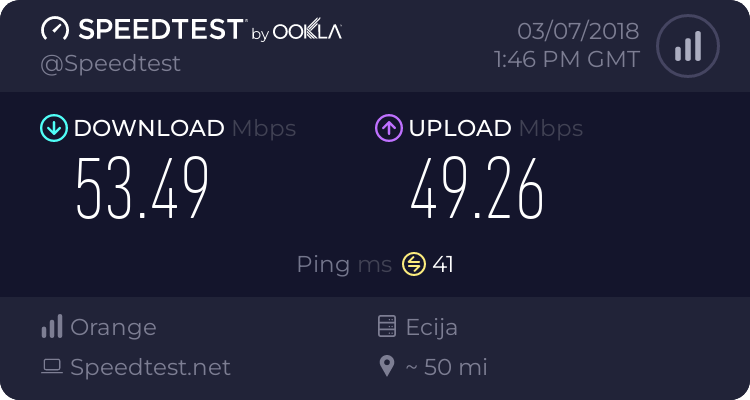
I just run a test with KTS2019 RC 1088 in Speedtest by Ookla - The Global Broadband Speed Test and got:

7118575414.png


But similar results with KTS2018...
 
At those speeds I can't not help since only 50 / 50 here...
 
  • Like
Reactions: Berny
So I have upgraded to 1Gbit internet today and I was sitting here for a few hours looking at speedtest results way under 200 mbit.

Thought it's an issue from my ISP's side, until I decided, for the heck of it, to kill every security suite on my computer.

and tadam, got the actual speed finally.

I have narrowed it down to the problem being KIS 2018. I went on google to find similar threads, which I did, on the official forums, but the helps/solutions included sfc /scannow(lol..) and claiming the speedtest results are false.
Aka found no solution to it.

So I thought before getting rid of it entirely, wanted to give it a shot here, maybe someone here with the same issue managed to find a solution.

Would upgrading to the latest 2019 beta solve my issues maybe?
I've always had this same problem with Kaspersky, almost always lowering my bandwidth, as well as another problem that was also with the network, about 3 times a day, always giving a connection error.
 
  • Like
Reactions: mekelek
I used Kaspersky IS 2018 for past 2 weeks (Latest as of now)...no drop down speeds observed anytime..
in fact its almost same and faster..web pages load good ..download is also good(No Slowdowns)
I agree this specific problem has arised with previous versions (own experience) web block takes time(page load takes time) ..but seems to be resolved (Nil)...
Opinions vary though...
 
I used Kaspersky IS 2018 for past 2 weeks (Latest as of now)...no drop down speeds observed anytime..
in fact its almost same and faster..web pages load good ..download is also good(No Slowdowns)
I agree this specific problem has arised with previous versions (own experience) web block takes time(page load takes time) ..but seems to be resolved (Nil)...
Opinions vary though...
this isn't about the speed of pages loading, but the actual max bandwith. if you have lower than 200mbit up/down then you won't have an issue.
 
  • Like
Reactions: Mahesh Sudula
Have you tried disabling KIS features and see if there is one aspect that is causing this?

Otherwise I'm of little help and am jealous of your bandwidth :cool:
 
Have you tried disabling KIS features and see if there is one aspect that is causing this?

Otherwise I'm of little help and am jealous of your bandwidth :cool:
yea, went through all the options, like nothing happened, even pausing the protection made no difference, had to actually exit..
 
I think every AV with a web filter will more or less slow down the internet speed
I notice KIS without tweak can severely slow down internet speed by antibanner, code injection and its thorough traffic scanning and monitoring

I'm in hungary, too but I only have 100/50Mbps internet and I can notice some internet speed drop

disabling KIS's code injection can reduce CPU usage and improve browsing speed
 
I think that downloading big files (already indicated above by harlan) is better test method than a Website Speedtest . Kaspersky has a kind of a Proxy that sends separated blocks to the Browser...
I did that too, same result.
I think every AV with a web filter will more or less slow down the internet speed
I notice KIS without tweak can severely slow down internet speed by antibanner, code injection and its thorough traffic scanning and monitoring

I'm in hungary, too but I only have 100/50Mbps internet and I can notice some internet speed drop

disabling KIS's code injection can reduce CPU usage and improve browsing speed
I tried disabling everything and nothing helped.
Installed GData, has no such issue anymore.
 
just a notice since people are finding my thread just now, the issue is gone after reinstalling KIS somehow.
 
  • Like
Reactions: harlan4096
Status
Not open for further replies.